 Charles Bochet
f4219449db
Charles Bochet
f4219449db
## Problem Follow-up to #21834, found during QA. That PR added an inline validation error on the AI Agent **Output → Variable Name** field. The error is rendered with `InputErrorHelper`, which is `position: absolute`. When the message wraps to two lines (which it does at the side-panel width), it is taken out of the layout flow and **overlaps the "Type" selector** directly below it: ``` Variable Name [ sdlfkj sdlkj ] Use only letters, numbers, underscores, dots or hyphens (max 64 Type <-- overlapped by the error message [ Text ▾ ] ``` ## Fix Render the error with `InputHint danger` instead of `InputErrorHelper`, matching how the sibling `FormNumberFieldInput` already shows its errors. `InputHint` flows in the column (`margin-top`, not absolute), so the error reserves its own space and pushes the following fields down instead of overlapping them. This is a one-line behaviour change in `FormTextFieldInput`; no new component or styling is introduced. ## After The `Type` field is pushed below the wrapped error message with correct spacing: 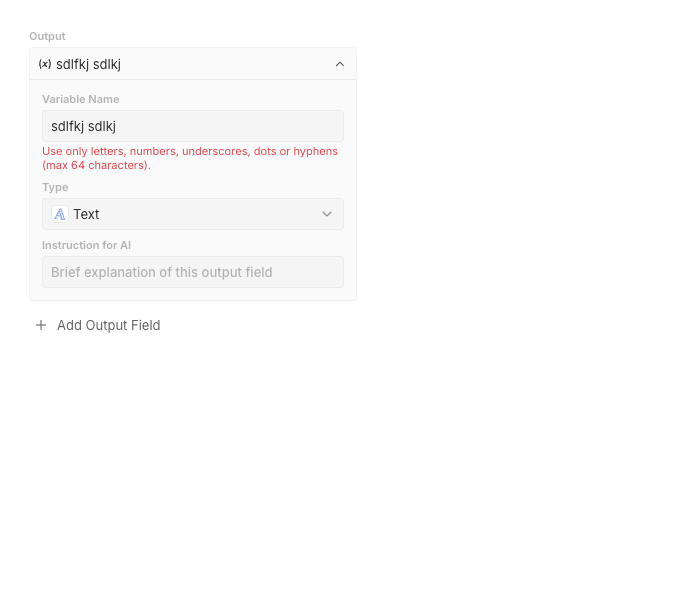 ## Tests - Added a `WithError` story to `FormTextFieldInput` (mirrors the existing `FormNumberFieldInput` `WithError` story) asserting the error message is visible. ## QA Reproduced and verified in Storybook against the real `WorkflowOutputSchemaBuilder` (throwaway story, not committed): before the fix the error overlapped `Type`; after the fix the `Type` field is pushed below the wrapped message with correct spacing.

The #1 Open-Source CRM
 Website ·
  Documentation ·
  Roadmap ·
  Discord ·
  Figma
Figma

Why Twenty
Twenty gives technical teams the building blocks for a custom CRM that meets complex business needs and quickly adapts as the business evolves. Twenty is the CRM you build, ship, and version like the rest of your stack.
 Learn more about why we built Twenty
Installation
Cloud

The fastest way to get started. Sign up at twenty.com and spin up a workspace in under a minute, with no infrastructure to manage and always up to date.
Build an app

Scaffold a new app with the Twenty CLI:
npx create-twenty-app my-app
Define objects, fields, and views as code:
import { defineObject, FieldType } from 'twenty-sdk/define';

export default defineObject({
  nameSingular: 'deal',
  namePlural: 'deals',
  labelSingular: 'Deal',
  labelPlural: 'Deals',
  fields: [
    { name: 'name', label: 'Name', type: FieldType.TEXT },
    { name: 'amount', label: 'Amount', type: FieldType.CURRENCY },
    { name: 'closeDate', label: 'Close Date', type: FieldType.DATE_TIME },
  ],
});
Then ship it to your workspace:
npx twenty app:publish --private
See the app development guide for objects, views, agents, and logic functions.
 Self-hosting

Run Twenty on your own infrastructure with Docker Compose, or contribute locally via the local setup guide.
Everything you need
Twenty gives you the building blocks of a modern CRM (objects, views, workflows, and agents) and lets you extend them as code. Here's a tour of what's in the box.
Want to go deeper? Read the  User Guide for product walkthroughs, or the Documentation for developer reference.

|

|

|

|

|

|
 Learn more about version control in doc
Stack
 TypeScript
 Nx
Nx NestJS, with BullMQ,
  PostgreSQL,
  Redis
Redis React, with Jotai, Linaria and Lingui
Thanks


Thanks to these amazing services that we use and recommend for code review (Greptile), catching bugs (Sentry) and translating (Crowdin).
Join the Community
Star the repo · Discord ·  Feature requests · Releases ·
  X ·
X ·  LinkedIn ·
  Crowdin ·
  Contribute