## Problem
Follow-up to #21834, found during QA.
That PR added an inline validation error on the AI Agent **Output →
Variable Name** field. The error is rendered with `InputErrorHelper`,
which is `position: absolute`. When the message wraps to two lines
(which it does at the side-panel width), it is taken out of the layout
flow and **overlaps the "Type" selector** directly below it:
```
Variable Name
[ sdlfkj sdlkj ]
Use only letters, numbers, underscores, dots or hyphens (max 64
Type <-- overlapped by the error message
[ Text ▾ ]
```
## Fix
Render the error with `InputHint danger` instead of `InputErrorHelper`,
matching how the sibling `FormNumberFieldInput` already shows its
errors. `InputHint` flows in the column (`margin-top`, not absolute), so
the error reserves its own space and pushes the following fields down
instead of overlapping them.
This is a one-line behaviour change in `FormTextFieldInput`; no new
component or styling is introduced.
## After
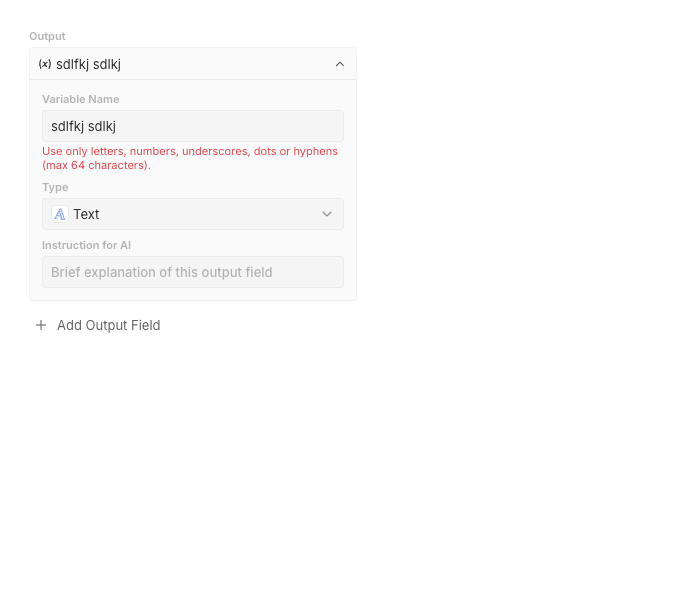
The `Type` field is pushed below the wrapped error message with correct
spacing:
## Tests
- Added a `WithError` story to `FormTextFieldInput` (mirrors the
existing `FormNumberFieldInput` `WithError` story) asserting the error
message is visible.
## QA
Reproduced and verified in Storybook against the real
`WorkflowOutputSchemaBuilder` (throwaway story, not committed): before
the fix the error overlapped `Type`; after the fix the `Type` field is
pushed below the wrapped message with correct spacing.
 Charles Bochet
f4219449db
Charles Bochet
f4219449db
