942755d0dd63fbd513a6caf744bc3e290dd695f2
167 Commits
| Author | SHA1 | Message | Date | |
|---|---|---|---|---|
 martmull martmull
|
942755d0dd |
fix(applications): display the installed application icon (#23411)
## Problem

After installing an app, its icon is missing across the UI, while
application *registration* icons render fine.

`Application.logo` holds the manifest path (`public/logo.svg`), which is
package-relative and not displayable. The server exposes a `logoUrl`
resolve field that turns it into
`/public-assets/{workspaceId}/{applicationId}/{logo}`, but on the front
end:

- `APPLICATION_FRAGMENT` and `FIND_MANY_APPLICATIONS` never selected
`Application.logoUrl`.
- So the only source of a usable logo url was
`currentWorkspace.installedApplications`, which is fetched by
`GetCurrentUser` at bootstrap. Nothing refreshed it after
`installApplication`, so a freshly installed app was absent from that
list.
- `useApplicationChipData` then fell through to
`fallbackApplicationData`, which callers populated with the raw `logo`
path. `getAbsoluteImageUrl('public/logo.svg')` yields
`{serverUrl}/public/logo.svg`, which 404s, so the avatar rendered as a
letter placeholder.

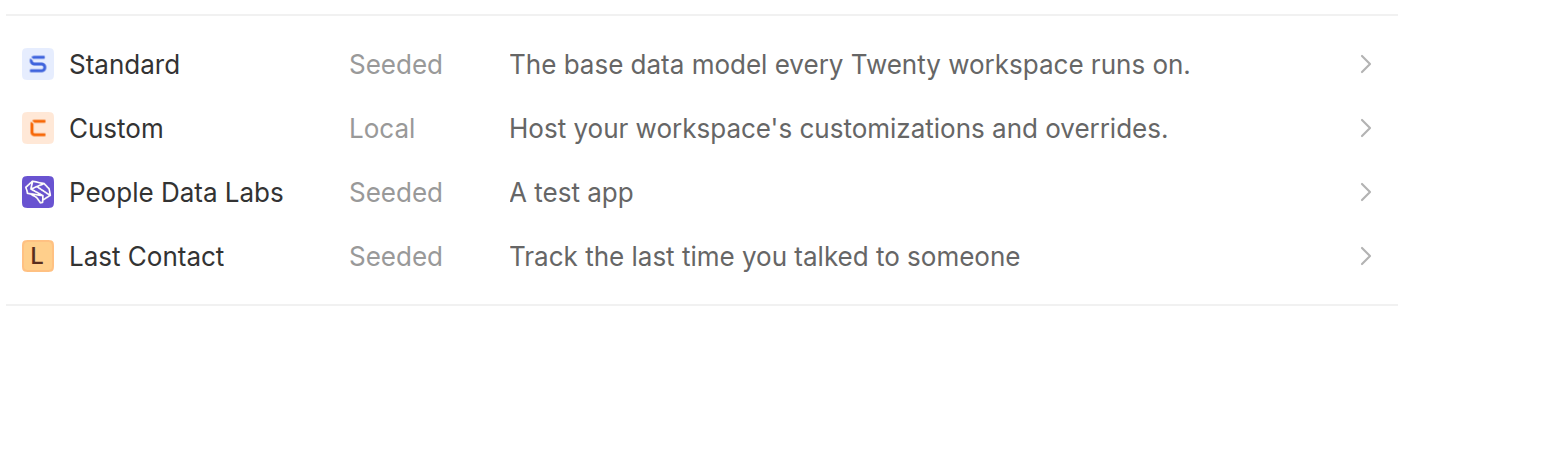
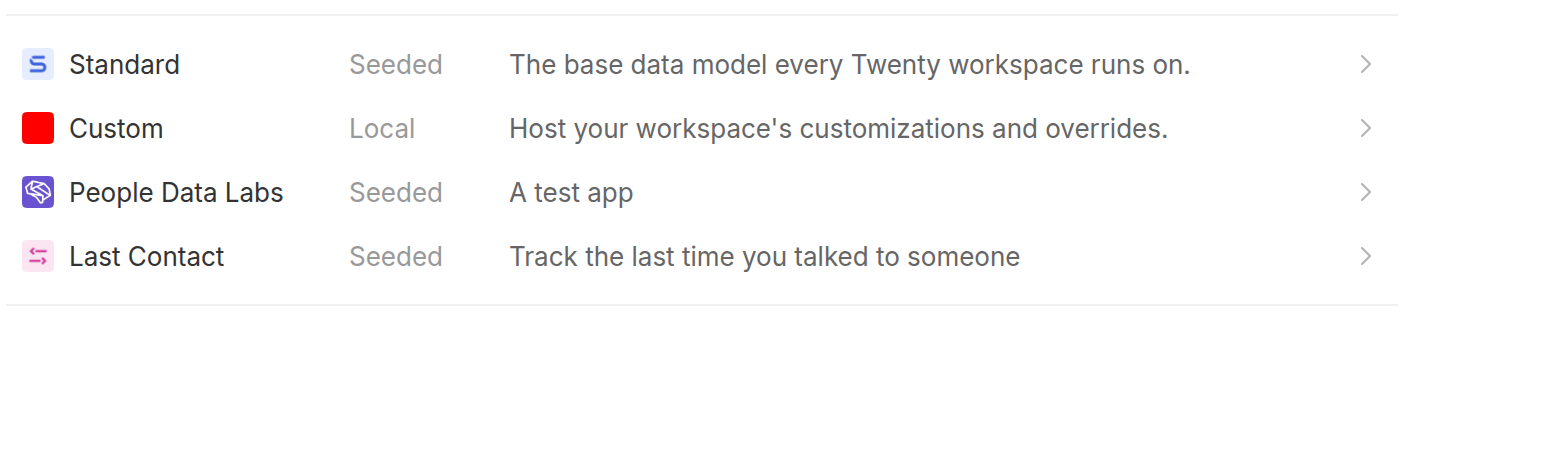
## Before / After

An app installed while the applications page is open, so the workspace
snapshot loaded at bootstrap does not know about it yet:

| Before | After |
|---|---|
| <img
src="https://raw.githubusercontent.com/twentyhq/twenty/e27a817fd95c5e44c1fbb64fd4fd68525daeee61/.pr-assets/app-icon-before.png"
width="480"> | <img
src="https://raw.githubusercontent.com/twentyhq/twenty/e27a817fd95c5e44c1fbb64fd4fd68525daeee61/.pr-assets/app-icon-after.png"
width="480"> |

## Changes

- Select `logoUrl` on `Application` in `APPLICATION_FRAGMENT` and
`FIND_MANY_APPLICATIONS`.
- Drop `logo` from `ApplicationDisplayData` and from the `AppChip` /
subtable fallback props, so a package-relative path can no longer reach
an `img` src. Call sites that already passed a url under `logo` now pass
`logoUrl`.
- `SettingsApplicationDetails` and `SettingsApplicationsTable` pass the
application's own `logoUrl`.
- On install, add the returned application to
`currentWorkspace.installedApplications` instead of reloading the
current user, so the chips that resolve by `applicationId` only (nav
menu items, object/field tables, tool rows, workflow nodes) pick it up.
- Stop exposing `logo` on the `Application` GraphQL type: nothing
selects it anymore, and having both `logo` (package-relative path) and
`logoUrl` (display url) was the source of the bug. The column is still
read server-side to build `logoUrl`.
- Regenerated `generated-metadata/graphql.ts`.

## Verification

Ran the stack locally against a seeded workspace with an installed app
whose logo lives at `public/logo.png`:

- `findManyApplications` returns a `logoUrl` under `/public-assets/...`,
and that url serves `200 image/png`.
- Reproduced the bug and the fix in the browser with the scenario shown
above (screenshots taken on the base commit and on this branch).
- `npx nx typecheck twenty-front`, `npx nx typecheck twenty-server`,
`npx nx lint:diff-with-main` on both, and the application settings jest
suites pass.

---
_Generated by [Claude
Code](https://claude.ai/code/session_01N8r4z2dZ553nAnCNe7GxMH)_

[Review in
cubic](https://cubic.dev/pr/twentyhq/twenty/pull/23411?utm_source=github)
|
||
|
martmull
|
25b0b2601f |
Replace admin app rollout buttons with upgrade-application CLI command (#23212)
## What Removes the two rollout buttons from the admin application detail page and replaces the upgrade flow with a CLI command that can be run directly from a server or worker pod. Also restructures application stop into its own module with a kill switch CLI command, and surfaces stopped apps in workspace settings. ### Removed - "Install on all workspaces" button (General tab, `SettingsAdminApplicationRegistrationGeneralToggles`), its confirmation modal and tooltip - "Upgrade existing installations" button (`SettingsApplicationRegistrationGeneralStats`), its confirmation modal and batch size input - `backfillApplicationInstallation` and `upgradeRegistrationApplications` admin GraphQL mutations and their frontend documents / generated types - `BackfillApplicationInstallationJob` (its only trigger was the removed mutation); `UpgradeApplicationsJob` is kept since the auto-upgrade flow still enqueues it Per review, the "install on all workspaces" flow is dropped without a CLI replacement for now; a dedicated command will be added when needed. ### application:upgrade command Located in `application-upgrade/commands`, registered in `ApplicationUpgradeModule`: ``` yarn command:prod application:upgrade \ --application-registration-universal-identifier <universalIdentifier> \ [--batch-size 5] \ [--workspace-id <id> --workspace-id <id2>] \ [--workspace-count-limit 10] \ [--dry-run] [--yes] ``` - `--workspace-id` (repeatable) restricts the upgrade to specific workspaces; `--workspace-count-limit` caps how many installations are upgraded (max 50, for canary rollouts) - `--batch-size` and `--workspace-count-limit` are validated as positive integers, max 50 - `--dry-run` reports how many (and which) workspaces would be upgraded, without upgrading - Without `--dry-run`, a confirmation prompt shows the app, target version and impacted workspaces; the run then executes exactly the confirmed set; `--yes` skips the prompt for non-interactive usage The upgrade plan is computed by a new `ApplicationUpgradeService.findApplicationsToUpgrade`, and batches run through a new `upgradeApplications` method — both reused by `upgradeAllApplications`, so the auto-upgrade job path is unchanged. ### Application kill switch (per review) Global mechanism only — a per-workspace stop had no demonstrated operational need and added a Redis key format, execution branching, CLI options and tests; an isolated workspace issue can be handled directly in the DB or Redis with the same effort. - `ApplicationStopService` moved to a dedicated `application-stop/` folder with its own `ApplicationStopModule` (imported and re-exported by `ApplicationModule`) - `stop` / `remove` methods that enable or clear the Redis-backed global kill switch; the logic function executor checks it before executing - `application:kill-switch` command with a positional action, confirmation prompt (shows the installation count) and `--yes` bypass: ``` # Enable the kill switch (stop is the default action) yarn command:prod application:kill-switch stop -u <universalIdentifier> [-y] yarn command:prod application:kill-switch -u <universalIdentifier> # Remove the kill switch yarn command:prod application:kill-switch remove -u <universalIdentifier> [-y] ``` ### Stopped apps surfaced in workspace settings (per review) - Dedicated `isApplicationStopped(applicationUniversalIdentifier)` query backed by the kill switch, fetched with `network-only` policy solely by the application detail page — listing applications triggers no extra Redis reads - Application detail page shows a danger banner when the app is stopped: "We are currently encountering issues with this app, its behavior may be degraded while we work on a fix." ## Test - `npx nx typecheck twenty-server` / `npx nx typecheck twenty-front` pass - `npx nx lint:diff-with-main` passes for both packages - `application-stop.service.spec.ts` covers stop, remove, caching and fail-open behavior - Verified end to end locally: ran the kill switch command on a seeded workspace and confirmed the banner renders on the app detail page (screenshot shared separately) |
||
|
martmull
|
e14c32015f |
Make upgrade applications batch size a job parameter defaulting to 5 (#23101)
Makes the batch size used when upgrading applications a parameter instead of a hardcoded constant, defaulting to 5, and lets admins set it from the upgrade confirmation modal. Backend: - `UpgradeApplicationsJobData` gains an optional `batchSize` field, passed through by `UpgradeApplicationsJob` to the service. - `ApplicationUpgradeService.upgradeAllApplications` accepts an optional `batchSize` parameter, defaulting to `UPGRADE_APPLICATIONS_DEFAULT_BATCH_SIZE = 5` (previously a fixed batch size of 20). The value is sanitized to a positive integer to avoid an infinite batching loop. - The `upgradeRegistrationApplications` admin mutation accepts an optional `batchSize: Int` argument and forwards it to the job. Frontend (admin panel): - The "Upgrade existing installations" confirmation modal now includes a "Batch size" number input, defaulting to 5, sent with the mutation. - Updated the admin GraphQL document and generated types. ## Screenshots Upgrade section on the admin app registration page: 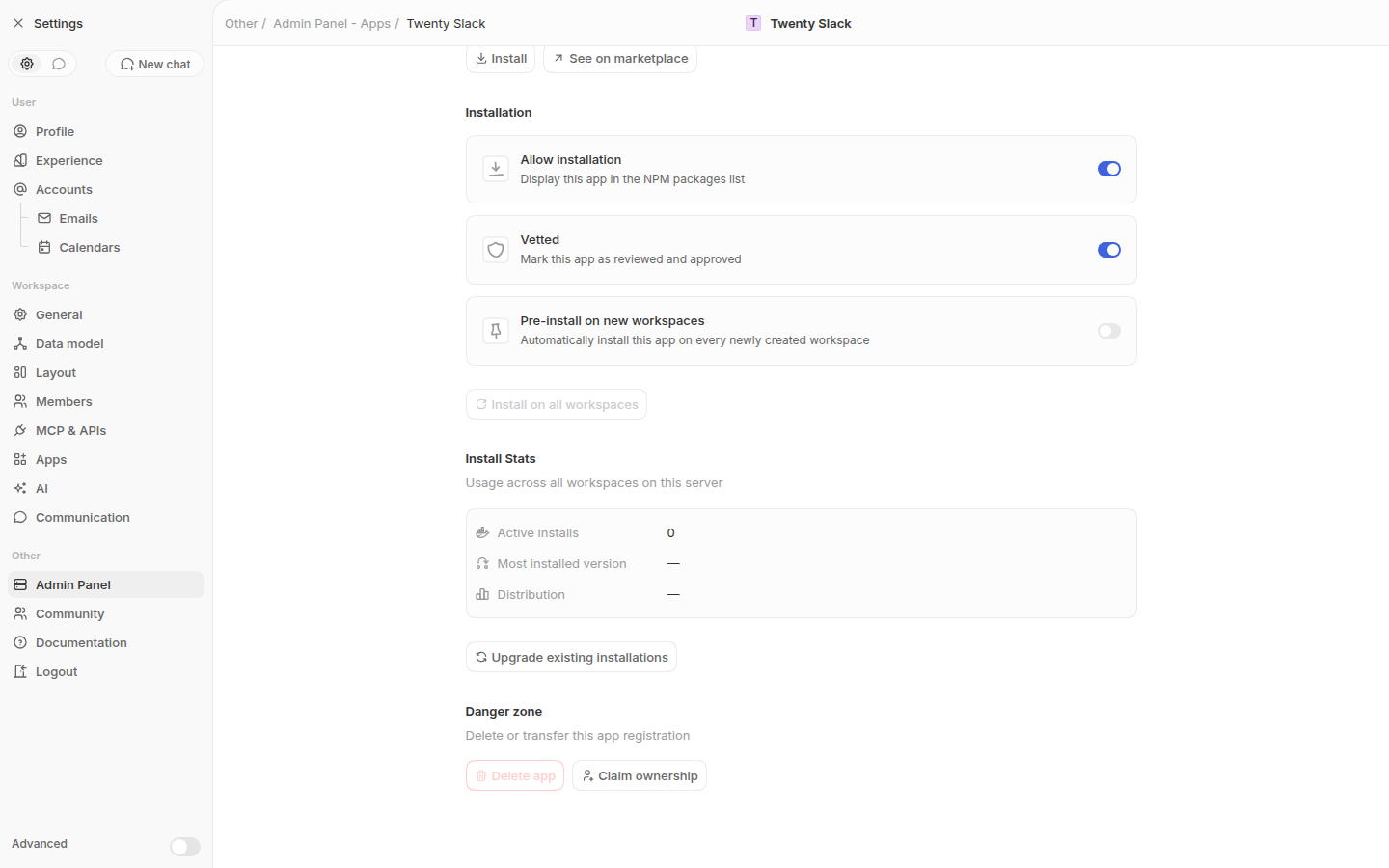 Confirmation modal with the new batch size input (defaults to 5): 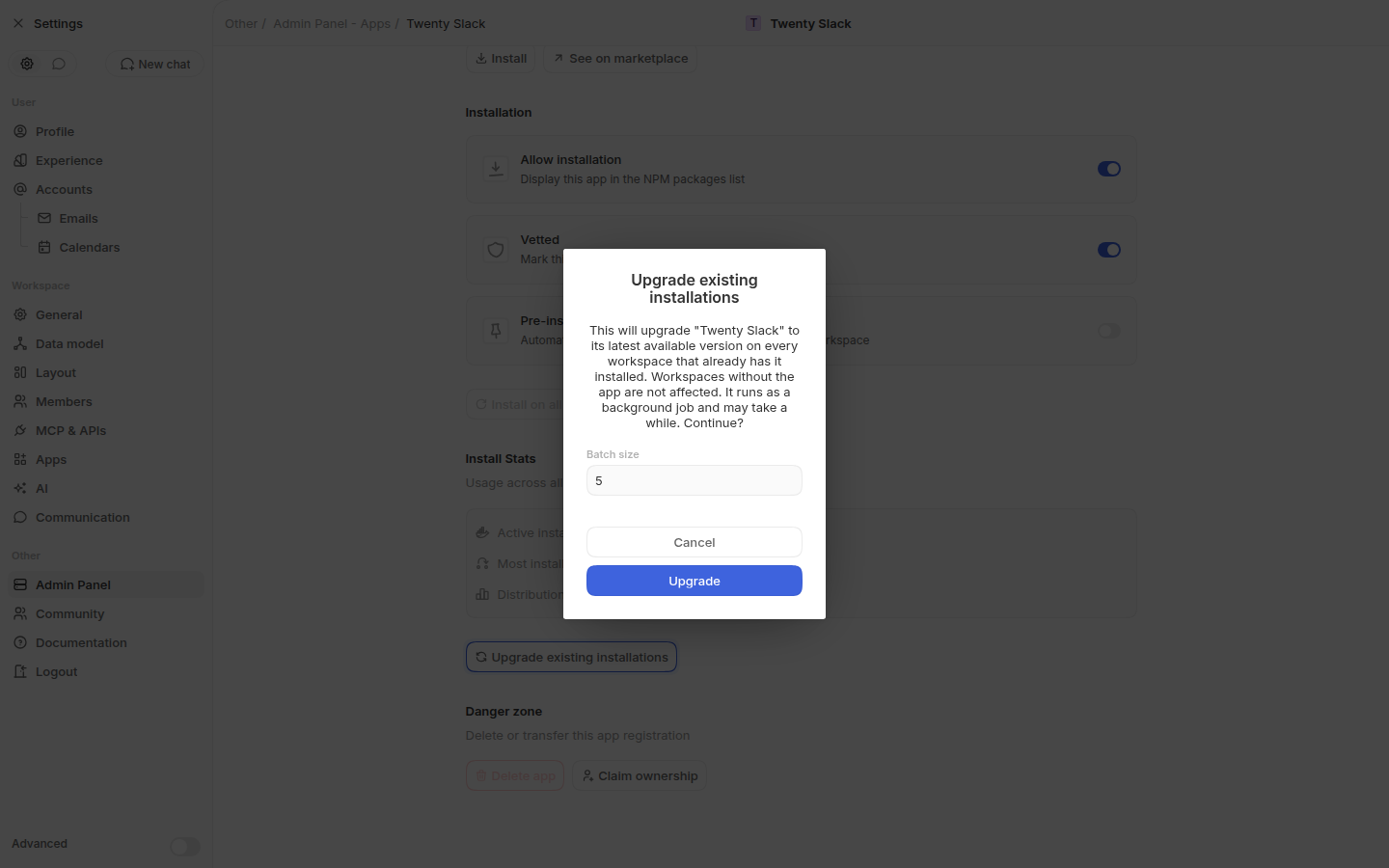 --------- Co-authored-by: Martin <martin@twenty.com> |
||
|
martmull
|
8d84a0b9f3 |
feat(app): allow non-admin developers to claim and list marketplace apps (#22621)
## Context Follow-up to #22609. Lets a non-admin developer claim ownership of a public Twenty app they published to npm, then request a marketplace listing that a server admin reviews. Marketplace state is per-instance for now. ## Claiming - Developer tab gets a **Claim an application** section: look up an unclaimed npm app by package name or universal identifier. - Ownership is proven with GitHub OAuth against the package's npm provenance (trusted publishing): the connected account must own the GitHub account or organization the package was published from. - Errors from the GitHub callback come back as a code and are shown inline with a link to the relevant documentation. - The old one-click claim stays admin-only. - A **Sync catalog** button triggers a catalog refresh instead of waiting for the hourly cron. - Gated behind the `IS_APP_CLAIMING_ENABLED` feature flag. ## Listing requests - Catalog-synced apps are created **unlisted**; a data migration unlists previously auto-listed unclaimed npm apps (owned or vetted rows are left untouched). - Owners request a listing from the Distribution tab (logo + description required); a server admin approves or rejects it from a **Listing requests** section in the Admin Panel. ## Screenshots <img width="1512" height="829" alt="image" src="https://github.com/user-attachments/assets/788d4362-97c4-4e42-810c-ef1f11517bec"/> <img width="1512" height="829" alt="image" src="https://github.com/user-attachments/assets/d6246190-c82a-4f64-87be-3bb668527645"/> <img width="1512" height="828" alt="image" src="https://github.com/user-attachments/assets/21a8dad4-610b-4d1f-8948-b9acab40d373"/> <img width="1512" height="829" alt="image" src="https://github.com/user-attachments/assets/58246130-41f7-451e-ae7f-57bd21d04bb6"/> --------- Co-authored-by: cubic-dev-ai[bot] <191113872+cubic-dev-ai[bot]@users.noreply.github.com> |
||
|
martmull
|
45b319ef2d |
Add autofocus to 2FA OTP inputs (#23067)
as title <img width="854" height="533" alt="image" src="https://github.com/user-attachments/assets/777c2d83-8318-4337-865d-67aebc9186c2" /> |
||
|
martmull
|
baa84bb2e0 |
Add auto-upgrade-in-apps (#23001)
We need to auto upgrade application, lets add this column in application entity, and add an admin button to autoupgrade all applications to latest app registrration version manually <img width="1131" height="372" alt="image" src="https://github.com/user-attachments/assets/4e755abc-38ad-4895-a2e8-d55ee1948ac2" /> <img width="906" height="533" alt="image" src="https://github.com/user-attachments/assets/ce002057-0341-4581-bf9a-66ac2bd84a9b" /> |
||
|
martmull
|
7381038452 |
Paginate admin panel app registrations list (#22734)
## Context The `findAllApplicationRegistrations` query on the admin panel Apps page (`/settings/admin-panel#apps`) loaded every application registration at once, with search and filtering done client-side. ## Changes **Server** - `findAllApplicationRegistrations` now takes `limit` / `offset` / `searchTerm` / `isPreInstalledOnly` args and returns a `PaginatedApplicationRegistrations` object (`registrations`, `totalCount`, `hasMore`), following the same pattern as `getQueueJobs`. - `ApplicationRegistrationService.findAll` uses `findAndCount` with `take`/`skip`, and moves the search (name, source package, universal identifier via `ILIKE`) and the pre-installed filter into the SQL query, mirroring how `getInstalledWorkspacesGlobal` filters installed workspaces. **Frontend** - `SettingsAdminApps` passes the page, the debounced search term (300ms, like the installed workspaces table), and the pre-installed toggle as query variables instead of filtering client-side. - Adds a Previous / Next pagination footer (25 per page) matching the queue jobs table, shown only when there is more than one page. - The "unconfigured first" ordering is kept within each page (`isConfigured` is a dataloader-resolved field, so it can't be sorted in SQL). ## Notes - Regenerated `generated-admin/graphql.ts` follows in a subsequent commit. --- _Generated by [Claude Code](https://claude.ai/code/session_015erumgPozkbNA3zPeKrrFW)_ <!-- This is an auto-generated description by cubic. --> <a href="https://cubic.dev/pr/twentyhq/twenty/pull/22734?utm_source=github" target="_blank" rel="noopener noreferrer" data-no-image-dialog="true"><picture><source media="(prefers-color-scheme: dark)" srcset="https://www.cubic.dev/buttons/review-in-cubic-dark.svg"><source media="(prefers-color-scheme: light)" srcset="https://www.cubic.dev/buttons/review-in-cubic-light.svg"><img alt="Review in cubic" src="https://www.cubic.dev/buttons/review-in-cubic-dark.svg"></picture></a> <!-- End of auto-generated description by cubic. --> --------- Co-authored-by: Weiko <corentin@twenty.com> |
||
|
Thomas des Francs
|
e609320666 | Squirclesssss 🟦🔵 (#22535) | ||
|
martmull
|
25fe66565c |
feat(applications): add type and options to application variables (#22157)
## Before <img width="1452" height="709" alt="image" src="https://github.com/user-attachments/assets/cd384ffa-cbe6-49d5-a807-ca8d580f55a9" /> <img width="1074" height="452" alt="image" src="https://github.com/user-attachments/assets/720d38db-3495-4032-8831-17d24ec6a7e7" /> ## After <img width="1421" height="865" alt="image" src="https://github.com/user-attachments/assets/2275c996-c895-4800-8324-2aa2ddfddd43" /> <img width="1348" height="870" alt="image" src="https://github.com/user-attachments/assets/3e1a891d-6db0-4cbd-870a-2a5bbde4929d" /> ## Summary Adds typed application variables with optional select **options**. This is the other half of #22059, split out from the custom-settings-tab removal. ## Changes - **Shared types**: `ApplicationVariable` / `ServerVariables` gain an optional `type` (a `FieldMetadataType` subset — `TEXT`, `BOOLEAN`, `NUMBER`, `DATE`, `SELECT`, `MULTI_SELECT`, `RAW_JSON`, `RICH_TEXT`, `ARRAY`, …) and select `options`. New `serializeApplicationVariableValue` / `deserializeApplicationVariableValue` helpers convert typed values to/from the encrypted string storage. - **Server**: `type`/`options` columns on `applicationVariable` and `applicationRegistrationVariable` (entities + DTOs), a fast `2-17` instance command, manifest processing via the serialization helpers, and a `QueryDeepPartialEntity` cast where the manifest JSON column is persisted. - **Frontend**: a polymorphic `SettingsApplicationVariableInput` that renders the native `Form*` field component for each type (boolean, number, date/date-time, select, multi-select, array, raw JSON, rich text, text); fragment/query updates to fetch `type`/`options`. - **SDK**: `defineApplication` validates that `SELECT`/`MULTI_SELECT` variables declare non-empty `options` at build time (since `options` is kept structurally optional for TypeORM/SDK compatibility). Variables default to `TEXT` when no type is given, so existing manifests are unaffected. ## Notes The generated GraphQL artifacts (`type`/`options` on the variable types) are regenerated by codegen; that change accompanies this PR. https://claude.ai/code/session_013Z7UB35V2mvUozh55QHG23 --- _Generated by [Claude Code](https://claude.ai/code/session_013Z7UB35V2mvUozh55QHG23)_ <!-- This is an auto-generated description by cubic. --> <a href="https://cubic.dev/pr/twentyhq/twenty/pull/22157?utm_source=github" target="_blank" rel="noopener noreferrer" data-no-image-dialog="true"><picture><source media="(prefers-color-scheme: dark)" srcset="https://www.cubic.dev/buttons/review-in-cubic-dark.svg"><source media="(prefers-color-scheme: light)" srcset="https://www.cubic.dev/buttons/review-in-cubic-light.svg"><img alt="Review in cubic" src="https://www.cubic.dev/buttons/review-in-cubic-dark.svg"></picture></a> <!-- End of auto-generated description by cubic. --> |
||
|
Félix Malfait
|
86e4685781 |
fix: format numbers according to user preferences in settings views (#22501)
## Context Record and field counts in several settings views were rendered as raw numbers (e.g. `158355`), ignoring the workspace member's number format preference. This PR routes them through the existing `useNumberFormat` hook (which wraps `formatNumber` with the user's `numberFormat` preference), so they render as `158,355` / `158 355` / `158.355` / `158'355` depending on the preference. ## Changes Starting point (from the screenshot): the Settings → Data model objects table. - **`SettingsObjectItemTableRow`** — Fields and Records columns in Settings → Data model - **`SettingsAvailableStandardObjectItemTableRow`** — Fields column in Settings → Data model → New object - **`SettingsDataModelOverviewObject`** — record count next to the object name in the data model graph overview (guards against `undefined` while the count query loads) - **`SettingsLogs`** — "X of Y" record counts above the event logs table - **`SettingsAdminGeneral`** — Users column in the admin panel top workspaces table - **`SettingsAdminWorkspaceContent`** — Members value in the admin panel workspace info card - **`NoteList`** — total notes count in the record page Notes tab ## Test coverage - `npx nx lint:diff-with-main twenty-front` (oxlint + oxfmt) passes - `npx nx typecheck twenty-front` passes - No behavioral change beyond formatting; `formatNumber` defaults to 0 decimals so integer counts stay integers https://claude.ai/code/session_019pXXZSaza8TXPYK8NefQiS --- _Generated by [Claude Code](https://claude.ai/code/session_019pXXZSaza8TXPYK8NefQiS)_ <!-- This is an auto-generated description by cubic. --> <a href="https://cubic.dev/pr/twentyhq/twenty/pull/22501?utm_source=github" target="_blank" rel="noopener noreferrer" data-no-image-dialog="true"><picture><source media="(prefers-color-scheme: dark)" srcset="https://www.cubic.dev/buttons/review-in-cubic-dark.svg"><source media="(prefers-color-scheme: light)" srcset="https://www.cubic.dev/buttons/review-in-cubic-light.svg"><img alt="Review in cubic" src="https://www.cubic.dev/buttons/review-in-cubic-dark.svg"></picture></a> <!-- End of auto-generated description by cubic. --> |
||
|
martmull
|
27dea0ed0b |
Add installed workspaces view to application registration (#22359)
## After <img width="895" height="344" alt="image" src="https://github.com/user-attachments/assets/33591753-f248-45ce-b32d-cc1112f50579" /> <img width="889" height="425" alt="image" src="https://github.com/user-attachments/assets/469ee228-9abb-486f-b2ec-9efb490bb2c8" /> <img width="766" height="343" alt="image" src="https://github.com/user-attachments/assets/2d88444a-6d98-4f97-8e5d-109197cfad27" /> ## Summary Add a new "Installed workspaces" section to the application registration settings page that displays all workspaces that have installed a given application, with pagination support. ## Key Changes - **Backend Service**: Added `getInstalledWorkspaces()` method to `ApplicationRegistrationService` that queries installed applications across workspaces with pagination support - **Backend DTO**: Created `ApplicationRegistrationInstalledWorkspacesDTO` and `InstalledWorkspaceDTO` to structure the response with workspace details (id, displayName, logo, version), total count, and hasMore flag - **GraphQL Resolver**: Added `findApplicationRegistrationInstalledWorkspaces` query resolver with pagination (page parameter, default page size of 10) and proper authorization guards - **Frontend Component**: Created `SettingsApplicationRegistrationInstalledWorkspaces` component that: - Displays installed workspaces in a table with workspace logo, name, and version - Shows initial 3 workspaces with "Show all" button to expand - Implements pagination with "Show more" button to load additional pages - Handles empty state (returns null if no workspaces installed) - **GraphQL Query**: Added `FindApplicationRegistrationInstalledWorkspaces` query document for frontend data fetching - **Integration**: Integrated the new component into `SettingsApplicationRegistrationGeneralTab` ## Implementation Details - Pagination uses offset-based approach with configurable page size (10 workspaces per page) - Query results are ordered by workspace displayName and id for consistent ordering - Soft-deleted applications and workspaces are excluded from the list and counts - Apollo Client's `fetchMore` with `updateQuery` merges paginated results into the cache - Component respects existing authorization (API_KEYS_AND_WEBHOOKS permission required) - Uses existing UI components (Table, Card, Avatar, Button) from twenty-ui library - Supports internationalization with Lingui ## Screenshots The new "Installed workspaces" section on the app registration General tab (admin app detail page), captured against a local instance with a demo app installed in 14 workspaces. The three PNGs are committed under `.github/assets/screenshots/installed-workspaces/` and render inline in the **Files changed** tab of this PR: - `1-first-3-show-all.png` — Collapsed: the first 3 installed workspaces (avatar + name + installed version) with a "Show all" button. - `2-expanded-show-more.png` — "Show all": the first page of 10 workspaces, with a "Show more" button (more remain). - `3-all-paginated.png` — "Show more": all 14 workspaces loaded, button gone. Review in cubic: https://cubic.dev/pr/twentyhq/twenty/pull/22359?utm_source=github https://claude.ai/code/session_012nWtviSBdfFeHEASTtwvJ7 |
||
|
Thomas des Francs
|
2bb7fb2e9b |
Polish settings page titles and admin tables (#22305)
## Summary - Reuse the shared settings title presentation for read-only and editable settings page titles. - Polish settings AI/app icons, breadcrumb cropping, and admin detail title icons. - Align admin panel table/card typography and spacing with existing settings tables. ## Before/After <img width="1524" height="2214" alt="Settings pages before and after" src="https://github.com/user-attachments/assets/91037b25-b442-4eb2-b244-1d8280ce2cd9" /> <img width="2200" height="3268" alt="Additional settings UI before and after" src="https://github.com/user-attachments/assets/f10d7283-7031-4958-8539-649c3067cd31" /> <!-- This is an auto-generated description by cubic. --> <a href="https://cubic.dev/pr/twentyhq/twenty/pull/22305?utm_source=github" target="_blank" rel="noopener noreferrer" data-no-image-dialog="true"><picture><source media="(prefers-color-scheme: dark)" srcset="https://www.cubic.dev/buttons/review-in-cubic-dark.svg"><source media="(prefers-color-scheme: light)" srcset="https://www.cubic.dev/buttons/review-in-cubic-light.svg"><img alt="Review in cubic" src="https://www.cubic.dev/buttons/review-in-cubic-dark.svg"></picture></a> <!-- End of auto-generated description by cubic. --> |
||
|
martmull
|
d1854bc7e9 |
Add marketplace catalog synchronization to admin panel (#22260)
## After <img width="1476" height="658" alt="image" src="https://github.com/user-attachments/assets/25a042dd-eabf-4b71-9872-d3b627104634" /> ## Summary This PR adds the ability for admins to manually synchronize the marketplace application catalog from the admin panel. It introduces a new mutation endpoint and UI controls to trigger catalog synchronization with user feedback via snackbar notifications. ## Key Changes - **Frontend (SettingsAdminApps component)**: - Added `useSnackBar` hook for user feedback on sync success/failure - Imported `useMutation` from Apollo Client to handle the sync operation - Added `IconRefresh` and `Button` imports for the sync UI control - Created `handleSyncCatalog` function that triggers the mutation, refetches app registrations, and displays appropriate snackbar messages - Added a new "General" section with a "Synchronize catalog" button above the existing app registrations table - Button shows loading state and is disabled while sync is in progress - **Backend (AdminPanelResolver)**: - Added `syncMarketplaceCatalog` mutation that queues a `MarketplaceCatalogSyncCronJob` via the message queue - Uses `@InjectMessageQueue` decorator to inject the cron queue service - Includes job deduplication via `id: 'marketplace-catalog-sync'` to prevent multiple pending sync jobs - Protected with `@UseGuards(AdminPanelGuard)` for admin-only access - **GraphQL Schema**: - Added `SyncMarketplaceCatalog` mutation type definition - Generated corresponding TypeScript types and mutation document - **New Files**: - Created `syncMarketplaceCatalog.ts` GraphQL mutation document <!-- This is an auto-generated description by cubic. --> <a href="https://cubic.dev/pr/twentyhq/twenty/pull/22260?utm_source=github" target="_blank" rel="noopener noreferrer" data-no-image-dialog="true"><picture><source media="(prefers-color-scheme: dark)" srcset="https://www.cubic.dev/buttons/review-in-cubic-dark.svg"><source media="(prefers-color-scheme: light)" srcset="https://www.cubic.dev/buttons/review-in-cubic-light.svg"><img alt="Review in cubic" src="https://www.cubic.dev/buttons/review-in-cubic-dark.svg"></picture></a> <!-- End of auto-generated description by cubic. --> |
||
|
martmull
|
e747bc3e42 |
Add backfill installation feature for pre-installed apps (#22199)
## After <img width="1070" height="514" alt="image" src="https://github.com/user-attachments/assets/9cbd2ff5-1678-4c2f-84da-074568f37c51" /> ## Summary Adds the ability to backfill application installations across all existing workspaces. This allows admins to retroactively install a pre-registered application on every active and suspended workspace through a background job, making the feature idempotent and non-blocking. ## Key Changes - **Backend Service**: Added `backfillApplicationOnAllWorkspaces()` method to `PreInstalledAppsService` that: - Validates the application registration exists - Iterates through all workspaces using `WorkspaceIteratorService` - Installs the app on each workspace - Swallows `APP_ALREADY_INSTALLED` errors for idempotency - Logs success/failure counts - **Background Job**: Created `BackfillApplicationInstallationJob` to process backfill requests asynchronously via the message queue - **GraphQL Mutation**: Added `backfillApplicationInstallation` mutation to `AdminPanelResolver` that: - Validates the application registration exists - Enqueues the background job - Returns immediately without blocking the request - **UI Components**: Enhanced `SettingsAdminApplicationRegistrationGeneralToggles` with: - New "Pre-install on new workspaces" toggle for the `isPreInstalled` flag - "Backfill on all workspaces" button with confirmation modal - Loading state and success/error snack bar feedback - **Data Model**: Added `isPreInstalled` field to `UpdateApplicationRegistrationPayload` input type - **Tests**: Added comprehensive unit tests for `PreInstalledAppsService.backfillApplicationOnAllWorkspaces()` covering: - Missing registration validation - Successful multi-workspace installation - Idempotent handling of already-installed errors - Proper error propagation for unexpected failures ## Implementation Details The backfill operation is designed to be: - **Idempotent**: Already-installed apps are skipped without error - **Non-blocking**: Runs as a background job via message queue - **Resilient**: Per-workspace failures don't block other installations - **Observable**: Logs aggregated success/failure counts for monitoring <!-- This is an auto-generated description by cubic. --> <a href="https://cubic.dev/pr/twentyhq/twenty/pull/22199?utm_source=github" target="_blank" rel="noopener noreferrer" data-no-image-dialog="true"><picture><source media="(prefers-color-scheme: dark)" srcset="https://www.cubic.dev/buttons/review-in-cubic-dark.svg"><source media="(prefers-color-scheme: light)" srcset="https://www.cubic.dev/buttons/review-in-cubic-light.svg"><img alt="Review in cubic" src="https://www.cubic.dev/buttons/review-in-cubic-dark.svg"></picture></a> <!-- End of auto-generated description by cubic. --> --------- Co-authored-by: cubic-dev-ai[bot] <191113872+cubic-dev-ai[bot]@users.noreply.github.com> |
||
|
Raphaël Bosi
|
5f22908588 |
Decouple twenty-ui Avatar from app server-URL config (#21968)
Makes `twenty-ui`'s `Avatar` render the `avatarUrl` it receives instead of building it from `window._env_`/`window.location` at module load, so the library no longer depends on the app environment. URL resolution moves to `twenty-front` via a `getAbsoluteImageUrl` helper applied at the call sites. Part of making twenty-ui a standalone library. |
||
|
Thomas des Francs
|
454758471f |
Fix side panel command menu header controls (#21747)
## Summary Tested the 3 behaviors of the issue locally. Animation is not perfect on the closing but I think this is a great v1 - Move the side-panel close action to the right side of the top bar while keeping back navigation on the left. - Keep the nav side-panel button as the command-menu entry point for direct side-panel pages and hide it while command-menu pages/history are active. - Reset command-menu search/filter state when opening the root command menu from the nav button. Fixes twentyhq/core-team-issues#2504 ## Videos ### Before https://github.com/user-attachments/assets/08c1b6b3-5fbd-4154-a85d-5072a3b7690e ### After https://github.com/user-attachments/assets/11682dea-f21c-47b5-91a8-869f30b09d96 <!-- This is an auto-generated description by cubic. --> <a href="https://cubic.dev/pr/twentyhq/twenty/pull/21747?utm_source=github" target="_blank" rel="noopener noreferrer" data-no-image-dialog="true"><picture><source media="(prefers-color-scheme: dark)" srcset="https://www.cubic.dev/buttons/review-in-cubic-dark.svg"><source media="(prefers-color-scheme: light)" srcset="https://www.cubic.dev/buttons/review-in-cubic-light.svg"><img alt="Review in cubic" src="https://www.cubic.dev/buttons/review-in-cubic-dark.svg"></picture></a> <!-- End of auto-generated description by cubic. --> |
||
|
Raphaël Bosi
|
8034c7725f |
Reorganize twenty-ui into best-practice component domains and per-component folders (#21745)
Reorganizes `twenty-ui`'s component organization to follow how the best
UI libraries (MUI, Mantine, Base UI, Polaris) structure their source,
now that the package has stabilized.

**Taxonomy** — dissolves the meaningless `components/` junk-drawer and
the 107-file `display/` mega-category. New domains/subpaths:
`data-display`, `typography`, `icon`, `surfaces`; `feedback` and
`layout` absorb the rest (banners/callout/info + placeholders →
feedback; modal/card → surfaces; motion + separators → layout).

**Per-component layout** — every component is now
`<domain>/<ComponentName>/<ComponentName>.tsx` with colocated
styles/stories/types, `internal/` for private helpers and `parts/` for
re-exported compound sub-parts. The redundant inner `/components/` is
gone. `icon` and `json-visualizer` are kept as cohesive subsystems.

**Also:** adds a tree-shakeable root barrel (`import { Button } from
'twenty-ui'`), the generator now owns `individual-entry.ts`, and a real
barrel-leak bug is fixed (private `internals/` parts were leaking into
the public API).

Consumer imports (~1.2k files) and the `twenty-sdk` UI aggregator were
updated by codemod. The change is **export-neutral** except 16
intentionally-removed private internals symbols (all verified
unconsumed). Gates green: typecheck, lint, build, size-limit, storybook.


<!-- This is an auto-generated description by cubic. -->
<a
href="https://cubic.dev/pr/twentyhq/twenty/pull/21745?utm_source=github"
target="_blank" rel="noopener noreferrer"
data-no-image-dialog="true"><picture><source
media="(prefers-color-scheme: dark)"
srcset="https://www.cubic.dev/buttons/review-in-cubic-dark.svg"><source
media="(prefers-color-scheme: light)"
srcset="https://www.cubic.dev/buttons/review-in-cubic-light.svg"><img
alt="Review in cubic"
src="https://www.cubic.dev/buttons/review-in-cubic-dark.svg"></picture></a>
<!-- End of auto-generated description by cubic. -->
|
||
|
Raphaël Bosi
|
9c9c34fccf |
Remove twenty-ui-deprecated and migrate frontend to twenty-ui (#21596)
Migrates `twenty-front`, `twenty-sdk`, and `twenty-front-component-renderer` from `twenty-ui-deprecated` to `twenty-ui` (mechanical import swap — the packages have API parity) and deletes the deprecated package along with its workspace/CI/config wiring. Also adds `@linaria/react`/`@linaria/core` as direct deps of `twenty-front` (it used them transitively via the deprecated package). Note: move the required status check from `ci-ui-status-check` to `ci-new-ui-status-check`. Argos: the Storybook box-model/button-reset baseline shift (the bulk of the visual diffs) is isolated in #21665 — Storybook now loads twenty-ui's global `reset.scss`, which the production app already ships. Once #21665 merges and this branch is rebased, the remaining Argos diffs are component-level visual-parity items only. |
||
|
Etienne
|
16a92f52a4 |
feat(admin-panel) - add billing/usage section (#21672)
Add billing/usage section <img width="740" height="763" alt="Screenshot 2026-06-16 at 14 39 51" src="https://github.com/user-attachments/assets/42db4fe4-3158-4ab8-aee5-28121ea530cd" /> <!-- This is an auto-generated description by cubic. --> <a href="https://cubic.dev/pr/twentyhq/twenty/pull/21672?utm_source=github" target="_blank" rel="noopener noreferrer" data-no-image-dialog="true"><picture><source media="(prefers-color-scheme: dark)" srcset="https://www.cubic.dev/buttons/review-in-cubic-dark.svg"><source media="(prefers-color-scheme: light)" srcset="https://www.cubic.dev/buttons/review-in-cubic-light.svg"><img alt="Review in cubic" src="https://www.cubic.dev/buttons/review-in-cubic-dark.svg"></picture></a> <!-- End of auto-generated description by cubic. --> |
||
|
Thomas des Francs
|
b14195428a |
Fix navigation and settings UI polish (#21523)
## Summary This PR groups the requested UI polish pass across navigation, settings, AI settings, data model, community/lab, and dashboard chips. ### Navigation and drawer polish - Smooths app/settings route switching with a 300ms content transition. - Smooths app menu/settings menu drawer swaps with a fade transition while preserving the existing drawer dimensions. - Keeps navigation and AI chat history panes mounted to avoid flicker when switching tabs. - Aligns the first app/settings section with the AI chat history section title. - Removes the main app navigation "Other" section. - Aligns the settings exit header with the workspace switcher header. - Sets the settings exit icon gap to 8px, uses the small icon stroke token, and keeps the icon color on text-secondary. - Makes the workspace switcher button 28px high inside its 32px container, moves the dropdown up so the workspace name does not jump, and keeps a 2px gap between header icon buttons. - Moves Settings below Support in the workspace switcher menu. - Pins the Advanced toggle to the bottom of the settings drawer and aligns its right padding with nav items. ### Settings surface polish - Fixes vertically cropped dropdown menu headers. - Makes wizard parent titles tertiary when a nested wizard title is visible. - Places danger-zone buttons side by side. - Uses a 32px Visualize button. - Restores 8px top/bottom padding on settings tables. - Separates AI overview counts into three columns like layout overview. - Adds separators inside setting cards, including the Smart Model / Fast Model card. - Groups lab/early-access toggles into one card with separators and full-width row backgrounds. - Replaces deprecated Enterprise adornment tags with the Organization adornment on gated AI/security/settings surfaces. - Uses the Discord brand icon in Community while keeping the standard icon component rendering pattern. - Tightens Skills/Tools search-to-table spacing so switching tabs does not shake the table top. - Fixes the small gap in nested navigation breadcrumbs between Emails and Calendars. ### Dashboard/data table polish - Fixes vertically cropped "Not shared" chips on dashboards. - Keeps table row/header spacing stable after the settings table padding restoration. ## Validation - `npx nx lint:diff-with-main twenty-front` - `npx tsc -p packages/twenty-front/tsconfig.json --noEmit` - Manual Chrome pass on `apple.localhost:3001` for profile, app navigation, workspace switcher, AI overview/models/skills/tools/usage, community/lab, data model, new-field wizard, and dashboards. ## Visual QA ### Settings surface fixes <img width="1324" height="2668" alt="Settings surface fixes before/after board" src="https://github.com/user-attachments/assets/312131fa-3922-4724-9460-46fd373754d1" /> ### Navigation drawer fixes <img width="1324" height="1816" alt="Navigation drawer fixes before/after board" src="https://github.com/user-attachments/assets/ca0b29e5-e393-46c0-81f7-e6bed2557b59" /> ### Tables, wizards, gates and chips <img width="1324" height="2242" alt="Tables, wizards, gates and chips before/after board" src="https://github.com/user-attachments/assets/5f358240-c31c-4c15-8ca8-04ed761fbf85" /> |
||
|
Charles Bochet
|
184c4948d6 |
security: strip Node dev headers from images + lingui 5.9.5 (drops vulnerable esbuild) (#21448)
## Context

AWS Inspector flags the `prod-twenty` image (built from current main)
with 16 findings, and Dependabot alert 174 flags esbuild. This PR fixes
the OpenSSL scanner findings and the esbuild CVE. The typeorm bump
(CVE-2025-60542) was **pulled out of this PR** — see "typeorm status"
below.

## Changes

### Strip `/usr/local/include/node` from runtime stages
(`twenty-server`, `twenty-app-dev`)
15 OpenSSL CVEs (June 9 advisory, incl. CRITICAL CVE-2026-34182) are all
detected via **Node's bundled OpenSSL dev headers**: 3 GENERIC
`openssl/openssl` 3.5.6 detections per CVE at
`/usr/local/include/node/openssl/archs/linux-x86_64/{asm,asm_avx2,no-asm}/include/openssl/opensslv.h`.
The headers are only needed by node-gyp and native addons are compiled
in the build stages — nothing compiles at runtime. Dropping them clears
all 45 detection instances and permanently ends this class of finding
(third occurrence: 3.5.5 → 3.5.6 → 3.5.7). None of these CVEs are
reachable through Node (no CMS/PKCS#7 API, `pfx` is operator-supplied,
Node's QUIC uses ngtcp2, ASN.1 issues need ~2GB inputs).

**Follow-up (~June 17, 2026):** the `node` binary itself still
statically links OpenSSL 3.5.6 — invisible to the scanner after this PR
and unreachable in practice, but the real fix is bumping the pinned
`node:24-alpine` digest once the [announced June 17 Node.js security
releases](https://nodejs.org/en/blog/vulnerability/june-2026-security-releases)
ship a 24.x linking OpenSSL ≥ 3.5.7 (verify via
`deps/openssl/openssl/VERSION.dat` on the release tag — 24.16.0 is still
on 3.5.6). A dated TODO sits next to the cleanup in the Dockerfile.

### esbuild dev-server CORS CVE (Dependabot alert 174,
GHSA-67mh-4wv8-2f99)
`@lingui/cli@5.1.2` (pins `esbuild ^0.21.5`) was the last parent
resolving a vulnerable esbuild (≤ 0.24.2 lets any website send requests
to the dev server and read responses). Instead of a resolution override,
this bumps the lockstepped **lingui suite 5.1.2 → 5.9.5** (within-major;
lingui adopted `esbuild ^0.25.1` in 5.4.1), which:

- removes `esbuild@0.21.5` and all its platform packages from the
lockfile with no forced ranges;
- drops the `@lingui/core` lockstep resolution (its comment marked it
droppable on the next coordinated lingui bump — the tree now resolves a
single `@lingui/core@5.9.5`);
- `@lingui/swc-plugin` stays at `^5.11.0` (peers on `@lingui/core: 5`;
its 6.x line targets lingui 6).

**lingui 5.9.5 behavioral fallout handled here:**
- Translation functions now **throw without an active locale** (5.1.2
fell back silently). The global `i18n` singleton that backs server-side
`` t`…` `` calls only had a messages compiler set, never an activated
locale → activate the source locale in `I18nService.loadTranslations()`,
mirrored in the server jest setup (unit tests bypass Nest bootstrap).
- `msg`/`t` placeholders are now strictly typed (reject
`null`/`undefined`/`unknown`) → one server call site and 16 twenty-front
files adapted with minimal nullish-coalescing fixes that preserve
rendering.
- `.po`/compiled-catalog churn from the new extractor/compiler
(reference reordering, sorted keys — verified content-identical on
unchanged `.po` inputs) is intentionally not committed: the scheduled
i18n workflows regenerate those.

## typeorm status (pulled out)

typeorm 0.3.20 → 0.3.26 was originally in this PR but **made workspace
metadata sync intermittently lossy**: `example-app-postcard` failed
twice with a *different* field missing from the synced PostCard object
each run, and one integration shard's `DataSeedWorkspaceCommand` died
with "Could not find flat entity with universal identifier …" — versus
zero such failures on recent main. Local runs (db reset + seed, group-by
integration suite 19/19) pass, so it is a nondeterministic
CI-load-sensitive regression that needs dedicated debugging (typeorm
changed LIMIT/OFFSET 0 semantics, lazy count for `getManyAndCount`,
upsert WHERE construction, and topological-sort internals in that
range). The resolutions comment documents this as the blocker;
CVE-2025-60542 is MySQL-driver-only (`sqlstring`), so Postgres-only
Twenty is not exposed in the meantime.

## Verification

- `npx nx typecheck twenty-server` / `twenty-front` — clean (no cache)
- `npx nx test twenty-server` — full suite green
- `lingui:extract` + `lingui:compile` — clean for twenty-server /
twenty-emails / twenty-front
- `oxfmt --check` — clean for both packages
- Lockfile diff: lingui 5.9.5 entries, `esbuild@0.21.5` +
`@esbuild/*@0.21.5` platform packages removed, no typeorm changes
|
||
|
Félix Malfait
|
ce2d77be2a |
feat(server): in-app server-level admin management (#19785) (#21321)
## Closes #19785 In-app management of **server-level admin rights** (`canAccessFullAdminPanel`, `canImpersonate`) so self-hosters no longer need raw SQL + a Redis flush + restart to grant access. > **Draft** — feature complete; `/code-review` + `/security-review` run and addressed. ### Background `AdminPanelGuard` / `ServerLevelImpersonateGuard` read `request.user.{canAccessFullAdminPanel,canImpersonate}`, hydrated each request from `CoreEntityCacheService.get('user', …)` (local 30-min + Redis no-TTL). The cache was only invalidated on soft-delete, so a raw `UPDATE core."user"` never took effect. The **first** signup auto-gets both flags; every subsequent admin previously needed raw SQL. ### UX - **Admin Panel → General → Administrators**: a read-only overview of every user with server-level access; each row links to that user's admin page. - **Find anyone** via the user search (Recent Users) — available to full admins and impersonators — then open their **admin user page**. - On the user page, an **"Administrator access"** card (gated on `canAccessFullAdminPanel`) has two toggles — *Full admin panel access* and *Impersonation* — that work for **any** user (a user with no access shows both off). Mirrors how **Impersonate** already works (find user → user page → act). Each change opens a confirm dialog with a **2FA code** field; the last full admin's toggle is disabled. ### Backend / security - **Cache fix** — invalidate the user entity cache on committed user updates (not just soft-delete) so privilege changes propagate (~100 ms, cluster-wide) with no restart. - `getServerAdmins` query + `updateServerAdminAccess` mutation (any `targetUserId`), gated on `canAccessFullAdminPanel`. - `NoImpersonationGuard` on both — an impersonated full-admin session can't be used to escalate an impersonator. - Fresh **2FA TOTP step-up** (enrolled+verified method **and** a fresh code; genuine 2FA errors surface; dev-skip on trusted `NODE_ENV`). - **Last-admin lockout** in a transaction with a pessimistic row lock (no TOCTOU). - **Email-to-all-admins + affected user** (rendered once per locale), structured log, audit event-log emit. - **Authorization**: the read-only `userLookupAdminPanel` + `adminPanelRecentUsers` lookups now accept `canAccessFullAdminPanel OR canImpersonate` (new `AdminPanelOrImpersonateGuard`), so a full admin without impersonate can still find users to manage. Workspace/impersonation queries stay impersonate-gated. ### Reviews - `/code-review` (max effort): 3 security findings (impersonation-escalation sink, lockout TOCTOU, step-up accepting PENDING 2FA) — **all fixed**. `/simplify`: applied. `/security-review`: **no high/medium vulnerabilities**. ### Follow-ups (not in this PR) - Unit tests for `AdminPanelServerAdminService` + a frontend test. - Point the self-host troubleshooting docs at the new UI. - OTP retry UX: `ConfirmationModal` closes on confirm, so a wrong code needs a reopen (kept to reuse the existing modal; no new pattern). ### Notes for reviewers - `generated-admin/graphql.ts` entries were hand-added to match codegen output (admin codegen needs a running server); re-run `nx graphql:generate twenty-front --configuration=admin` to confirm parity. - First-admin bootstrap (first signup) is unchanged. --------- Co-authored-by: claude[bot] <41898282+claude[bot]@users.noreply.github.com> |
||
|
Raphaël Bosi
|
c596a5e342 |
Rename twenty-ui to twenty-ui-deprecated and twenty-new-ui to twenty-ui to prepare package release (#21315)
## Description Promotes the next-gen UI library (formerly `twenty-new-ui`) to the name **`twenty-ui`** (v0.1.0, publishable) and renames the old package to **`twenty-ui-deprecated`**. Rewrites ~1,730 `twenty-ui` imports → `twenty-ui-deprecated`, updates all configs/CI/Docker/deps, and migrates twenty-front's `Toggle` to the new package (first consumer) as a drop-in. ## Next steps - Wire the `ui/v*` publish dispatch (`cd-deploy-tag.yaml` + `.yarnrc.yml`), then tag `ui/v0.1.0` to publish. - Continue migrating components from `twenty-ui-deprecated` → `twenty-ui`. |
||
|
Félix Malfait
|
a3a44c8315 |
fix(front): settings skeleton, app-detail header & empty favorites (#21209)
Three small post-redesign UI fixes. Each is an independent commit, so they can be split into separate PRs if preferred. ## 1. Settings loading skeleton — match the rounded-card layout The redesign (#21131) moved settings chrome into a rounded card (`SettingsPageLayout`: bordered header with breadcrumb + centered title, optional secondary bar, 760px body), but `SettingsSkeletonLoader` still rendered the old flat `PageHeader` + `PageBody` — so pages painted as a full-width flat bar then snapped into the card. - `SettingsSkeletonLoader` now reproduces the card and **reuses the real `SettingsPageHeader` + `SettingsPageContainer`**, so the frame aligns by construction; the card CSS is replicated (not `SettingsPageLayout`) to avoid the layout's side effects (hotkeys, side panel, info banner). - It's **composed with `SettingsSectionSkeletonLoader`** so the loading body is identical whether or not chrome is present. Rule: no chrome on screen yet → full-page skeleton; chrome already on screen → body-only `SettingsSectionSkeletonLoader` (the admin Enterprise tab now uses it, matching its sibling tabs). A short comment on each component documents this. ## 2. Application detail header — pass a plain title `SettingsApplicationDetails` / `SettingsAvailableApplicationDetails` passed a custom `SettingsApplicationDetailTitle` (avatar + name + multi-line description, fixed width) into `SettingsPageLayout`'s **centered single-line title slot**, which broke the header. They now pass the app's display name like every other page. The available-app "unlisted" notice moves into the body as a reusable `InlineBanner`; the now-unused `SettingsApplicationDetailTitle` is removed. ## 3. Navigation — hide Favorites when empty Always rendering the Favorites section (#21087) left a stray "Favorites" title above Workspace for users with no favorites. It now renders only when at least one favorite exists (redundant per-child guards dropped). Note: the "+ add favorite" entry point therefore appears once you have ≥1 favorite; the first favorite is created from a record/view as before. ## Verification - `nx typecheck twenty-front` ✅ · `oxlint` + `oxfmt --check` on changed files ✅ - i18n catalogs intentionally untouched — handled by the repo's separate i18n pipeline. |
||
|
Parship Chowdhury
|
120793f69f |
fix: block self-impersonation in admin panel (#21130)
## Issue - From Settings -> Admin Panel -> Workspace -> Members, impersonating the currently logged-in user still issued an impersonation login token. Token exchange produced invalid impersonation JWTs (`impersonatorUserWorkspaceId === impersonatedUserWorkspaceId`). JWT validation then failed with `User cannot impersonate themselves`, leaving the app in an endless loading state until cookies were cleared. - Closes #21086 ## Approach I was first thinking of to only hide the impersonate button for the logged-in user in the admin, since they can not click what isn’t shown (as I thought it was just a frontend issue). But that was not enough: - The `impersonate` mutation can still be called directly (GraphQL client, scripts, devtools). - Before this fix, the mutation could succeed and only fail later at JWT validation, which led to invalid tokens and a broken session. So the PR does both: - Frontend: hide/disable self-impersonation in the UI and avoid reloading on failed token exchange (UX). - Backend: reject self-impersonation in `ImpersonationService` and at token exchange (enforcement, fail fast before bad tokens). Hiding the button is the right product behavior; the backend change is what makes the rule real and safe. ## How to test Manual: - Log in as a user with admin impersonation. - Go to Settings -> Admin panel -> Workspace -> open your workspace -> members. - Confirm your row has no Impersonate button; other members still do. - Open Admin Panel -> User for yourself -> confirm no impersonate button. - Open Settings -> Members -> your own member profile -> confirm no Impersonate action. - Impersonate another member -> should work as before Automated: `npx jest impersonation.service.spec` ### Before: <img width="830" height="413" alt="Screenshot 2026-06-02 122224" src="https://github.com/user-attachments/assets/46f38a74-8bd6-4ffa-b749-500ce18314f1" /> ### After: <img width="795" height="369" alt="Screenshot 2026-06-02 122333" src="https://github.com/user-attachments/assets/62ece4a8-d38b-4f91-817f-792ff49b146b" /> --------- Signed-off-by: Parship Chowdhury <parshipchowdhury@gmail.com> Co-authored-by: Etienne <45695613+etiennejouan@users.noreply.github.com> |
||
|
martmull
|
c2df39405c |
Fix admin pannel server variable config tab (#21017)
## Before <img width="1046" height="490" alt="image" src="https://github.com/user-attachments/assets/450557de-fcf5-4b51-afdb-36c0c36e43d8" /> ## After <img width="1040" height="414" alt="image" src="https://github.com/user-attachments/assets/4a5fe2ab-85d6-4431-9397-6f81ae24055d" /> |
||
|
Félix Malfait
|
7065441972 |
fix: refresh admin panel feature flags after toggling (#21007)
## Summary

- Add `refetchQueries` to the `updateWorkspaceFeatureFlag` mutation in
the admin workspace detail page so the toggle reflects the new value
after toggling.
- Rename `useFeatureFlagState` → `useAdminUpdateFeatureFlag` since the
hook lives under `admin-panel` and is only consumed by the admin
workspace detail page.

## Bug

In the admin panel, toggling a feature flag for a workspace other than
the admin's own workspace sent the backend mutation successfully, but
the toggle in the UI remained unchanged.

The displayed value is derived from:
```tsx
const currentWorkspaceValue =
  currentWorkspace?.id === workspaceId
    ? currentWorkspace?.featureFlags?.find((f) => f.key === flag.key)?.value
    : undefined;
const displayedValue = currentWorkspaceValue ?? flag.value;
```

When viewing a different workspace, `currentWorkspaceValue` is
`undefined` so the toggle reads `flag.value` from the
`WORKSPACE_LOOKUP_ADMIN_PANEL` query. That query was never refetched
after the mutation, so the displayed value stayed stale.

The existing optimistic Jotai update on `currentWorkspaceState` still
runs — it is needed so the rest of the app (anything consuming
`useIsFeatureEnabled`) reacts immediately when an admin toggles a flag
on their own workspace.

## Test plan

- [ ] Open the admin panel → pick a workspace that is not your own →
Feature Flags tab → toggle a flag → toggle visually flips after the
mutation completes.
- [ ] Same flow on your own workspace → toggle flips, and any UI gated
on that flag also reacts.
- [ ] If the mutation fails, the toggle reverts (existing `onError`
rollback path).
|
||
|
Thomas des Francs
|
c721fa8502 |
Add editor mode for text field widgets (#20779)
## Summary Tested ↓ <img width="3456" height="1990" alt="CleanShot 2026-05-20 at 21 14 04@2x" src="https://github.com/user-attachments/assets/b4e0d3d3-715f-4ad7-bd03-e8e1922b3c6c" /> - Enable `FieldDisplayMode.EDITOR` for plain `TEXT` field widgets while keeping `FIELD` as the default display mode. - Add a plain multiline text editor renderer for `TEXT + EDITOR` field widgets with optimistic record-store/cache updates and debounced persistence. - Reuse the shared `TextArea` component through a transparent, uncapped variant so the editor has no input chrome and lets the widget grow. - Add unit coverage for text display-mode config and a Storybook scenario for a text field widget in editor mode. ## useEffect cleanup note `FieldWidgetTextEditor` flushes the debounced persist callback in a `useEffect` cleanup: ```ts useEffect(() => () => persistTextDebounced.flush(), [persistTextDebounced]); ``` This follows the existing debounced autosave cleanup pattern already used in `WorkflowEditActionHttpRequest`. It ensures pending text changes are persisted when the widget unmounts, while `onBlur` still flushes immediately for normal editor exits. ## Validation - `npx nx test twenty-front --testPathPattern=page-layout` - `npx nx typecheck twenty-front` - `npx nx lint twenty-front` - Browser check on `http://apple.localhost:3001/object/company/20202020-a305-41e7-8c72-ba44072a4c58` for transparent textarea, no internal max-height/scroll, equal padding, and widget growth. Note: lint passes with two unrelated existing warnings in `NavigationDrawerItem.tsx` and `ConfigVariableEdit.tsx`. --------- Co-authored-by: Charles Bochet <charles@twenty.com> |
||
|
martmull
|
a9ff1a9d3c |
Fix server variable not shown (#20799)
## Before <img width="1502" height="675" alt="image" src="https://github.com/user-attachments/assets/b64b24b4-11a5-4f6b-a3aa-c77108f22e9d" /> ## After <img width="1262" height="593" alt="image" src="https://github.com/user-attachments/assets/42d662b4-2ec6-4ad4-9d19-58f25f52475c" /> --------- Co-authored-by: ehconitin <nitinkoche03@gmail.com> |
||
|
Charles Bochet
|
75b9b2fe5d |
feat(admin-panel): signing keys management tab with usage tracking (#20586)
## Summary - Adds a new admin-only **Security** tab to the Admin Panel (alongside General/Apps/AI/Config/Health) containing a **Signing Keys** section. The tab is intentionally introduced now so the upcoming **Encryption rotation** work can land as a sibling section. - Lists every JWT signing key with key id, `createdAt`, `revokedAt`, current/active/revoked status, and a **7-day verification count** read from Redis. A trailing row aggregates **legacy HS256** verifications so it is clear when the deprecated path is still in use. - Lets an admin **revoke** a public key. Revoking the current key drops `isCurrent`, sets `revokedAt`, nulls the encrypted `privateKey` and clears the in-process cached current key; the existing lazy path in `JwtKeyManagerService.getCurrentSigningKey()` then mints a fresh current key on the next sign. ## Backend - `SigningKeyVerifyCounterService` — bucketed Redis counter under the existing `EngineMetrics` namespace. 1-day UTC-aligned buckets, 8-day TTL refreshed on every increment, batched read via `mget`. Failures are swallowed and logged at `warn` so a Redis hiccup cannot break auth. - `JwtWrapperService.verifyJwtToken` records verifies **after success** for both ES256 (`kid` as identifier) and HS256 (the literal `legacy` identifier). - `JwtKeyManagerService.listSigningKeys()` and `revokeSigningKey(id)`: list ordered by `isCurrent DESC, createdAt DESC`; revoke is idempotent, validates the UUID, invalidates the public-key cache, and resets the cached current-key promise. - `AdminPanelResolver.getSigningKeys` (query) and `revokeSigningKey` (mutation) are both decorated with `@UseGuards(AdminPanelGuard)` so they are admin-only, like the 35 existing admin-only methods on this resolver. `privateKey` is never returned over GraphQL. ## Frontend - New `SECURITY` tab id wired into `SettingsAdminContent` and `SettingsAdminTabContent` (gated by `canAccessFullAdminPanel`). - `SettingsAdminSecurity` / `SettingsAdminSigningKeysTable` strictly reuse existing admin-panel components: `Section`, `H2Title`, `Table`/`TableRow`/`TableCell`/`TableHeader` from `@/ui/layout/table`, `Tag`/`Button` from `twenty-ui`, and `ConfirmationModal` mirroring the queue retry/delete modals. Only one minimal styled helper for the monospaced UUID rendering. - `useRevokeSigningKey` uses `useApolloAdminClient`, refetches `GetSigningKeys`, shows success/error snackbars (same pattern as `useRetryJobs`/`useDeleteJobs`). <img width="1293" height="881" alt="image" src="https://github.com/user-attachments/assets/7cf98664-950b-4451-af85-27781a8e9a9c" /> |
||
|
Etienne
|
fcd2d586ee |
chore(billing) - remove feature flag (#20531)
- remove feature flag - remove old enforce cap usage logic |
||
|
Charles Bochet
|
e7032d0638 |
fix: prevent admin panel workspace upgrade error from overflowing the table (#20394)
## Summary In the admin panel workspace detail page, the **Upgrade Status > Last error** row was rendering the raw `errorMessage` string directly. Long messages (typically full stack traces) overflowed the table cell and overlapped neighbouring rows, breaking the layout. The `Last command` row in the same table already uses `OverflowingTextWithTooltip` (the helper used elsewhere in settings tables) to clamp long values to a single line and reveal the full text in a tooltip on hover. This PR applies the same treatment to the `Last error` row, with `isTooltipMultiline` so newlines in the stack trace are preserved when the tooltip opens. ## Test plan - [ ] Open Admin Panel > a workspace with a failed upgrade and verify the `Last error` row stays on a single line with an ellipsis - [ ] Hover the row and verify the full multi-line error is shown in the tooltip - [ ] Verify other rows (Last command, Last updated, etc.) and the workspace info section are unaffected |
||
|
Etienne
|
9fc5be1c4c |
Billing - Migrate from Stripe metering (#20298)
**Overall strategy** **1. Introduce “Billing V2” behind a workspace flag** Gate the new model with FeatureFlagKey.IS_BILLING_V2_ENABLED so existing workspaces stay on the old behavior until they’re migrated or explicitly on V2. **2. Replace workflow metered SKUs with a resource-credit product** Conceptually, billable “workflow execution” usage is not the primary subscription line item anymore. Add a RESOURCE_CREDIT product (and keep WORKFLOW_NODE_EXECUTION as deprecated for the transition). Usage and limits are expressed through credit buckets (e.g. price metadata like credit_amount), so one product can represent pooled credits instead of a narrow workflow-only meter. **3. Migrate subscriptions in two layers** Schema/catalog: persist extra price metadata (instance upgrade) so the server knows credit amounts and can match Stripe prices to the new model. Per workspace: the registered workspace command upgrade:2-2:migrate-to-billing-v2 finds subscriptions that still have WORKFLOW_NODE_EXECUTION, swaps those items to the right RESOURCE_CREDIT prices (using existing Stripe schedule + BillingSubscriptionUpdateService stack), then treats the workspace as V2 (flag). Workspaces without that legacy item or without a subscription are skipped. **4. Unify subscription lifecycle + usage on the server** **5. Refresh the product surface in Settings** Test : - [x] Subscribe v1 + Update subscribe + Migrate - [x] Subscribe v2 + Update subscribe |
||
|
martmull
|
948ed964bb |
Add isConfigured to application registration in App admin panel (#20326)
## After Added "Configured" column in admin panel apps tab <img width="1171" height="611" alt="image" src="https://github.com/user-attachments/assets/e6850b39-5789-4ad2-b3df-192a28cb03e2" /> Add a banner to ask to configure the application <img width="1218" height="483" alt="image" src="https://github.com/user-attachments/assets/1491363c-3479-41ca-97b7-c7dc9e07ff16" /> |
||
|
Marie
|
4852ac401a |
Add server upgrade status on admin panel (#20107)
## Summary Adds an admin upgrade-status panel that surfaces per-instance and per-workspace migration health, backed by a Redis-cached aggregate to keep the page snappy on large fleets. <img width="827" height="880" alt="Screenshot 2026-04-28 at 10 21 03" src="https://github.com/user-attachments/assets/8f88baa9-7268-4eff-bf6a-906a7f06ca91" /> <img width="804" height="892" alt="Screenshot 2026-04-28 at 10 21 11" src="https://github.com/user-attachments/assets/1e6decf8-766a-4d0e-96b1-03a9962bba3c" /> ## Computed metrics **Instance** (`InstanceUpgradeStatus`) - `inferredVersion` — version derived from the latest non-initial instance command name - `health` — `upToDate` | `behind` | `failed`, derived from the latest attempt vs. the last expected instance step in the upgrade sequence - `latestCommand` — `{ name, status, executedByVersion, errorMessage, createdAt }` from the most recent attempt **Per-workspace** (`WorkspaceUpgradeStatus`) - `workspaceId`, `displayName` - `inferredVersion`, `health`, `latestCommand` (same shape as instance), computed against the latest expected step in the sequence **Aggregate** (`AllWorkspacesUpgradeStatus`, only across `ACTIVE` / `SUSPENDED` workspaces) - `instanceUpgradeStatus` - `totalCount`, `upToDateCount`, `behindCount`, `failedCount` - `workspacesBehindIds[]`, `workspacesFailedIds[]` - `computedAt` ## Fetching strategy All reads go through `UpgradeStatusCacheService` (cache namespace: `EngineHealth`). - **Aggregate read** (`getAllWorkspacesStatus` → `getAllWorkspacesUpgradeStatus` query): reads summary + behind-ids + failed-ids in parallel; if any of the three keys is missing, full recompute (`recomputeAllWorkspaces`) is triggered, which also primes per-workspace entries. - **Per-workspace read** (`getWorkspacesStatus(ids)` → `getUpgradeStatus(ids)` query): `mget` on workspace keys; misses are recomputed individually (`recomputeWorkspace`), and aggregates are reconciled in place (count + id list deltas) without a full recompute. - **Recompute on demand**: `refreshUpgradeStatus` mutation calls `recomputeAllWorkspaces` to bypass cache and rewrite all keys. - **Auto-invalidation**: `InstanceCommandRunnerService` (fast + slow paths) and `WorkspaceCommandRunnerService` invalidate after every run via `safeInvalidateUpgradeStatusCache()` (`flushByPattern('upgrade-status:*')`). Failures in cache invalidation are swallowed and logged so they never break the migration runner. - **TTL**: `60 * 60 * 1000` ms (1 hour) on every key — protects against stale data even if a runner crashes before invalidating. ## Introduced cache keys All under the `EngineHealth` cache-storage namespace: | Key | Type | Purpose | | --- | --- | --- | | `upgrade-status:all-workspaces:summary` | `CachedAllWorkspacesStatusSummary` | Counts + instance status + `computedAt` | | `upgrade-status:all-workspaces:behind-ids` | `string[]` | Workspace ids in `behind` state | | `upgrade-status:all-workspaces:failed-ids` | `string[]` | Workspace ids in `failed` state | | `upgrade-status:workspace:<workspaceId>` | `CachedWorkspaceUpgradeStatus` | Per-workspace status (one key per workspace) | Full invalidation uses the pattern `upgrade-status:*`. ## Index added on `upgradeMigration` (already added on prod) Migration `2-2-instance-command-fast-1777308014234-addUpgradeMigrationWorkspaceIdIndex.ts`: ```sql CREATE INDEX "IDX_upgradeMigration_workspaceId_name_attempt" ON "core"."upgradeMigration" ("workspaceId", "name", "attempt") WHERE "workspaceId" IS NOT NULL; |
||
|
martmull
|
bddd23fd9c |
Fix application icons (#20142)
fixes application chip (icon Name) in all setting tables ## After <img width="1200" height="896" alt="image" src="https://github.com/user-attachments/assets/bd377f47-1d52-4142-b904-f2ce90c1db78" /> <img width="1200" height="917" alt="image" src="https://github.com/user-attachments/assets/f49cc742-f11e-47e3-86ed-34beffe493c7" /> <img width="1234" height="878" alt="image" src="https://github.com/user-attachments/assets/2ab459de-5f9d-4d39-9490-eec4ed9ee432" /> <img width="1239" height="845" alt="image" src="https://github.com/user-attachments/assets/3c1bf258-285a-47b9-a60d-05ba1564334d" /> <img width="1183" height="907" alt="image" src="https://github.com/user-attachments/assets/715b2470-2d88-48e3-88ac-d3daf3451717" /> <img width="1300" height="912" alt="image" src="https://github.com/user-attachments/assets/d7c829fa-bf1d-4f19-82de-a8bf29e22bfa" /> |
||
|
Thomas des Francs
|
fb8b9cb86c |
Add admin avatars and app logos (#20001)
## Summary - Add user avatars and workspace logos to the admin general table and workspace member detail view - Show app icons in the admin app registrations table and reuse the shared application display component - Expose the needed avatar and logo fields through admin GraphQL queries and backend lookup/statistics services - Keep workspace fallback behavior consistent when no logo is set and clean up a few local table styling duplicates ## Testing - `./node_modules/.bin/tsc -p packages/twenty-front/tsconfig.json --noEmit --pretty false` - Manual UI verification of the admin general, workspace detail, and apps tables --------- Co-authored-by: Charles Bochet <charles@twenty.com> |
||
|
nitin
|
ca84d28157 |
[AI] ai usage line chart date gap filling (#20048)
https://github.com/user-attachments/assets/ecd37dfb-daae-41c3-8316-a9d923463eca |
||
|
Félix Malfait
|
085c0b9b7f |
feat(admin-panel): add read-only Billing tab and workspace logos (#20012)
## Summary - Adds a **Billing** tab on the admin-panel workspace detail page that surfaces Stripe customer + active subscription details (status, plan, interval, current period, trial, cancellation, line items, credit balance). Tab is gated on `IS_BILLING_ENABLED` both in the backend service and in the frontend tab list — completely hidden on instances where billing is disabled. - Renders a **workspace avatar next to the name** in the admin Top Workspaces list by plumbing the workspace `logo` field through the admin DTO, statistics SQL query, and generated admin GraphQL types. - **Read-only** by design: no Stripe API calls, no mutations — data comes from the existing \`BillingCustomerEntity\` / \`BillingSubscriptionEntity\` / \`BillingPriceEntity\` tables via \`BillingSubscriptionService.getCurrentBillingSubscription\`. ### What the tab shows - **Customer** container — Stripe customer ID (with link to the Stripe dashboard, monospaced), credit balance (formatted, from \`creditBalanceMicro\`). - **Subscription** container — status tag (color-coded), plan tag, billing interval, current period range, trial range (if trialing), \`cancelAtPeriodEnd\` / \`cancelAt\` / \`canceledAt\` (only when set), Stripe subscription ID (external link). - **Line items** — one card per subscription item with product name, product key tag, seats (if quantity), credits per period (for metered), unit price (formatted with currency). ### Design choices - Styling matches the user-facing billing page (\`SubscriptionInfoContainer\` + \`Tag\` + \`H2Title\` + \`Section\`) — no new UI primitives. - Currency is rendered inline with amounts via \`Intl.NumberFormat\` (e.g. \`\$19.00\`) instead of as a separate row. - Uses the generated admin GraphQL types (\`WorkspaceBillingAdminPanelQuery\`, \`SubscriptionStatus\`, \`SubscriptionInterval\`) — no hand-typed response shapes. ## Test plan - [x] \`npx nx typecheck twenty-server\` — passes - [x] \`npx nx typecheck twenty-front\` — passes - [x] oxlint + prettier on all touched files — clean - [x] \`graphql:generate --configuration=admin\` — regenerated; new \`workspaceBillingAdminPanel\` query + \`logo\` field on \`AdminPanelTopWorkspace\` appear in \`generated-admin/graphql.ts\` - [x] Backend GraphQL schema introspection shows \`workspaceBillingAdminPanel\` query on \`/admin-panel\` - [x] Direct GraphQL call with seeded \`BillingCustomer\` + \`BillingSubscription\` + \`BillingPrice\` rows returns the expected shape (\`status: "Trialing"\`, plan \`PRO\`, items with quantity/unitAmount/includedCredits, trial period dates) - [x] With \`IS_BILLING_ENABLED=false\` (default) the Billing tab is hidden — verified in the admin panel UI - [x] Top Workspaces list renders workspace avatars next to names — verified in the admin panel UI - [ ] Smoke test the Billing tab render in a real instance that has \`IS_BILLING_ENABLED=true\` + live Stripe data (skipped locally due to dev-env auth friction after toggling billing/multi-workspace; recommend a reviewer check) 🤖 Generated with [Claude Code](https://claude.com/claude-code) --------- Co-authored-by: Claude Opus 4.7 (1M context) <noreply@anthropic.com> |
||
|
Félix Malfait
|
4f938aa097 |
feat(app): infrastructure for pre-installed apps (#19973)
**PR 1 of 2.** Follow-up PR ships the Exa app, sets it as a default
pre-installed app, and removes the current `WebSearchTool` /
`WebSearchService` / `ExaDriver`. This PR adds the plumbing; no
user-visible change yet.

## Summary

- Server admins can declare a list of npm app packages to auto-install
on every new workspace and backfill onto existing workspaces via CLI.
- Server-level secrets (like Exa's API key) live on the
`ApplicationRegistration` (one row per server, encrypted) and are
injected into logic function execution env at runtime. No more
per-workspace storage of global secrets.
- A generic `POST /app/billing/charge` endpoint lets app logic functions
emit workspace usage events for metered features. Exa uses it in PR 2;
future apps (call recorder, etc.) reuse it.
- `LogicFunctionToolProvider` tool name prefix changes `logic_function_`
→ `app_`. Shorter, accurate (they come from installed apps).

## What's in this PR

**Logic function executor — server-level variables**
- `LogicFunctionExecutorService.getExecutionEnvVariables` now resolves
env vars in the order: hardcoded defaults →
`ApplicationRegistrationVariable[]` (server-level) →
`ApplicationVariable[]` (workspace-level override). The manifest
`serverVariables` schema has existed; this closes the loop.

**Config**
- `PRE_INSTALLED_APPS` — comma-separated list of npm packages. Default:
empty.

**\`PreInstalledAppsService\`** (new module)
- \`onApplicationBootstrap()\` — fetches each package's manifest from
the app registry CDN, upserts an \`ApplicationRegistration\`, and seeds
declared \`serverVariables\` from matching env vars (e.g.
\`EXA_API_KEY\` env → encrypted registration variable).
- \`installOnWorkspace(workspaceId)\` — installs all pre-installed apps
on a single workspace. Tolerates per-app failures.

**Auto-install on new workspace activation**
- \`WorkspaceService.prefillCreatedWorkspaceRecords\` invokes
\`installOnWorkspace\` after prefilling standard records. Non-blocking
on failure.

**Backfill CLI command**
- \`install-pre-installed-apps\` — iterates active and suspended
workspaces, installs pre-installed apps that aren't yet installed.
Idempotent. Run after changing \`PRE_INSTALLED_APPS\`.

**App billing endpoint**
- \`POST /app/billing/charge\`. Authenticated via \`APPLICATION_ACCESS\`
token (already injected into logic function execution env as
\`DEFAULT_APP_ACCESS_TOKEN\`). Body: \`{ creditsUsedMicro, quantity,
unit, operationType, resourceContext? }\`. Emits \`USAGE_RECORDED\` with
\`applicationId\` as \`resourceId\`. Generic — reusable by any app.

**Tool name prefix**
- \`LogicFunctionToolProvider.buildLogicFunctionToolName\` now produces
\`app_<name>\` instead of \`logic_function_<name>\`. Only affects tools
sourced from logic functions; other tool providers unchanged.

## Stats

- 16 files, +501 / −2
- 7 new files (1 command, 1 service × 2, 1 controller, 1 DTO, 2 modules)
- Typecheck: 7 pre-existing errors, zero new
- Prettier clean

## Behavior deltas

- **\`PRE_INSTALLED_APPS\` default = empty**: existing servers see no
change on merge.
- **\`ApplicationRegistrationVariable\` is now read by the executor**:
apps that were using manifest \`serverVariables\` but expecting them to
be ignored by the executor will now see them injected. No apps ship with
\`isTool: true\` logic functions today, so this is latent — first
consumer is Exa in PR 2.
- **Tool prefix**: currently no logic-function tools are named
\`logic_function_*\` in any production flow. The prefix change affects
only future tools emitted by \`LogicFunctionToolProvider\`.

## Risks

- **CDN unavailability at startup**: if the app registry CDN is down,
\`ensureRegistrationsExist\` logs warnings but doesn't block server
start. Installation on new workspaces during this window will find no
registrations and log a non-blocking error. Backfill command can retry
after CDN recovers.
- **Cold-start overhead**: \`ensureRegistrationsExist\` is called once
per process on bootstrap. Current configurable default is empty, so zero
overhead. When an admin sets \`PRE_INSTALLED_APPS\`, they accept one
HTTP call per package at boot.
- **Server-level variables flow**:
\`ApplicationRegistrationVariable.encryptedValue\` is shared by all
workspaces of a server. Appropriate for a single-tenant Exa key. Not
appropriate for per-tenant keys — those go in workspace-level
\`ApplicationVariable\` and override.

## Test plan

- [ ] \`npx nx typecheck twenty-server\` passes (verified: 7
pre-existing unrelated errors, zero new)
- [ ] Set \`PRE_INSTALLED_APPS=@twenty-apps/hello-world\` (or any real
npm-published app), \`HELLO_WORLD_API_KEY=xxx\`, restart server:
\`ApplicationRegistration\` row is upserted,
\`ApplicationRegistrationVariable\` for HELLO_WORLD_API_KEY is populated
(encrypted).
- [ ] Create a new workspace: the app is auto-installed,
\`ApplicationEntity\` row created, \`LogicFunctionEntity\` rows created.
- [ ] Existing workspace: run \`yarn nx run twenty-server:command
install-pre-installed-apps\`: apps install across all workspaces,
idempotent on re-run.
- [ ] Trigger a logic function that reads
\`process.env.HELLO_WORLD_API_KEY\`: value resolves from the
server-level \`ApplicationRegistrationVariable\`.
- [ ] Log a charge from the handler: \`POST /app/billing/charge\` with
\`Authorization: Bearer \$DEFAULT_APP_ACCESS_TOKEN\` body
\`{creditsUsedMicro: 1000, quantity: 1, unit: "INVOCATION",
operationType: "WEB_SEARCH"}\` → returns \`{success: true}\`,
\`USAGE_RECORDED\` event emitted with correct
\`resourceId=applicationId\`.
- [ ] Tool name generated by \`LogicFunctionToolProvider\` starts with
\`app_\`.

## What's NOT in this PR (PR 2 scope)

- The Exa app itself (\`packages/twenty-apps/...\` directory)
- Removing \`WebSearchTool\`, \`WebSearchService\`, \`ExaDriver\`,
\`web-search\` module
- Removing \`WEB_SEARCH_DRIVER\` config var
- Removing the current \`exa_web_search\` entry in
\`ActionToolProvider\`
- Chat preload list updated to \`app_exa_web_search\`
- Frontend \`getToolDisplayMessage\` branch for \`app_exa_web_search\`
- Setting \`PRE_INSTALLED_APPS\` default to include \`@twenty-apps/exa\`

---------

Co-authored-by: Claude Opus 4.7 (1M context) <noreply@anthropic.com>
|
||
|
Félix Malfait
|
ec98130def |
fix(admin-panel): inline skeleton loaders for table sections (#20014)
## Summary \`SettingsSkeletonLoader\` wraps its content in \`PageHeader\` + \`PageBody\`, which is right for **full-page replacement** (user detail, config variable detail, etc.) but renders as a large empty stub with one tiny floating bar when placed **inline inside a section that's already scaffolded**. That's what showed up in Recent Users, Top Workspaces, and the Chats tab in the admin panel — a jarring white page flash where a few row placeholders should be. This PR adds \`SettingsAdminSectionSkeletonLoader\` — a small, configurable-row-count skeleton that uses the project's standard \`SkeletonTheme\` pattern (\`theme.background.tertiary\` / \`theme.background.transparent.lighter\` + \`borderRadius: 4\`, matching \`PageContentSkeletonLoader\` and \`SettingsAdminTabSkeletonLoader\`) and renders row-height bars that match \`TableRow\` spacing. Swaps it into the three inline call sites. Full-page usages of \`SettingsSkeletonLoader\` are unchanged. ### Changed - **New**: \`packages/twenty-front/src/modules/settings/admin-panel/components/SettingsAdminSectionSkeletonLoader.tsx\` - **Swapped** (3 inline loading states): \`SettingsAdminGeneral.tsx\` (Recent Users + Top Workspaces), \`SettingsAdminWorkspaceDetail.tsx\` (Chats tab) ## Test plan - [x] typecheck (\`npx nx typecheck twenty-front --skip-nx-cache\`) — clean - [x] oxlint — 0 warnings - [x] prettier — clean - [ ] Visual: navigate to admin panel, observe Recent Users / Top Workspaces / Chats tab loading — should see a tight stack of row-height placeholder bars instead of a big empty page stub 🤖 Generated with [Claude Code](https://claude.com/claude-code) --------- Co-authored-by: Claude Opus 4.7 (1M context) <noreply@anthropic.com> |
||
|
martmull
|
5dd7eba911 |
Fix app design 6 (#19827)
Unify application display page and isntalled page --------- Co-authored-by: Charles Bochet <charles@twenty.com> |
||
|
Félix Malfait
|
75848ff8ea |
feat: move admin panel to dedicated /admin-panel GraphQL endpoint (#19852)
## Summary Splits admin-panel resolvers off the shared `/metadata` GraphQL endpoint onto a dedicated `/admin-panel` endpoint. The backend plumbing mirrors the existing `metadata` / `core` pattern (new scope, decorator, module, factory), and admin types now live in their own `generated-admin/graphql.ts` on the frontend — dropping 877 lines of admin noise from `generated-metadata`. ## Why - **Smaller attack surface on `/metadata`** — every authenticated user hits that endpoint; admin ops don't belong there. - **Independent complexity limits and monitoring** per endpoint. - **Cleaner module boundaries** — admin is a cross-cutting concern that doesn't match the "shared-schema configuration" meaning of `/metadata`. - **Deploy / blast-radius isolation** — a broken admin query can't affect `/metadata`. Runtime behavior, auth, and authorization are unchanged — this is a relocation, not a re-permissioning. All existing guards (`WorkspaceAuthGuard`, `UserAuthGuard`, `SettingsPermissionGuard(SECURITY)` at class level; `AdminPanelGuard` / `ServerLevelImpersonateGuard` at method level) remain on `AdminPanelResolver`. ## What changed ### Backend - `@AdminResolver()` decorator with scope `'admin'`, naming parallels `CoreResolver` / `MetadataResolver`. - `AdminPanelGraphQLApiModule` + `adminPanelModuleFactory` registered at `/admin-panel`, same Yoga hook set as the metadata factory (Sentry tracing, error handler, introspection-disabling in prod, complexity validation). - Middleware chain on `/admin-panel` is identical to `/metadata`. - `@nestjs/graphql` patch extended: `resolverSchemaScope?: 'core' | 'metadata' | 'admin'`. - `AdminPanelResolver` class decorator swapped from `@MetadataResolver()` to `@AdminResolver()` — no other changes. ### Frontend - `codegen-admin.cjs` → `src/generated-admin/graphql.ts` (982 lines). - `codegen-metadata.cjs` excludes admin paths; metadata file shrinks by 877 lines. - `ApolloAdminProvider` / `useApolloAdminClient` follow the existing `ApolloCoreProvider` / `useApolloCoreClient` pattern, wired inside `AppRouterProviders` alongside the core provider. - 37 admin consumer files migrated: imports switched to `~/generated-admin/graphql` and `client: useApolloAdminClient()` is passed to `useQuery` / `useMutation`. - Three files intentionally kept on `generated-metadata` because they consume non-admin Documents: `useHandleImpersonate.ts`, `SettingsAdminApplicationRegistrationDangerZone.tsx`, `SettingsAdminApplicationRegistrationGeneralToggles.tsx`. ### CI - `ci-server.yaml` runs all three `graphql:generate` configurations and diff-checks all three generated dirs. ## Authorization (unchanged, but audited while reviewing) Every one of the 38 methods on `AdminPanelResolver` has a method-level guard: - `AdminPanelGuard` (32 methods) — requires `canAccessFullAdminPanel === true` - `ServerLevelImpersonateGuard` (6 methods: user/workspace lookup + chat thread views) — requires `canImpersonate === true` On top of the class-level guards above. No resolver method is accessible without these flags + `SECURITY` permission in the workspace. ## Test plan - [ ] Dev server boots; `/graphql`, `/metadata`, `/admin-panel` all mapped as separate GraphQL routes (confirmed locally during development). - [ ] `nx typecheck twenty-server` passes. - [ ] `nx typecheck twenty-front` passes. - [ ] `nx lint:diff-with-main twenty-server` and `twenty-front` both clean. - [ ] Manual smoke test: log in with a user who has `canAccessFullAdminPanel=true`, open the admin panel at `/settings/admin-panel`, verify each tab loads (General, Health, Config variables, AI, Apps, Workspace details, User details, chat threads). - [ ] Manual smoke test: log in with a user who has `canImpersonate=false` and `canAccessFullAdminPanel=false`, hit `/admin-panel` directly with a raw GraphQL request, confirm permission error on every operation. - [ ] Production deploy note: reverse proxy / ingress must route the new `/admin-panel` path to the Nest server. If the proxy has an explicit allowlist, infra change required before cutover. ## Follow-ups (out of scope here) - Consider cutting over the three `SettingsAdminApplicationRegistration*` components to admin-scope versions of the app-registration operations so the admin page is fully on the admin endpoint. - The `renderGraphiQL` double-assignment in `admin-panel.module-factory.ts` is copied from `metadata.module-factory.ts` — worth cleaning up in both. |
||
|
martmull
|
120ced44a9 |
Fix app design 4 (#19803)
## Before <img width="1512" height="584" alt="image" src="https://github.com/user-attachments/assets/2a05d0c7-4bba-438f-9b05-4abd159530ba" /> <img width="1512" height="908" alt="image" src="https://github.com/user-attachments/assets/a36da096-505d-4f25-84bc-a0feca436d53" /> ## After <img width="1503" height="574" alt="image" src="https://github.com/user-attachments/assets/e039b92f-057a-4ed7-869a-a248f446eb2b" /> <img width="1512" height="904" alt="image" src="https://github.com/user-attachments/assets/065767b5-8a70-4ea7-a520-5b2ccbdcffa3" /> --------- Co-authored-by: Copilot Autofix powered by AI <223894421+github-code-quality[bot]@users.noreply.github.com> |
||
|
martmull
|
381f3ba7d9 |
Fix app design 1/2 (#19735)
comply with https://www.figma.com/design/xt8O9mFeLl46C5InWwoMrN/Twenty?node-id=96977-349627&m=dev ## After <img width="1512" height="909" alt="Capture d’écran 2026-04-16 à 09 40 37" src="https://github.com/user-attachments/assets/6d80191a-79a9-4f0f-aa4f-0e447fff4f6d" /> <img width="1512" height="909" alt="Capture d’écran 2026-04-16 à 09 40 22" src="https://github.com/user-attachments/assets/4f763272-027e-4246-b455-7d46babf7d8c" /> <img width="1512" height="909" alt="Capture d’écran 2026-04-16 à 09 39 11" src="https://github.com/user-attachments/assets/b9b35e18-8068-447e-821d-5ec28bb5bd16" /> <img width="1512" height="909" alt="Capture d’écran 2026-04-16 à 09 39 05" src="https://github.com/user-attachments/assets/57d9318a-902f-4fd7-a2a3-5795ebe0b9dc" /> <img width="1512" height="909" alt="Capture d’écran 2026-04-16 à 09 39 02" src="https://github.com/user-attachments/assets/78a33fa8-6bdd-484e-a82d-bd0f7592a623" /> <img width="1512" height="909" alt="Capture d’écran 2026-04-16 à 09 38 58" src="https://github.com/user-attachments/assets/f7987aed-c6e1-4032-a611-86817655137d" /> <img width="1512" height="909" alt="Capture d’écran 2026-04-16 à 09 38 55" src="https://github.com/user-attachments/assets/d1c451ab-1d2d-41e4-a059-cf4303ecabe7" /> <img width="1512" height="909" alt="Capture d’écran 2026-04-16 à 09 38 48" src="https://github.com/user-attachments/assets/593cae36-2320-443f-a955-93b211a6ee3f" /> <img width="1512" height="909" alt="Capture d’écran 2026-04-16 à 09 37 40" src="https://github.com/user-attachments/assets/c9f602b1-8de3-4e82-a3a6-344594a0c153" /> <img width="1512" height="909" alt="Capture d’écran 2026-04-16 à 09 37 34" src="https://github.com/user-attachments/assets/b54ddddf-5dda-46c8-ace3-cffe6015825a" /> ## before <img width="1512" height="909" alt="Capture d’écran 2026-04-16 à 09 42 18" src="https://github.com/user-attachments/assets/c0976a0a-0124-48ec-8e7c-78627cea7063" /> <img width="1512" height="909" alt="Capture d’écran 2026-04-16 à 09 42 16" src="https://github.com/user-attachments/assets/d2db926c-4040-411d-9091-8b60e7c519e6" /> <img width="1512" height="909" alt="Capture d’écran 2026-04-16 à 09 42 13" src="https://github.com/user-attachments/assets/2d69f2ff-f26e-4249-91a3-2cf3d261e840" /> <img width="1512" height="909" alt="Capture d’écran 2026-04-16 à 09 42 07" src="https://github.com/user-attachments/assets/1028aabc-77ac-4c51-a8c3-9a194faba87f" /> <img width="1512" height="909" alt="Capture d’écran 2026-04-16 à 09 42 01" src="https://github.com/user-attachments/assets/1caa9f5e-3eaa-433c-9d3b-e0f094f16e8e" /> <img width="1512" height="909" alt="Capture d’écran 2026-04-16 à 09 41 56" src="https://github.com/user-attachments/assets/f42b6976-3a8f-4591-9283-bda79bdb424b" /> <img width="1512" height="909" alt="Capture d’écran 2026-04-16 à 09 41 53" src="https://github.com/user-attachments/assets/93d00df8-0091-4dfa-9ac0-f6f376be5962" /> <img width="1512" height="909" alt="Capture d’écran 2026-04-16 à 09 41 43" src="https://github.com/user-attachments/assets/9deae7e5-39c1-4518-a463-6d79bc5bf132" /> <img width="1512" height="909" alt="Capture d’écran 2026-04-16 à 09 41 37" src="https://github.com/user-attachments/assets/3e21b521-c47d-482c-ad41-66abfe973772" /> |
||
|
martmull
|
b3354ab6e7 |
Fix multi-workspace-registration (#19685)
## Before <img width="1512" height="915" alt="image" src="https://github.com/user-attachments/assets/5cb05f76-b672-404e-b31d-ca455802f97a" /> ## After <img width="1512" height="726" alt="image" src="https://github.com/user-attachments/assets/58229c4c-3ac6-4428-9c4d-3586a2b9ee36" /> |
||
|
Félix Malfait
|
09806d7d8c |
Add admin panel workspace detail page with chat viewer (#19579)
## Overview Adds comprehensive admin panel functionality for viewing workspace details and AI chat threads. ## Changes ### Frontend - **New Routes**: Added `AdminPanelWorkspaceDetail` and `AdminPanelWorkspaceChatThread` pages with lazy loading - **New Queries**: - `getAdminWorkspaceChatThreads` - fetch chat threads for a workspace - `getAdminChatThreadMessages` - fetch messages for a specific thread - `workspaceLookupAdminPanel` - lookup workspace info and users - **New Components**: - `SettingsAdminWorkspaceDetail` - displays workspace info and chat sessions tabs - `SettingsAdminWorkspaceChatThread` - renders chat conversation with message bubbles - **Navigation**: Updated AI admin panel to link to workspace detail pages - **Settings Paths**: Added `AdminPanelWorkspaceDetail` and `AdminPanelWorkspaceChatThread` paths ### Backend - **New DTOs**: - `AdminWorkspaceChatThreadDTO` - workspace chat thread data - `AdminChatThreadMessagesDTO` - thread with messages - `AdminChatMessageDTO` - individual message with parts - **New Resolvers**: Added three queries to `AdminPanelResolver` - **New Service Methods**: - `workspaceLookup()` - fetch workspace info - `getWorkspaceChatThreads()` - list chat threads - `getChatThreadMessages()` - fetch thread messages with validation - **Module Updates**: Added entity imports for workspace, user, AI chat, and feature flag data ### Security - Added `allowImpersonation` check before accessing chat data - Validates workspace ownership and access permissions --------- Co-authored-by: Claude Opus 4.6 <noreply@anthropic.com> |
||
|
Félix Malfait
|
4c57352450 |
Improve sensitive config variable masking and editing UX (#19578)
## Summary This PR enhances the handling of sensitive configuration variables by improving masking logic and user experience when editing them. It adds metadata-aware masking for dynamically marked sensitive variables and clears sensitive values when entering edit mode. ## Key Changes - **Backend masking improvements**: Updated `maskSensitiveValue()` to accept metadata parameter, enabling masking of variables marked as sensitive via metadata (not just predefined masking config). Sensitive non-string values are masked as `********`. - **Edit mode UX**: When editing a sensitive variable, the value field is now cleared on entering edit mode to prevent exposing masked values and ensure users intentionally provide new secret values. - **Form state tracking**: Enhanced `useConfigVariableForm()` hook to accept an `isEditing` parameter and properly track value changes for sensitive variables during edit operations. - **Input placeholder**: Updated placeholder text for sensitive variable inputs to show `Enter a new secret value` instead of the generic database storage message, providing clearer intent to users. ## Implementation Details - The `maskSensitiveValue()` method now checks both predefined masking configurations and runtime metadata to determine if a value should be masked - Sensitive string values use LAST_N_CHARS strategy (4 characters), while non-string values are masked uniformly - The form's `hasValueChanged` flag is set to true when editing sensitive variables to ensure proper validation and submission handling https://claude.ai/code/session_01JiTckmuVJMQWpJ7TUGwsqb --------- Co-authored-by: Claude <noreply@anthropic.com> |
||
|
nitin
|
50c5a1a8de |
[AI] new model tab design (#19384)
closes https://discord.com/channels/1130383047699738754/1480979892610007121 <img width="1839" height="1316" alt="CleanShot 2026-04-07 at 15 22 38" src="https://github.com/user-attachments/assets/d8f6048c-4e0f-425f-b7ea-4913d116020e" /> |
||
|
Neil Kanakia
|
bad488494f |
Fix dark mode text color on permissions tab empty stat (#19336) (#19340)
Before: black text in dark mode <img width="1224" height="860" alt="image" src="https://github.com/user-attachments/assets/a419ef77-9358-4588-ad19-a15b57448682" /> After updated styling: the correct grey text in dark mode <img width="638" height="249" alt="Screenshot 2026-04-05 at 2 47 24 PM" src="https://github.com/user-attachments/assets/bf736464-d33c-40f1-8244-2cf5d93b7e9c" /> --------- Co-authored-by: Charles Bochet <charles@twenty.com> |