b84f7482373dfc9d60f76f967c8c470d5bc5a1b9
5031 Commits
| Author | SHA1 | Message | Date | |
|---|---|---|---|---|
 Thomas des Francs Thomas des Francs
|
b84f748237 |
Fix navigation opened section spacing (#22222)
## Summary - Remove the collapsed empty `Opened` sidebar section when no opened object exists. - Restore the first navigation section top alignment with the settings `User` section. ## Before/After Visual verification after the fix: in the current fixture data, the first visible main sidebar section (`Favorites`) starts at y=92, matching the settings `User` section at y=92. This confirms there is no collapsed `Opened` spacer pushing the main drawer content down. <!-- This is an auto-generated description by cubic. --> <a href="https://cubic.dev/pr/twentyhq/twenty/pull/22222?utm_source=github" target="_blank" rel="noopener noreferrer" data-no-image-dialog="true"><picture><source media="(prefers-color-scheme: dark)" srcset="https://www.cubic.dev/buttons/review-in-cubic-dark.svg"><source media="(prefers-color-scheme: light)" srcset="https://www.cubic.dev/buttons/review-in-cubic-light.svg"><img alt="Review in cubic" src="https://www.cubic.dev/buttons/review-in-cubic-dark.svg"></picture></a> <!-- End of auto-generated description by cubic. --> |
||
|
Félix Malfait
|
da6a2ee300 |
fix(ai-chat): keep streams alive on silent SSE death + make the stream job idempotent (#22201)
## Problem In production, an AI-chat assistant response sometimes freezes mid-stream (partial text, looks hung), then "picks up again on its own" later without the user resending and without a known worker restart. Root cause: the **agent-chat SSE subscription has no keepalive and no silent-death detection**. - Delivery is fire-and-forget Redis pub/sub (`SubscriptionService.publishToAgentChat`) and the resolver returns the **raw** iterator — unlike `EventStreamResolver`, which heartbeats every 30s via `wrapAsyncIteratorWithLifecycle`. - During a quiet model/tool gap the connection sends no bytes, so a proxy/LB/NAT can silently drop it mid-stream. `graphql-sse` neither surfaces an error nor resumes with `Last-Event-ID`, and **nothing re-pulls the existing Redis chunk catch-up on reconnect** (it only runs on thread (re)mount / `message-persisted` refetch). - So the live view freezes; recovery only happens when the terminal `message-persisted` fires a full refetch from the DB — the observed "self-recovery". This is the **same silent-SSE-death class fixed for the DB event stream in #21061**, which was never applied to the agent-chat path. The symptom also matches #21096 (worker logs the job finishing, client never updates, reload shows the message). It is **not** queue prioritization, and it is **not** addressed by #22193 (which only stabilizes the assistant message id and removes end-of-stream flicker). A secondary, independent self-recovery path also existed: BullMQ stalled-job re-run (default 30s `lockDuration`, no idempotency guard) re-streaming the whole turn → duplicate assistant messages / double billing. ## Changes ### Commit 1 — keepalive + silent-death recovery (ports the #21061 pattern to agent chat) - **Shared:** new `keepalive` variant on `AgentChatSubscriptionEvent`. - **Server:** wrap the agent-chat subscription iterator with `wrapAsyncIteratorWithLifecycle` — emit a `keepalive` on connect and every `APPLICATION_KEEPALIVE_INTERVAL_MS` (30s) so the connection keeps flushing bytes and a dead connection becomes detectable. - **Client:** track the last received event timestamp (refreshed on every chunk/keepalive in the SSE `next` sink); new `AgentChatStreamKeepAliveEffect` forces a resubscribe + messages refetch after 90s of silence, so the durable Redis chunk list backfills the gap (`firstLiveSeq` is reset on resubscribe). ### Commit 2 — stream-job idempotency + lockDuration - Thread a `lockDuration` option through `MessageQueueWorkerOptions` + the BullMQ driver; set `aiStreamQueue` to 10 min so long streams aren't falsely stalled. - Guard `StreamAgentChatJob.handle` with a `streamId`-scoped Redis lock (`SET NX PX` + compare-and-delete release) so a stalled re-run is skipped instead of double-processing. ## Verification ⚠️ I could **not run typecheck/lint locally** — `yarn install` could not complete in this environment (transient registry network aborts before the link step, so `node_modules` never populated). **Please rely on CI for type/lint verification.** The changes are written to match existing conventions; the points most worth a reviewer's eye are the resolver's iterator typing and the ioredis `set(..., 'PX', ttl, 'NX')` overload. How to confirm the root cause in prod: a frozen client with the worker logging `StreamAgentChatJob processed in …ms` and no `[AI_CHAT_NO_TEXT]` is the silent-death signature (check reverse-proxy idle/buffering). For the secondary path, watch `aiStreamQueue` `stalled`/re-processed metrics and duplicate turns around worker restarts. ## Notes / trade-offs - The 10-min `lockDuration` means a genuinely crashed worker's job isn't reclaimed for up to 10 min; the client-side keepalive/catch-up recovers the view independently, and the idempotency lock prevents duplicates. Faster dead-worker recovery could be a follow-up. - Touches `useAgentChatSubscription.ts` / `AgentChatRuntimeEffects.tsx` / `stream-agent-chat.job.ts`, which #22193 also touches — trivial rebase expected. Opened as **draft** pending CI. https://claude.ai/code/session_018dF82A1VcsuWMxPLmdY3dm --- _Generated by [Claude Code](https://claude.ai/code/session_018dF82A1VcsuWMxPLmdY3dm)_ <!-- This is an auto-generated description by cubic. --> <a href="https://cubic.dev/pr/twentyhq/twenty/pull/22201?utm_source=github" target="_blank" rel="noopener noreferrer" data-no-image-dialog="true"><picture><source media="(prefers-color-scheme: dark)" srcset="https://www.cubic.dev/buttons/review-in-cubic-dark.svg"><source media="(prefers-color-scheme: light)" srcset="https://www.cubic.dev/buttons/review-in-cubic-light.svg"><img alt="Review in cubic" src="https://www.cubic.dev/buttons/review-in-cubic-dark.svg"></picture></a> <!-- End of auto-generated description by cubic. --> |
||
|
Raphaël Bosi
|
8f7d6c24dd |
Add v2 onboarding import contacts page and unify the onboarding v2 shell (#22212)
<img width="3024" height="1668" alt="CleanShot 2026-06-26 at 13 29 28@2x" src="https://github.com/user-attachments/assets/9bdd0029-45eb-4ddb-859f-eaab9bb61406" /> Adds the new v2 onboarding **Import contacts** step (email + calendar import), shown right after workspace creation in the v2 flow. The presentational page was designed in a previous PR; this wires it in and unifies the shell. **What changed** - Reuses and unifies the existing v2 onboarding shell: extracts `OnboardingV2Layout` + `OnboardingV2Header` (the back + logo header, now with the free-credits pill), and the `SignInUpV2` workspace-creation step renders through it (old `SignInUpV2Header` removed). - New `SyncEmailsV2` route (`/sync/emails-v2`) under `BlankLayout`, wired to the same OAuth/skip hooks as v1 `SyncEmails`. - The `SYNC_EMAIL` step routes to the new page only when `isOnboardingV2` is set (mirrors the existing `WorkspaceActivation` → `WorkspaceActivationV2` branch); the v1 modal is unchanged for the non-v2 flow. - No backend changes — reuses the `SYNC_EMAIL` status and `skipSyncEmailOnboardingStep` mutation. **Reviewer notes** - Connect defaults to `METADATA` (private) visibility to match the "Only you will be able to see your emails and events" note (v1 had a selector defaulting to `SHARE_EVERYTHING`). - The header free-credits pill shows `0` for now (no current-workspace credits source on the frontend yet). - The back button is hidden on the import page (no meaningful "back" after workspace creation); unchanged on the workspace-creation step. |
||
|
Weiko
|
ebe067f65c |
Fix favorite showing non-readable objects (#22217)
## Context Navigation menu items backed by objects the user has no read permission on were correctly hidden from the Workspace section, but Favorites still showed them. Favorites are user-scoped nav items (tied to workspaceMemberId), and FavoritesSection only filtered out folder children (!item.folderId) without ever checking canReadObjectRecords. The shared upstream filter (filterAndSortNavigationMenuItems) intentionally does not apply read permissions, because its output also drives drag-and-drop position math and layout-customization/edit mode, which need the complete, unfiltered list. So read-permission filtering belongs at the display layer. ## Fix New shared hook useReadableNavigationMenuItems that centralizes the read-permission filtering logic previously duplicated across sections: wires up objectMetadataItems + views + object permissions around isNavigationMenuItemReadable filters folder children and top-level items (dropping folders whose children are all unreadable) exposes both raw filtered* outputs and isLayoutCustomizationModeEnabled-aware display* outputs FavoritesSection now applies the filter via the hook, so unreadable favorites are hidden — while still showing everything in layout-customization mode (consistent with the Workspace section). WorkspaceSectionContainer refactored to consume the same hook, removing its inline isItemReadable, the dual-map reduce, and inline filtering. ## Before ### With access <img width="842" height="570" alt="Screenshot 2026-06-25 at 14 01 38" src="https://github.com/user-attachments/assets/ae51f3c8-c178-4162-84ce-3fe49cf07987" /> ### Without access <img width="987" height="590" alt="Screenshot 2026-06-25 at 14 02 08" src="https://github.com/user-attachments/assets/94dacea3-bd77-4fcb-868d-353ed513b28c" /> ## After ### Without access <img width="1001" height="615" alt="Screenshot 2026-06-25 at 14 02 46" src="https://github.com/user-attachments/assets/e1ccd5d9-8583-4ff1-ab91-6f6d187925c5" /> <!-- This is an auto-generated description by cubic. --> <a href="https://cubic.dev/pr/twentyhq/twenty/pull/22217?utm_source=github" target="_blank" rel="noopener noreferrer" data-no-image-dialog="true"><picture><source media="(prefers-color-scheme: dark)" srcset="https://www.cubic.dev/buttons/review-in-cubic-dark.svg"><source media="(prefers-color-scheme: light)" srcset="https://www.cubic.dev/buttons/review-in-cubic-light.svg"><img alt="Review in cubic" src="https://www.cubic.dev/buttons/review-in-cubic-dark.svg"></picture></a> <!-- End of auto-generated description by cubic. --> |
||
|
Thomas des Francs
|
fdf9f543ae |
Fix rounded page layout tab edit outline (#22214)
## Summary - Round the edited page layout tab outline to match the tab hover radius. ## Test plan - `npx oxfmt --check packages/twenty-front/src/modules/page-layout/components/PageLayoutTabListReorderableTab.tsx` - `npx oxlint --type-aware -c packages/twenty-front/.oxlintrc.json packages/twenty-front/src/modules/page-layout/components/PageLayoutTabListReorderableTab.tsx` - `npx nx run twenty-front:lint` - Browser: verified the edited `Notes` tab outline before/after locally. ## Visual <img width="1108" height="392" alt="clipboard" src="https://github.com/user-attachments/assets/1cb63180-83a9-4ef8-9c55-2b475eaaa02b" /> <!-- This is an auto-generated description by cubic. --> <a href="https://cubic.dev/pr/twentyhq/twenty/pull/22214?utm_source=github" target="_blank" rel="noopener noreferrer" data-no-image-dialog="true"><picture><source media="(prefers-color-scheme: dark)" srcset="https://www.cubic.dev/buttons/review-in-cubic-dark.svg"><source media="(prefers-color-scheme: light)" srcset="https://www.cubic.dev/buttons/review-in-cubic-light.svg"><img alt="Review in cubic" src="https://www.cubic.dev/buttons/review-in-cubic-dark.svg"></picture></a> <!-- End of auto-generated description by cubic. --> |
||
|
Thomas des Francs
|
bea7857a1c |
Fix settings page root overflow (#22207)
## Summary - Clamp the fixed app shell with `overflow: hidden` so long nested settings scroll content no longer contributes to the document root scroll range. - Keeps the object permission page scrolling inside its existing settings `ScrollWrapper` instead of letting the whole page slide under the viewport. ## Screenshots Before: root document can scroll under the bottom of the viewport and exposes the gray app background. 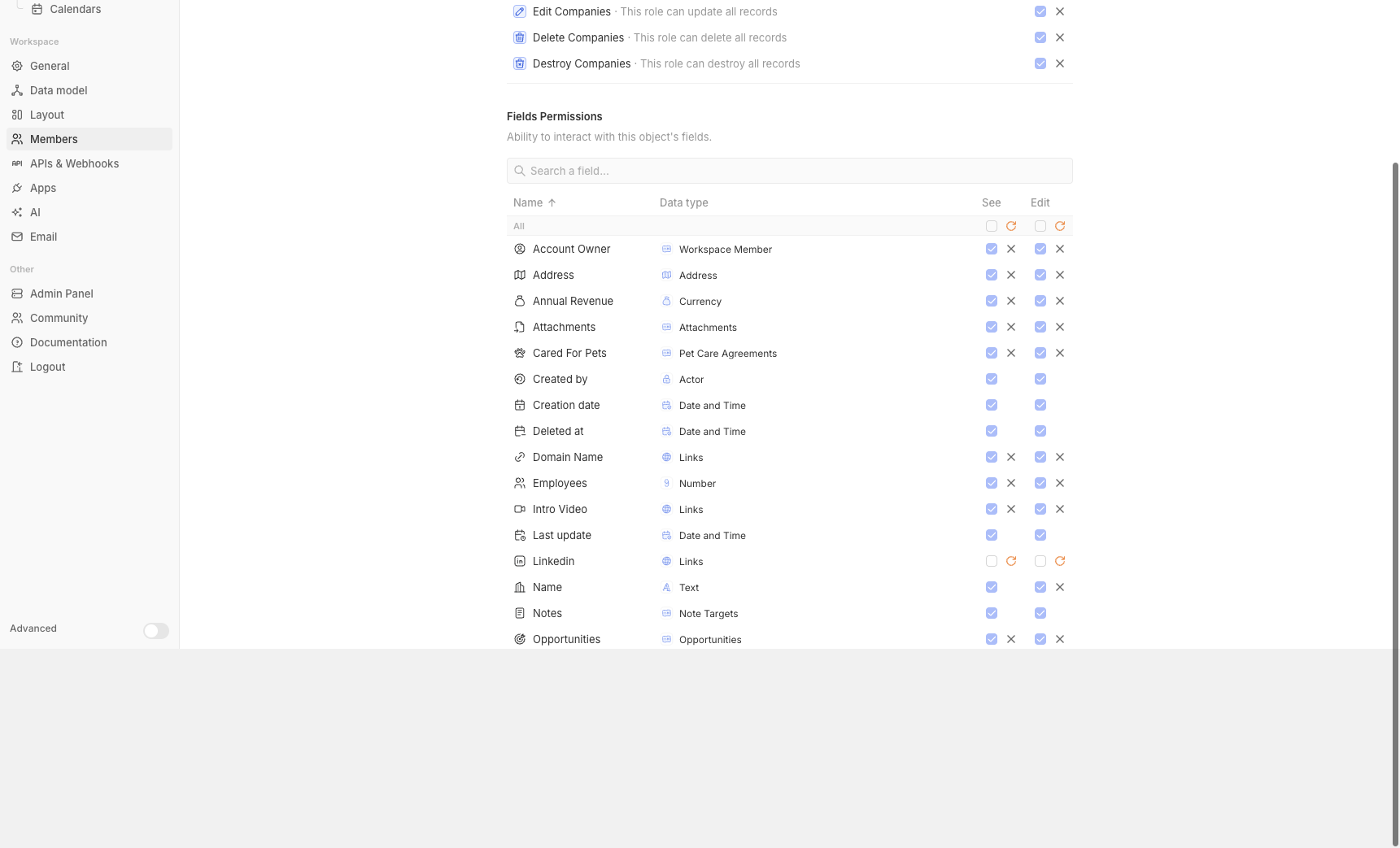 After: the same root scroll attempt leaves the app shell fixed to the viewport. 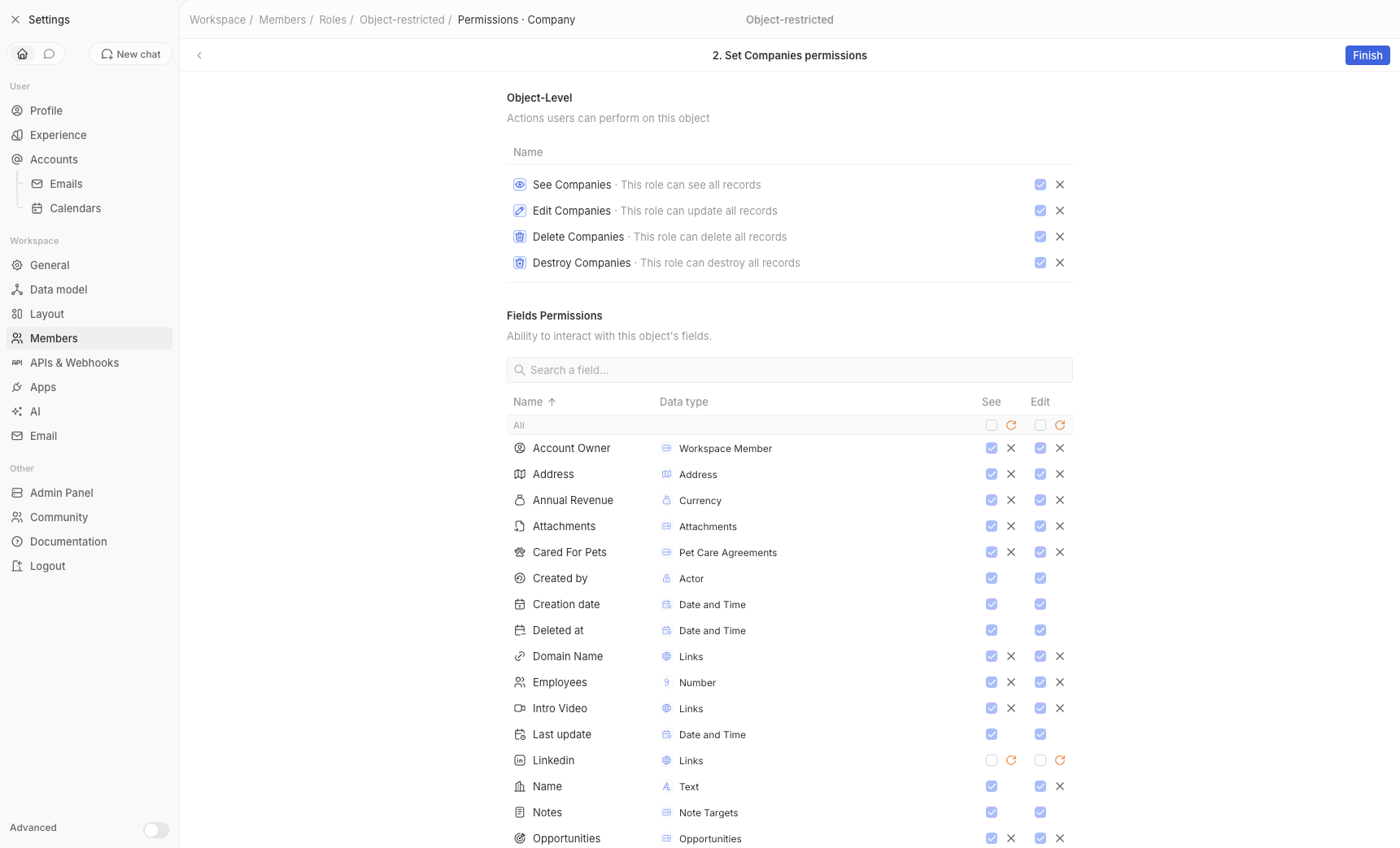 ## Browser Validation Route tested: `/settings/members/roles/78fa69cb-1237-43b5-bfa5-5a11a47bf781/object/5ab1a16b-7811-471f-ac53-940666c667dd` - Before on `http://apple.localhost:3001`: `window.scrollTo(0, 9999)` moved the root to `scrollY=244.5`; `htmlScrollHeight=1287`, `htmlClientHeight=1043`. - After on `http://apple.localhost:3002`: the same root scroll attempt stayed at `scrollY=0`; `htmlScrollHeight=1043`, `htmlClientHeight=1043`. - The settings content still scrolls internally: wrapper `scrollHeight=1475`, `clientHeight=955`. ## Checks - `git diff --check` - `yarn oxfmt --check packages/twenty-front/src/modules/ui/layout/page/components/DefaultLayout.tsx` - `cd packages/twenty-front && npx oxlint --type-aware -c .oxlintrc.json src/modules/ui/layout/page/components/DefaultLayout.tsx` <!-- This is an auto-generated description by cubic. --> <a href="https://cubic.dev/pr/twentyhq/twenty/pull/22207?utm_source=github" target="_blank" rel="noopener noreferrer" data-no-image-dialog="true"><picture><source media="(prefers-color-scheme: dark)" srcset="https://www.cubic.dev/buttons/review-in-cubic-dark.svg"><source media="(prefers-color-scheme: light)" srcset="https://www.cubic.dev/buttons/review-in-cubic-light.svg"><img alt="Review in cubic" src="https://www.cubic.dev/buttons/review-in-cubic-dark.svg"></picture></a> <!-- End of auto-generated description by cubic. --> |
||
|
Thomas des Francs
|
34dc681c0e |
Use settings icon in settings drawer tab (#22204)
## Summary - Let the shared navigation drawer tab row accept a custom icon and accessible label for its navigation tab. - Use the Settings icon and Settings label when that tab row is rendered inside the settings drawer. - Keep the main navigation drawer defaulting to the Home icon. ## Screenshots ### Before <img width="420" alt="Before: settings drawer navigation tab uses the Home icon" src="https://github.com/user-attachments/assets/03b684ba-0f62-4a96-a9f1-8c6138efd9cf" /> ### After <img width="420" alt="After: settings drawer navigation tab uses the Settings icon" src="https://github.com/user-attachments/assets/3e5f4669-ed7c-4355-be92-c9cfbf160959" /> ## Validation - `yarn oxfmt --check packages/twenty-front/src/modules/navigation/components/MainNavigationDrawerTabsRow.tsx packages/twenty-front/src/modules/navigation/components/SettingsNavigationDrawer.tsx` - `git diff --check` - `yarn nx typecheck twenty-front` Note: `oxlint` could not run locally because the installed dependencies are missing the native `@oxlint/binding-darwin-*` optional package. |
||
|
Raphaël Bosi
|
cb49a7a053 |
Add v2 onboarding loading screen while creating workspace (#22152)
https://github.com/user-attachments/assets/cc7b1d10-7495-4f21-9311-4c22c0f14771 Adds the full-screen loading screen shown while a new workspace is being created in the v2 sign-up flow (`SignInUpV2`), building on the v2 "Create your workspace" step. How it works: - Submitting the v2 create-workspace form marks the flow as v2 (`isOnboardingV2State`) and creates the workspace. The flag is carried across the cross-subdomain redirect with an `onboardingV2=true` URL param, so v2 users land on a new `/workspace-activation-v2` route instead of v1's `/workspace-activation`. - `WorkspaceActivationV2` runs the real `activateWorkspace` mutation on mount and renders the loader: a pulsing Twenty logomark above a stack of status messages that shift up one at a time, cycling once per second. There is no faked/minimum duration; it advances to the next onboarding step as soon as the workspace is activated. - On activation failure it shows a "Workspace creation failed" screen with a Retry button. v1 onboarding is unchanged. Storybook: `Modules/Auth/SignInUpWorkspaceActivationV2`. Note: The flashes will be fixed in later PRs <!-- This is an auto-generated description by cubic. --> <a href="https://cubic.dev/pr/twentyhq/twenty/pull/22152?utm_source=github" target="_blank" rel="noopener noreferrer" data-no-image-dialog="true"><picture><source media="(prefers-color-scheme: dark)" srcset="https://www.cubic.dev/buttons/review-in-cubic-dark.svg"><source media="(prefers-color-scheme: light)" srcset="https://www.cubic.dev/buttons/review-in-cubic-light.svg"><img alt="Review in cubic" src="https://www.cubic.dev/buttons/review-in-cubic-dark.svg"></picture></a> <!-- End of auto-generated description by cubic. --> |
||
|
Akash!
|
ce4d0f3447 |
fix: hide "Create Workspace" button when multi-workspace is disabled (#22202)
## Description This PR fixes a bug where the "Create Workspace" button was unconditionally rendered in the workspace switcher dropdown, even when single-workspace mode was active (`IS_MULTIWORKSPACE_ENABLED=false`). This created a confusing "dead-end" action for users, as clicking the button would do nothing (because the backend correctly blocks workspace creation in this mode, and the frontend skips the redirect). ### Changes made - Imported the `isMultiWorkspaceEnabledState` atom from client-config. - Evaluated `isMultiWorkspaceEnabled` inside `MultiWorkspaceDropdownDefaultComponents`. - Conditionally rendered the "Create Workspace" `<MenuItem>` only if multi-workspace is enabled. Closes #22139 <!-- This is an auto-generated description by cubic. --> <a href="https://cubic.dev/pr/twentyhq/twenty/pull/22202?utm_source=github" target="_blank" rel="noopener noreferrer" data-no-image-dialog="true"><picture><source media="(prefers-color-scheme: dark)" srcset="https://www.cubic.dev/buttons/review-in-cubic-dark.svg"><source media="(prefers-color-scheme: light)" srcset="https://www.cubic.dev/buttons/review-in-cubic-light.svg"><img alt="Review in cubic" src="https://www.cubic.dev/buttons/review-in-cubic-dark.svg"></picture></a> <!-- End of auto-generated description by cubic. --> |
||
|
Etienne
|
b625bd1995 |
fix(ai-chat) - improvements (#22193)
- remove flickering at assistant message streamed end - add copy code - leave chat history when navigating to settings <!-- This is an auto-generated description by cubic. --> <a href="https://cubic.dev/pr/twentyhq/twenty/pull/22193?utm_source=github" target="_blank" rel="noopener noreferrer" data-no-image-dialog="true"><picture><source media="(prefers-color-scheme: dark)" srcset="https://www.cubic.dev/buttons/review-in-cubic-dark.svg"><source media="(prefers-color-scheme: light)" srcset="https://www.cubic.dev/buttons/review-in-cubic-light.svg"><img alt="Review in cubic" src="https://www.cubic.dev/buttons/review-in-cubic-dark.svg"></picture></a> <!-- End of auto-generated description by cubic. --> |
||
|
Thomas des Francs
|
9b57c5dfac |
Set record card header height and calendar spacing (#22187)
## Summary Sets the shared `RecordCardHeaderContainer` height to `32px`, so board and calendar card headers use the same common header size. Updates the board fetch-more card-height estimate to use the same `32px` header value. Reduces the calendar card header/content gap by removing the body top padding while keeping the existing side and bottom padding. ## Screenshots Before: 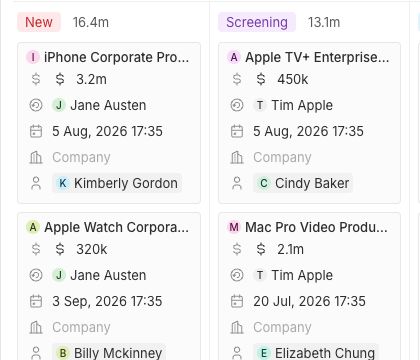 After: 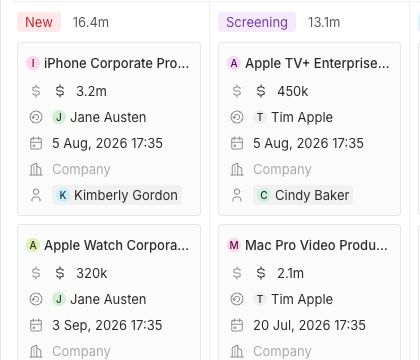 ## Validation - Browser verification on `http://apple.localhost:3001/objects/opportunities?viewId=0433d066-dda7-4b2c-89e5-04d4792d193c`: visible calendar card body padding computes to `0px 4px 4px` - Browser verification on board view: visible board card headers compute to `32px` - Browser console errors: none - `git diff --check` - `prettier --write` on changed files - `oxlint --type-aware` on changed files in the running checkout |
||
|
Mani bharadwaj
|
7e48d36c98 |
fix(twenty-front): apply object type translations to details panel relation labels (#22090)
## Problem When users customize or translate object type names (e.g. "Company" → "Unternehmen" in German), the translated/customized names do **not** appear in the details panel. The default English names still show instead. This is because the frontend's relation metadata only carried `nameSingular`/`namePlural` (internal API identifiers), not `labelSingular`/`labelPlural` (user-facing display labels). Components that display relation names had no choice but to use the internal identifiers. Fixes #19790 ## Changes ### Data layer — add labels to the pipeline - **GraphQL fragment** (`fragment.ts`): Added `labelSingular`/`labelPlural` to `sourceObjectMetadata` and `targetObjectMetadata` in both `relation` and `morphRelations` - **Type** (`FieldMetadataItemRelation.ts`): Extended the `Pick` type to include `labelSingular`/`labelPlural` - **Field metadata type** (`FieldMetadata.ts`): Added `relationObjectMetadataLabelSingular`/`LabelPlural` to `FieldRelationMetadata` - **Mapping** (`formatFieldMetadataItemAsFieldDefinition.ts`): Maps the new label fields with `label ?? name` fallback for backwards compatibility ### Display layer — use labels for user-facing text - **RecordDetailRelationRecordsListItem**: Uses `relationObjectMetadataLabelSingular` for delete confirmation dialog title, subtitle, and button text (falls back to `nameSingular`) - **RecordDetailRelationRecordsList**: Threads `objectLabelSingular` prop through - **RecordDetailRelationSection**: Passes `labelSingular ?? nameSingular` from the looked-up object metadata - **FieldWidgetRelationCard**: Passes `relationObjectMetadataLabelSingular` from field metadata - **FieldWidgetJunctionRelationCard**: Passes `labelSingular ?? nameSingular` from object metadata lookup - **FieldWidgetMorphRelationCard**: Passes label from morph relation hook result - **useGetMorphRelationRelatedRecordsWithObjectNameSingular**: Carries `labelSingular` from matched morph relation ### Test data - Updated story/mock files with `relationObjectMetadataLabelSingular`/`LabelPlural` fields - Updated `SettingsDataModelRelationFieldPreview` with label fields in morph relation objects ## Design decisions - **Backwards compatible**: All new props are optional. Every display usage uses `label ?? name` fallback, so if `labelSingular` isn't available yet (e.g. before GraphQL regeneration), it falls back to the old behavior - **Lookup vs display separation**: `nameSingular` continues to be used for lookups, routing, and GraphQL queries (it's the identifier). `labelSingular` is only used for user-facing display text - **Minimal scope**: Only changes the display paths identified in the bug report — confirmation dialogs and relation labels in the details panel ## Test plan 1. Set workspace language to a non-English locale (e.g. German) 2. Navigate to a record with relation fields 3. Verify relation section titles and labels show translated names 4. Try to delete a related record — verify the confirmation dialog uses the translated name 5. Switch language back to English — verify everything still works correctly <!-- This is an auto-generated description by cubic. --> <a href="https://cubic.dev/pr/twentyhq/twenty/pull/22090?utm_source=github" target="_blank" rel="noopener noreferrer" data-no-image-dialog="true"><picture><source media="(prefers-color-scheme: dark)" srcset="https://www.cubic.dev/buttons/review-in-cubic-dark.svg"><source media="(prefers-color-scheme: light)" srcset="https://www.cubic.dev/buttons/review-in-cubic-light.svg"><img alt="Review in cubic" src="https://www.cubic.dev/buttons/review-in-cubic-dark.svg"></picture></a> <!-- End of auto-generated description by cubic. --> --------- Co-authored-by: Charles Bochet <charles@twenty.com> |
||
|
Parship Chowdhury
|
b3e39e2198 |
fix: relative date picker calendar display (#21895)
Part of https://github.com/twentyhq/twenty/issues/19739#issuecomment-4652034526 (Bug 1-3). Maybe it feels like theses bugs are not actually bugs, but we can maybe say it as UX improvements: specially needed in case when an user will choose any past options. ### Bug 1: calendar open on wrong month With Is Relative (e.g. Past 1 Quarter), the calendar opened on today’s month instead of the range start. After the fix, it now opens on the first month of the filtered range. **Testing:** View filter → Date field → Is Relative → Past 1 Quarter. Calendar opens on January (range start), not today’s month https://github.com/user-attachments/assets/8849d00a-4d5c-4f8a-8d31-3a62535eb311 ### Bug 2: Dates not highlighted Ranges older than ~2 months (e.g. Q1 when today is June) showed no highlighted days. Highlighting now covers the full resolved range. **Testing:** Same setup: past 1 Quarter on a date when Q1 is outside the old 2‑month window. Jan 1 - Mar 31 will highlight. https://github.com/user-attachments/assets/d21e2272-c923-4493-80ff-bdf4228842b1 ### Bug 3: No month navigation Relative mode only showed Past - 1 - Quarter controls with no way to browse months. Now see the new arrows move through months without changing the filter. <img width="377" height="455" alt="Screenshot 2026-06-20 181107" src="https://github.com/user-attachments/assets/eb51feb9-af10-489a-b166-8b8d6c642e05" /> > [!NOTE] > 1. We can't do the fixes by one by one, i have to fix them within one PR because all the fixes are inter-related, like we can't test the bug 1 fix alone without implementing bug 3. > 2. Bug 4 will be done in a separate PR which is actually the issue #19739. See https://github.com/twentyhq/twenty/issues/19739#issuecomment-4652034526 for better understanding. > 3. If you see the screen recordings, they are actually done with the alignment fixes from #21881 . So without that changes you will see the alignmemt issues in the calendar grid in your local. --------- Co-authored-by: Félix Malfait <felix.malfait@gmail.com> |
||
|
Marie
|
6e2df0654b |
[Workflows] Allow iterator to take whole item as variable (#22031)
**Select the whole item in iterator loops, and iterate over a step's array output** ## Summary Two related improvements to working with lists in workflows: - Pick the current item as a whole inside an iterator loop. Previously, in a node inside the loop, you could only reference individual fields of the Iterator's current item. Now you can select the whole item (e.g. a full record) — useful for passing it straight into a downstream step. <img width="1270" height="744" alt="Screenshot 2026-06-23 at 17 02 47" src="https://github.com/user-attachments/assets/6b92e72e-ec25-4c1a-9841-3a438210e753" /> - Iterate over a step's array output. A Code / Logic Function step that returns a top-level array couldn't be fed to the Iterator: its output was flattened into indexed entries (0, 1, …) with no way to select the array as a whole. A new "Whole list" option selects the step's entire output, and the Iterator infers the per-iteration item shape from it. <img width="1026" height="728" alt="Screenshot 2026-06-23 at 17 17 53" src="https://github.com/user-attachments/assets/db07dcd8-4fb8-4db9-8b45-aa56051d9f3b" /> Together these complete the loop ergonomics: select a list → iterate → reference the current item (whole or by field) downstream — matching the model used by tools like Windmill. ## What changed - The variable picker offers a "Use the whole item" option when viewing an iterator's current item, and a "Whole list" option when a step returns a top-level array. - The Iterator's current-item schema can now be inferred from a variable pointing at a step's whole output. ## Risks for existing workflows None expected. The change is purely additive: - No DB migration and no change to how output schemas are stored or read — existing schemas, variables, and iterators behave identically. - No change to runtime variable resolution; existing {{step.field}} and current-item references are untouched. - The new options only apply to new selections (whole item / whole list); all existing paths take the unchanged code path. - The only edge case: array detection is heuristic (an output whose keys are exactly 0…n-1), so an object that happens to have those keys would also show "Whole list". This is rare for real outputs, affects nothing unless a user selects it, and fails safe — the Iterator validates its input and throws a clear "items must be an array" error if a non-array is passed. <!-- This is an auto-generated description by cubic. --> <a href="https://cubic.dev/pr/twentyhq/twenty/pull/22031?utm_source=github" target="_blank" rel="noopener noreferrer" data-no-image-dialog="true"><picture><source media="(prefers-color-scheme: dark)" srcset="https://www.cubic.dev/buttons/review-in-cubic-dark.svg"><source media="(prefers-color-scheme: light)" srcset="https://www.cubic.dev/buttons/review-in-cubic-light.svg"><img alt="Review in cubic" src="https://www.cubic.dev/buttons/review-in-cubic-dark.svg"></picture></a> <!-- End of auto-generated description by cubic. --> --------- Co-authored-by: Charles Bochet <charles@twenty.com> |
||
|
Parship Chowdhury
|
c635a191bf |
fix: uneven spacing in date picker calendar grid (#21881)
### Summary While working on #19739, I found that in the date filter calendar dropdown, day cells and highlighted dates looked misaligned i.e. tighter on the right side. The solution is to apply a uniform margin in `DatePicker.tsx` and `DateTimePicker.tsx`. ### Before: <img width="377" height="436" alt="Screenshot 2026-06-20 021856" src="https://github.com/user-attachments/assets/4ef62a48-6b99-4647-95f6-bd39f43eaa26" /> <img width="442" height="518" alt="Screenshot 2026-06-20 021932" src="https://github.com/user-attachments/assets/e6e1e8f8-257a-41e5-825f-bd2fe91e372a" /> ### After: <img width="346" height="380" alt="Screenshot 2026-06-20 021813" src="https://github.com/user-attachments/assets/5fdd03fe-e61b-4fec-a0f3-f6ac4ee9effb" /> <img width="322" height="457" alt="Screenshot 2026-06-20 022013" src="https://github.com/user-attachments/assets/a33c6439-f2d5-43e7-a043-f9cf4fec770a" /> <!-- This is an auto-generated description by cubic. --> <a href="https://cubic.dev/pr/twentyhq/twenty/pull/21881?utm_source=github" target="_blank" rel="noopener noreferrer" data-no-image-dialog="true"><picture><source media="(prefers-color-scheme: dark)" srcset="https://www.cubic.dev/buttons/review-in-cubic-dark.svg"><source media="(prefers-color-scheme: light)" srcset="https://www.cubic.dev/buttons/review-in-cubic-light.svg"><img alt="Review in cubic" src="https://www.cubic.dev/buttons/review-in-cubic-dark.svg"></picture></a> <!-- End of auto-generated description by cubic. --> --------- Signed-off-by: Parship Chowdhury <parshipchowdhury@gmail.com> Co-authored-by: Charles Bochet <charles@twenty.com> |
||
|
Aleksa Jankovic
|
0b31d2a6a0 |
fix(front): wrap long note/markdown text on mobile browsers (#21909)
Fixes #21929 ### Issue When viewing/reading a note's body (BlockNote rich-text / markdown content) on Android, long text overflows horizontally off the viewport in **Chrome** and **Firefox**, while it wraps correctly on **iOS Safari**. ### Root cause The note body is rendered by the BlockNote editor (`StyledEditor` in `BlockEditor.tsx`). The block/inline content had no `overflow-wrap`, and the flex-based `.bn-block-content` had no `min-width` constraint. WebKit (iOS Safari) breaks the content, but Blink (Android Chrome) and Gecko (Android Firefox) keep the intrinsic *min-content* width of the flex children, so the container expands past the viewport instead of wrapping. ### Fix Add wrapping/sizing rules to the editor container so text breaks and wraps consistently across browsers, without changing the desktop layout: - `overflow-wrap: anywhere` on `.bn-block-content` / `.bn-inline-content` — unlike `break-word`, this reduces the min-content size so flex children can actually shrink. - `min-width: 0` on `.bn-block-content` and on the editor wrapper, plus `max-width: 100%` on the wrapper. ### Test plan - Open a Note containing a very long word / URL or a long paragraph. - Android Chrome & Firefox: text now wraps within the viewport (no horizontal overflow). - iOS Safari: unchanged (still wraps). - Desktop: layout unchanged. ### Screenshots Android <img width="1080" height="1949" alt="Screenshot_20260620_231356_Chrome(1)" src="https://github.com/user-attachments/assets/bb1e38cf-198a-4ded-9dde-e0a26e637ed8" /> iPhone <img width="686" height="1280" alt="IMG_20260620_231841_096" src="https://github.com/user-attachments/assets/9cee7557-bb69-453d-bea4-a5c37de220af" /> --- ### ✅ Verified on a real Android device Reproduced and validated on a **Samsung Galaxy A71 (Android, Chrome / Blink)** using the exact note show-page DOM/CSS chain (`ScrollWrapper` → full-width container → `StyledEditor` → `.bn-mantine` `container-type: inline-size` → flex `.bn-block-content` → ProseMirror `word-wrap: break-word`): - **Without the fix:** a long unbreakable string stays on one line and overflows horizontally off the viewport (`scrollWidth ≈ 1336px` in a ~360px viewport, with a horizontal scrollbar) — matching the reported bug. - **With the fix:** the same string wraps within the viewport. Notably this does **not** reproduce on desktop Chromium — only on the mobile engine — which matches the original report (Android Chrome/Firefox broken, iOS Safari fine). The flex `.bn-block-content` (`min-width: auto`) resolves to the unbreakable token's intrinsic width on Android Blink; `min-width: 0` + `overflow-wrap: anywhere` lets it shrink and wrap. Screenshot <img width="1080" height="2400" alt="image" src="https://github.com/user-attachments/assets/827dc579-4b1e-43ea-8b28-0ca781b12d88" /> |
||
|
Akash!
|
87329c8810 |
fix(ask-ai): resolve stream subscription race condition on new thread… (#21916)
## Description Resolves a race condition in the Ask AI feature where the first assistant reply in a newly created thread does not stream into the UI and only appears after sending a second message. ### What's Changed - **Immediate Thread Subscription:** Updated `useAgentChat.ts` to immediately set `currentAiChatThread` to the newly generated `threadId` instead of deferring it until after the `SEND_CHAT_MESSAGE` mutation finishes. - **The Bug:** Previously, the backend worker processed the AI chat job so quickly that the stream completed and fired the `message-persisted` event *before* the frontend established the SSE subscription. - **The Fix:** By setting the thread ID immediately, the `useAgentChatSubscription` hook now properly connects and listens to the SSE stream before the backend begins emitting chunks, guaranteeing the first message streams seamlessly. ### How to Test 1. Open the Ask AI panel and start a completely new thread. 2. Send an initial message (e.g., "Hello!"). 3. Observe that the AI's response successfully streams into the chat without needing a workaround or page refresh. Closes #21694 --------- Co-authored-by: Etienne <45695613+etiennejouan@users.noreply.github.com> |
||
|
Weiko
|
864ea452b4 |
fix mobile side panel close (#22169)
The side panel close (X) button was hidden on all mobile views, while the back button only renders when there is navigation history. When the side panel is opened at the root (e.g. viewing a record directly with a single-item navigation stack), neither button was shown, leaving no way to dismiss the panel on mobile. Keep the close button available on mobile whenever there is no back button to fall back on, so the panel is always dismissable. ## Before https://github.com/user-attachments/assets/61891d25-26b8-4ba4-8b05-73fd44f92d89 ## After https://github.com/user-attachments/assets/41342722-bcaf-420b-83bb-3cafaec49516 |
||
|
Charles Bochet
|
d8cb4aa15b |
fix(filter): resolve filter-derived date defaults with Temporal (fixes create/update crash in date-filtered views) (#22124)
## Symptom

Creating or updating an Opportunity on a board view crashes with:

```
Uncaught TypeError: e.split is not a function
    at splitDateString (date-fns) → parseISO → isMatchingDateFilter
    → isRecordMatchingFilter → <group-by optimistic effect> → createOneRecord
```

`e` is a non-string (a `Date` object, shown as `{}` in the debugger).
Distinct from the `null` case fixed in #22029.

## Root cause

Reproduced on a live board filtered by **Close date — Is relative —
"This quarter"** (a `DATE_TIME` field).

When you create a record in a filtered view, `useCreateNewIndexRecord`
derives default field values from the view's filters via
`buildRecordInputFromFilter` → `buildValueFromFilter`. For a date field,
`computeValueFromFilterDate` returned a JS **`Date` object** (`new
Date()` / `new Date(value)`), assigned to the new record verbatim. The
optimistic record's `closeDate` was then a `Date`, not an ISO string,
and the group-by optimistic effect matched it via `parseISO(dateObject)`
→ `dateString.split is not a function`, crashing every create/update in
the view.

## Fix

`computeValueFromFilterDate` now returns timezone-aware **ISO strings**
via Temporal, mirroring what `turnRecordFilterIntoGqlOperationFilter`
produces for the same filters — so a record created in a date-filtered
view actually satisfies its own filter:

- **`DATE_TIME`** → an instant. Date-only filter values (a `DATE_TIME`
"is" filter stores `yyyy-MM-dd`, no time) are resolved to the start of
day in the user's time zone, matching how the filter operands are built
— `Temporal.Instant.from()` alone would `RangeError` on them.
- **`DATE`** → a plain date `yyyy-MM-dd` resolved in the **user's time
zone** (`Temporal.Now.plainDateISO(timeZone)`). A bare `new
Date().toISOString()` would use the UTC date, which near midnight is the
wrong calendar day for non-UTC users, so the new record could miss its
own `IS_TODAY`/relative filter. The time zone is threaded from
`useUserTimezone` (same source the filter side uses).
- `IS_BEFORE` subtracts 1 day for `DATE` / 1 minute for `DATE_TIME` (the
`-1 minute` special-case moved out of `buildRecordInputFromFilter`,
which now just assigns the string).

No `Date` object ever reaches `parseISO`, and the value matches the
filter operand, so the optimistic card lands in the right place.

## Tests

- `buildValueFromFilter.spec.ts`: every date operator returns an ISO
**string** (round-tripped to the expected instant); a `DATE` block
asserts date-only `yyyy-MM-dd` output and that `IS_TODAY` resolves to
the correct calendar day **per time zone** at a UTC day boundary
(`2024-03-20` UTC vs `2024-03-21` Asia/Tokyo); a date-only `DATE_TIME`
`IS` value resolves to start-of-day in the user time zone (UTC vs
America/New_York) without throwing.
- `buildRecordInputFromFilter.test.ts`: filter-derived date values are
ISO strings, not `Date` objects.

## Verified locally (Chrome)

Reproduced the exact prod scenario on the **By Stage Opportunities
Kanban board** (the group-by optimistic effect) with a **Close date — Is
relative** filter:

- Created a card in a column → **no `split is not a function` crash**;
the card got a valid Close date (`now` for the relative filter, e.g. `25
Jun 2026 13:10`). Console clean.
- Also verified a **table view + Close date — Is** filter: created
record gets a valid start-of-day value (`25 Jun 2026 00:00`).

Both `IS_RELATIVE` (→ now instant) and the date-only `IS` (→
start-of-day in the user tz) paths produce string values that the
optimistic matcher handles without throwing.
|
||
|
Thomas des Francs
|
2aeacf341f |
Flatten system object pickers (#22161)
## Summary - Flatten system object entries into the first-level workflow object pickers. - Flatten dashboard Source and record-page Field picker advanced/system entries into the main searchable list. - Keep regular entries first, place system/advanced entries at the bottom, and cap page-layout picker height at 340px. - Add keyboard selection support to workflow object pickers through `SelectableList`. ## Review notes - Removed now-unused Advanced submenu state, submenu headers, and duplicated filtering paths. - Kept the width behavior scoped to each existing dropdown; the shared page-layout wrapper only controls height/scrolling. - No blocking issues found in the final reviewed diff. ## Screenshots ### Workflow record type picker | Before | After | | --- | --- | | <img src="https://gist.githubusercontent.com/Bonapara/d2b6754b3f1927b3d755b5f260e8b12f/raw/dc3f7ef933bdca6c39599c45c827db0f27f01e7d/before-workflow-record-type-advanced.png" width="320" /> | <img src="https://gist.githubusercontent.com/Bonapara/d2b6754b3f1927b3d755b5f260e8b12f/raw/2ee195a8562e13d0f4307e7891ab60cfaecae8cf/after-workflow-record-type-flat.png" width="320" /> | ### Dashboard Source picker | Before | After | | --- | --- | | <img src="https://gist.githubusercontent.com/Bonapara/d2b6754b3f1927b3d755b5f260e8b12f/raw/45f57728ec7643c7048e857829e977d49b9b365c/before-dashboard-source-tall.png" width="420" /> | <img src="https://gist.githubusercontent.com/Bonapara/d2b6754b3f1927b3d755b5f260e8b12f/raw/f8b864ea5e3d04a00b9b6a613e8bf97dd545933c/after-dashboard-source-340px.png" width="420" /> | ### Record page Field picker | Before | After | | --- | --- | | <img src="https://gist.githubusercontent.com/Bonapara/d2b6754b3f1927b3d755b5f260e8b12f/raw/ea5f14ccac6c0d9b3d953b4047dc7491702f756a/before-record-field-advanced.png" width="320" /> | <img src="https://gist.githubusercontent.com/Bonapara/d2b6754b3f1927b3d755b5f260e8b12f/raw/9d0717cf3cfcb47ed17d595ba83b19a37718c3eb/after-record-field-flat.png" width="320" /> | ## Checks - `npx oxfmt --check` on touched files - `git diff --check` - `npx tsc -p tsconfig.json --noEmit --pretty false --noErrorTruncation | rg "(ChartDataSourceDropdownContent|FieldWidgetFieldDropdownContent|PageLayoutDropdownContentContainer|WorkflowObjectDropdownContent|WorkflowEditTriggerDatabaseEventForm|WorkflowEditActionFindRecords|WorkflowEditActionPickRecord|ChartSettingItem)"` returned no touched-file diagnostics - Browser verification: dashboard Source top/bottom, record-page Field top/bottom, workflow Record Type top/bottom, and ArrowDown selection in workflow Record Type menu <!-- This is an auto-generated description by cubic. --> <a href="https://cubic.dev/pr/twentyhq/twenty/pull/22161?utm_source=github" target="_blank" rel="noopener noreferrer" data-no-image-dialog="true"><picture><source media="(prefers-color-scheme: dark)" srcset="https://www.cubic.dev/buttons/review-in-cubic-dark.svg"><source media="(prefers-color-scheme: light)" srcset="https://www.cubic.dev/buttons/review-in-cubic-light.svg"><img alt="Review in cubic" src="https://www.cubic.dev/buttons/review-in-cubic-dark.svg"></picture></a> <!-- End of auto-generated description by cubic. --> |
||
|
Abdul Rahman
|
db5338cf32 |
Feat: group records by many to one relation (#22123)
## Group records by relation (Kanban + Table)

Adds grouping by `MANY_TO_ONE` relation fields on both board and table
views, reusing the existing `ViewGroup` storage (`fieldValue = related
record id`).

- **New group** record picker to create relation-backed groups (board
column + table row)
- Relation-aware group headers (name/avatar), filtering, and drag-drop
(writes the FK join column) — all using one canonical `${name}Id` column
- Sort menu hides alphabetical options when grouping by a relation (no
comparable title)
- A group whose backing record no longer exists renders a "Deleted" chip
instead of a blank header
- **Backend:** allow `MANY_TO_ONE` relations as the Kanban
`mainGroupByField` in the flat-view validator


https://github.com/user-attachments/assets/267077a6-2667-4506-b178-eee420a16f20


<!-- This is an auto-generated description by cubic. -->
<a
href="https://cubic.dev/pr/twentyhq/twenty/pull/22123?utm_source=github"
target="_blank" rel="noopener noreferrer"
data-no-image-dialog="true"><picture><source
media="(prefers-color-scheme: dark)"
srcset="https://www.cubic.dev/buttons/review-in-cubic-dark.svg"><source
media="(prefers-color-scheme: light)"
srcset="https://www.cubic.dev/buttons/review-in-cubic-light.svg"><img
alt="Review in cubic"
src="https://www.cubic.dev/buttons/review-in-cubic-dark.svg"></picture></a>
<!-- End of auto-generated description by cubic. -->
|
||
|
Emmanuel Hernández Bazán
|
981ee6a2d7 |
fix: stabilize tooltip anchor ID with useRef to prevent hover glitch (#21888)
## Context Tooltip components were generating a new anchor ID on every render. This caused a flicker/glitch when hovering: the tooltip would briefly disappear and reappear because React reconciled the changed ID as a different element. ## Solution Changed the anchor ID generation from inline (re-created every render) to `useRef` (stable across renders). The ID is now created once on mount and stays the same for the lifetime of the component. ## Test plan - [x] Hover over any element with a tooltip — no flicker or disappear/reappear behavior - [x] Multiple tooltips on the same page still work independently 🤖 Generated with [Claude Code](https://claude.ai/claude-code) <!-- This is an auto-generated description by cubic. --> <a href="https://cubic.dev/pr/twentyhq/twenty/pull/21888?utm_source=github" target="_blank" rel="noopener noreferrer" data-no-image-dialog="true"><picture><source media="(prefers-color-scheme: dark)" srcset="https://www.cubic.dev/buttons/review-in-cubic-dark.svg"><source media="(prefers-color-scheme: light)" srcset="https://www.cubic.dev/buttons/review-in-cubic-light.svg"><img alt="Review in cubic" src="https://www.cubic.dev/buttons/review-in-cubic-dark.svg"></picture></a> <!-- End of auto-generated description by cubic. --> --------- Co-authored-by: Emmanuel Hernandez <emmanuel.hernandez@clickbalance.com> Co-authored-by: Charles Bochet <charles@twenty.com> |
||
|
Félix Malfait
|
5242ddf458 |
feat(apps): let front components open a record in the side panel (#22140)
## Why Front components (apps) could `navigate()` to a record's **full page**, but there was no way to open a specific record in the **side panel**. More generally, `openSidePanelPage` could navigate to a `SidePanelPages` enum page but couldn't pass the context most pages need. ## What `openSidePanelPage`'s params are now a **discriminated union keyed on `page`**, so each page declares its own typed payload (instead of a flat bag of optionals whose validity silently depends on `page`). This is also safer: pages that can't render without context can't be "opened" into a broken panel. Wired the param-bearing pages host-side, each bridging to its existing internal hook: | `page` | Params | Bridges to | |---|---|---| | `ViewRecord` | `recordId`, `objectNameSingular`, `resetNavigationStack?` | `useOpenRecordInSidePanel` (full-page fallback on mobile / unsupported objects) | | `EditRichText` | `recordId`, `objectNameSingular`, `fieldName?` | `useOpenRichTextInSidePanel` | | `ComposeEmail` | `connectedAccountId`, `threadId?`, `defaultTo?`, `defaultSubject?`, `defaultInReplyTo?`, `pageTitle?`, `pageIcon?` | `useOpenComposeEmailInSidePanel` | | `ViewFrontComponent` | `frontComponentId`, optional `recordId`+`objectNameSingular`, `pageTitle`, `pageIcon?`, `resetNavigationStack?` | `useOpenFrontComponentInSidePanel` | | *(any other page)* | `pageTitle`, `pageIcon?`, `shouldResetSearchState?` | `navigateSidePanel` | `CommandOpenSidePanelPage` now takes the union directly, so headless command-menu items can open any of these. Threaded through `twenty-sdk` → `twenty-front-component-renderer` → host (`useFrontComponentExecutionContext`), with unit tests per page and the mobile/unsupported fallbacks. ## Deliberately deferred: `MergeRecords` `useOpenMergeRecordsPageInSidePanel` takes `objectNameSingular` / `objectRecordIds` at **hook-init** (it calls `useObjectMetadataItem` / `useLazyFindManyRecords` at render), so it can't be driven by runtime app params without refactoring that hook + its current caller. Left out of this PR — better as its own change. ## Worth a second look (reviewers) - **`ViewFrontComponent`** lets an app open a front component by id. Within an app that's clean composition; whether an app should be able to target *another* app's component is a scoping/security question. The render still runs under the app's access token, so cross-app fetches would fail auth — but flagging it explicitly. ## Security note Side-panel record/page views render natively under the **user's** session/Apollo client, not the app's scoped token — RLS/field permissions are enforced as if the user opened it themselves. Same trust model as `navigate(AppPath.RecordShowPage, …)`. ## Follow-up A separate PR will centralize the mobile + `canOpenObjectInSidePanel` guard inside `useOpenRecordInSidePanel` (currently duplicated across callers, missing in others). ## Validation > [!NOTE] > Dependencies wouldn't install in this environment (flaky network during `yarn install`), so lint / typecheck / jest weren't run locally — relying on CI. The diff was reviewed manually for type-consistency, including the discriminated-union narrowing in the host switch. https://claude.ai/code/session_01AAJFXzsCeoj6BeP3ofiTKQ |
||
|
Félix Malfait
|
b841b92cb5 |
fix(billing): widen embedded add-card modal and align its buttons (#22141)
## Context Follow-up to #22125. The embedded "Add your credit card" modal had two visual issues: 1. **Too narrow** — it used `narrowWidth` (~368px), which capped the Stripe Payment Element too tightly (cramped card fields, country dropdown, and the Google Pay / Cash App / bank-account accordions). 2. **Mismatched buttons** — the submit used `MainButton` (onboarding's filled CTA) while Cancel used `Button` (the settings/`ConfirmationModal` outlined style), so the two never matched. No new components or behavior — purely prop/component swaps within existing primitives. ## Changes - **`AddCreditCardModal`**: drop `narrowWidth`, use `size="medium"` so the Payment Element has room. - **`AddPaymentMethodForm`**: replace `MainButton` with `Button` (`variant="secondary"`, `accent="blue"`, `fullWidth`), using `Button`'s built-in `isLoading` spinner. Both buttons are now full-width outlined `Button`s, matching the sibling `StartSubscriptionConfirmationModal` (which renders `ConfirmationModal`'s blue-accented confirm + plain cancel). Removed the now-unused `MainButton`/`Loader` imports and `StyledButtonContainer`. ## Notes - Frontend-only; no GraphQL/schema/codegen impact. https://claude.ai/code/session_01VU7SfrSgaYWr2AhVL8DMfu --- _Generated by [Claude Code](https://claude.ai/code/session_01VU7SfrSgaYWr2AhVL8DMfu)_ <!-- This is an auto-generated description by cubic. --> <a href="https://cubic.dev/pr/twentyhq/twenty/pull/22141?utm_source=github" target="_blank" rel="noopener noreferrer" data-no-image-dialog="true"><picture><source media="(prefers-color-scheme: dark)" srcset="https://www.cubic.dev/buttons/review-in-cubic-dark.svg"><source media="(prefers-color-scheme: light)" srcset="https://www.cubic.dev/buttons/review-in-cubic-light.svg"><img alt="Review in cubic" src="https://www.cubic.dev/buttons/review-in-cubic-dark.svg"></picture></a> <!-- End of auto-generated description by cubic. --> |
||
|
Félix Malfait
|
94dbcc27a9 |
feat(billing): embed credit card form in the add-card trial-end modal (#22125)
## Context

When a trialing workspace (trial without a credit card) clicks **Add
Credit Card** from the "End trial period" banner or the AI-chat
usage-limit banner, the modal currently redirects the browser to
Stripe's hosted billing portal to collect the card. Since we already
embed the Stripe Payment Element in onboarding, this brings the same
in-app experience to the trial-end modal so the whole flow stays inside
Twenty.

## Why the onboarding flow couldn't be reused as-is

The onboarding embed (`createSubscriptionPaymentIntent` /
`SubscriptionPaymentForm`) **creates a new subscription** with
`payment_behavior: 'default_incomplete'`. In the trial-end case the
customer **already has a trialing subscription**, so that path throws
`BILLING_SUBSCRIPTION_INVALID`. The correct primitive here is a
**SetupIntent** against the existing customer: collect + save the card,
then end the trial.

A standalone SetupIntent attaches the card to the customer but does
**not** make it the default (the Stripe portal used to do that for us),
so the trial-end invoice would have no payment method. The backend now
backfills the customer default before charging.

## Changes

**Backend**
- `StripeCustomerService`: `createSetupIntent()` for an existing
customer, and `ensureDefaultPaymentMethod()` which sets the customer
default only when none is already set (won't clobber a portal-chosen
default).
- `BillingPortalWorkspaceService.createPaymentMethodSetupIntent()`:
returns a SetupIntent client secret for the current non-canceled
subscription's customer.
- `BillingSubscriptionService.endTrialPeriod()`: ensures a default
payment method before `trial_end: 'now'`.
- New `createBillingPaymentMethodSetupIntent` mutation +
`BillingSetupIntent` DTO; SDK schema snapshot synced.

**Frontend**
- `AddPaymentMethodForm`: Stripe Elements (`mode: 'setup'`), confirms
with `redirect: 'if_required'` so the common card case stays in-app; 3DS
still redirects and is finished by the existing
`EndTrialAfterPaymentMethodEffect`.
- `AddCreditCardModal`: hosts the embedded form.
- Both trial-end banners (`InformationBannerEndTrialPeriod`,
`AIChatNoMoreBillingCreditsBanner`) open the embedded modal instead of
redirecting when no card is on file; the AI-chat path preserves its
thread context in the 3DS return URL.

## Flow

1. User clicks **Add Credit Card** → embedded modal opens.
2. Card entered → `createBillingPaymentMethodSetupIntent` →
`confirmSetup({ redirect: 'if_required' })`.
3. Non-3DS: confirms inline → `endSubscriptionTrialPeriod` →
subscription active, no redirect.
4. 3DS: redirects to `?startSubscriptionAfterPaymentMethod=true` →
existing effect finishes activation.
5. Self-hosted instances without a Stripe publishable key fall back to
the existing portal redirect (the form renders an unavailable state).

## Notes for reviewers
- The metadata GraphQL types were regenerated by hand (codegen needs a
live `/metadata` server, which wasn't available in the authoring
environment); a `graphql:generate --configuration=metadata` run against
a live backend should be a no-op.
- Local `typecheck`/`lint` could not be run in the authoring environment
(dependency install was blocked); relying on CI to validate.
- Scope is intentionally limited to the two trial-end banner modals. The
Settings → Billing "update payment method" link still uses the Stripe
portal.

https://claude.ai/code/session_01VU7SfrSgaYWr2AhVL8DMfu

---
_Generated by [Claude
Code](https://claude.ai/code/session_01VU7SfrSgaYWr2AhVL8DMfu)_

<!-- This is an auto-generated description by cubic. -->
<a
href="https://cubic.dev/pr/twentyhq/twenty/pull/22125?utm_source=github"
target="_blank" rel="noopener noreferrer"
data-no-image-dialog="true"><picture><source
media="(prefers-color-scheme: dark)"
srcset="https://www.cubic.dev/buttons/review-in-cubic-dark.svg"><source
media="(prefers-color-scheme: light)"
srcset="https://www.cubic.dev/buttons/review-in-cubic-light.svg"><img
alt="Review in cubic"
src="https://www.cubic.dev/buttons/review-in-cubic-dark.svg"></picture></a>
<!-- End of auto-generated description by cubic. -->
|
||
|
Félix Malfait
|
179ab2f066 |
feat(billing): clarify subscription, credits, and add-credits sections (#22126)
## What & why Redesigns the **content** of the workspace billing settings page so the numbers that matter are surfaced clearly. Strictly reuses existing design-system components — no new UI primitives, no color/font changes, same section structure. All pricing values are pulled from the pricing config (nothing hardcoded). ## Changes **Subscription card** (`SettingsBillingSubscriptionInfo.tsx`) - **Seats** row shows per-seat pricing inline, e.g. `16 × $25 / seat / mo` (interval-aware unit). - **"Credits by period" → "Monthly credits"** (interval-aware: "Yearly credits" on yearly plans). - New **"Total per month"** row (→ "Total per year" on yearly) with a helper line via the existing `Label`: `$400 seats + $2,000 credits · next charge <date>`. The total is computed at the billing interval, so it equals the actual next charge. - **"Switch to Yearly · save 20%"** — discount computed from real monthly vs. yearly config prices (only appended when > 0). **Credit usage card** (`SettingsBillingCreditsSection.tsx`) - Denominator stays total available (allocation + rollover); figures shown in full (`3,856`, not `3.86k`). - "Base Credits" → **"This month's credits"** + a **"Rolled over"** row rendered as `+1,856`. - Adds a blue `Info` note stating the rollover rule: *"Unused credits roll over, up to 2× your plan's credits (max 4,000)."* — verified against the backend cap (`billing-credit-rollover.service.ts`: `rolloverAmount = min(unused, tierQuantity)`). **Add-credits section** (`ResourceCreditPriceSelector.tsx`) - "Resource credits" → **"Add monthly credits"** with a description clarifying it stacks on the plan and adjusts the bill. - On selection, shows the resulting **new total** and **new rollover cap** (2× the new allocation). **Shared logic** - New `useBillingSubscriptionCost` hook centralizes the seats/credits/total math so the subscription card and the add-credits selector stay consistent. - Yearly-discount calculation lives in `useBillingWording` (`getYearlyDiscountPercent`) next to the existing price logic. All new figures degrade gracefully — the Total row and the add-credits summary only render when fully computable, so trial/edge states never show partial numbers. ## Testing ⚠️ `nx typecheck` / `lint` could **not** be run in the authoring environment (dependency install couldn't complete due to flaky network). The changes were reviewed manually against the generated GraphQL types (`BillingPlanKey` = `{ENTERPRISE, PRO}`, `unitAmount: number`, `creditAmount: Maybe<number>`, nullable `interval`/`currentPeriodEnd`/`quantity` — all guarded) and a 4-angle cleanup pass (reuse/simplify/efficiency/altitude). **Please let CI run typecheck + lint to confirm.** https://claude.ai/code/session_01GNhCHPfD1SRzAiBACXGCf7 --- _Generated by [Claude Code](https://claude.ai/code/session_01GNhCHPfD1SRzAiBACXGCf7)_ <!-- This is an auto-generated description by cubic. --> <a href="https://cubic.dev/pr/twentyhq/twenty/pull/22126?utm_source=github" target="_blank" rel="noopener noreferrer" data-no-image-dialog="true"><picture><source media="(prefers-color-scheme: dark)" srcset="https://www.cubic.dev/buttons/review-in-cubic-dark.svg"><source media="(prefers-color-scheme: light)" srcset="https://www.cubic.dev/buttons/review-in-cubic-light.svg"><img alt="Review in cubic" src="https://www.cubic.dev/buttons/review-in-cubic-dark.svg"></picture></a> <!-- End of auto-generated description by cubic. --> |
||
|
Thomas des Francs
|
e22d31c553 |
Close side panel after command menu actions (#22118)
## What changed - Close the command side panel after eligible headless command-menu actions complete or are confirmed. - Cover delete, restore, permanent destroy, create view, import, see deleted, and hide deleted record commands. - Keep create-record behavior unchanged so a newly created record can still open in the side panel. - Add focused Jest coverage for the affected command components and the create-record exception. # Before https://github.com/user-attachments/assets/36632578-3cab-47db-8f6d-350cd6fce683 # After https://github.com/user-attachments/assets/c9dba19b-7f4a-44aa-ae7f-57660c5a1e96 --------- Co-authored-by: Charles Bochet <charles@twenty.com> |
||
|
Raphaël Bosi
|
02120aac42 |
Add v2 create-workspace onboarding screen (#22075)
https://github.com/user-attachments/assets/30d69db2-ef50-48b5-8233-d9a36511b5e8 Builds the second step of the new onboarding flow on top of #22027: the v2 "Create your workspace" screen, shown inside `/welcome-v2` at the `WorkspaceCreation` step. What changed: - New `SignInUpV2Header` (back chevron + Twenty logo) and `SignInUpWorkspaceCreationFormV2` (left-aligned title/subtitle, logo upload, Name + Subdomain fields, "Create workspace"), wired into `SignInUpV2` for the workspace-creation step. - When a subdomain is taken, a box now lists 3 server-verified-available alternatives. Backend `SubdomainAvailabilityDTO` returns `suggestedSubdomains` via a new `findAvailableSubdomains` helper. - The shared `useWorkspaceSubdomainField` hook is extended additively (new `suggestions` + `applySuggestionValue`) so the v1 `/welcome` screen is untouched. Reviewer notes: - `generated-metadata/graphql.ts` was hand-patched (metadata codegen needs a running server). - Storybook: `Pages/Auth/SignInUpV2 → WorkspaceCreation`. <!-- This is an auto-generated description by cubic. --> <a href="https://cubic.dev/pr/twentyhq/twenty/pull/22075?utm_source=github" target="_blank" rel="noopener noreferrer" data-no-image-dialog="true"><picture><source media="(prefers-color-scheme: dark)" srcset="https://www.cubic.dev/buttons/review-in-cubic-dark.svg"><source media="(prefers-color-scheme: light)" srcset="https://www.cubic.dev/buttons/review-in-cubic-light.svg"><img alt="Review in cubic" src="https://www.cubic.dev/buttons/review-in-cubic-dark.svg"></picture></a> <!-- End of auto-generated description by cubic. --> |
||
|
Emmanuel Hernández Bazán
|
33d2441a93 |
fix(ux): input error messages no longer overlap adjacent fields in forms (#21886)
## Context `InputErrorHelper` used `position: absolute` which took the error message out of normal document flow. In multi-field grid layouts (e.g. the HTTP Request workflow node editor), this caused the error text to render on top of the input below it instead of pushing it down. ## Solution Removed `position: absolute` from `InputErrorHelper`. The error message now participates in normal document flow and pushes subsequent content downward, as expected in modern forms. ## Test plan - [x] Open the HTTP Request node editor, fill in a field incorrectly — error message appears below the field without overlapping the next input - [x] Verify single-field forms still display error messages correctly 🤖 Generated with [Claude Code](https://claude.ai/claude-code) <!-- This is an auto-generated description by cubic. --> <a href="https://cubic.dev/pr/twentyhq/twenty/pull/21886?utm_source=github" target="_blank" rel="noopener noreferrer" data-no-image-dialog="true"><picture><source media="(prefers-color-scheme: dark)" srcset="https://www.cubic.dev/buttons/review-in-cubic-dark.svg"><source media="(prefers-color-scheme: light)" srcset="https://www.cubic.dev/buttons/review-in-cubic-light.svg"><img alt="Review in cubic" src="https://www.cubic.dev/buttons/review-in-cubic-dark.svg"></picture></a> <!-- End of auto-generated description by cubic. --> --------- Co-authored-by: Emmanuel Hernandez <emmanuel.hernandez@clickbalance.com> Co-authored-by: Charles Bochet <charles@twenty.com> |
||
|
Thomas des Francs
|
9ed0d85954 |
Update workspace domain card layout (#22108)
## What changed - Render the Workspace domain cards side by side instead of stacked. - Keep both domain cards full width within the row. - Rename the section title from `Workspace Domain` to `Workspace domain`. - Use the `www` globe icon for Subdomain while keeping the standard globe for Custom Domain. - Export `IconWorldWww` from `twenty-ui/icon` for front-end consumers. <img width="1029" height="220" alt="image" src="https://github.com/user-attachments/assets/83ad8a29-d63c-42bb-9233-7754d1e7adf7" /> ## Why This matches the updated settings design for the Workspace domain section and makes the Subdomain and Custom Domain options scan as sibling actions. ## Validation - Ran focused `oxlint` and `oxfmt` checks on edited files. - Built `twenty-ui` successfully. - Ran `twenty-front` typecheck successfully. <!-- This is an auto-generated description by cubic. --> <a href="https://cubic.dev/pr/twentyhq/twenty/pull/22108?utm_source=github" target="_blank" rel="noopener noreferrer" data-no-image-dialog="true"><picture><source media="(prefers-color-scheme: dark)" srcset="https://www.cubic.dev/buttons/review-in-cubic-dark.svg"><source media="(prefers-color-scheme: light)" srcset="https://www.cubic.dev/buttons/review-in-cubic-light.svg"><img alt="Review in cubic" src="https://www.cubic.dev/buttons/review-in-cubic-dark.svg"></picture></a> <!-- End of auto-generated description by cubic. --> |
||
|
Félix Malfait
|
7d3cd5ed00 |
feat(front): add search to the language picker (#22095)
## What Adds a search bar to the **Settings → Experience → Language** picker, and makes languages searchable across languages. Each option is matched against: - its displayed label (the name in the current UI language) - its name **in English** — typing `chinese` finds "Chinois — Simplifié" - its **native name** — typing `中文` finds the same option Matching is also accent-insensitive (`francais` finds "Français"). ## How - The shared `Select` already supports search via `withSearchInput` (used by the currency/country pickers) — the picker just opts in. - Cross-language matching uses the platform `Intl.DisplayNames` API to derive each language's English and native names — no hardcoded translation tables, no extra requests. - A generic optional `searchKeywords` field on `SelectOption` lets the `Select` filter match synonyms on top of the label; the filter now runs through the existing `normalizeSearchText`, hence the accent-insensitivity. Behavior is unchanged for every existing `Select` (strict superset for ASCII labels). ## Test - `nx typecheck` / `nx lint` pass for `twenty-front` and `twenty-ui`. - Open the Language dropdown and try `chinese`, `中文`, or `francais`. <!-- This is an auto-generated description by cubic. --> <a href="https://cubic.dev/pr/twentyhq/twenty/pull/22095?utm_source=github" target="_blank" rel="noopener noreferrer" data-no-image-dialog="true"><picture><source media="(prefers-color-scheme: dark)" srcset="https://www.cubic.dev/buttons/review-in-cubic-dark.svg"><source media="(prefers-color-scheme: light)" srcset="https://www.cubic.dev/buttons/review-in-cubic-light.svg"><img alt="Review in cubic" src="https://www.cubic.dev/buttons/review-in-cubic-dark.svg"></picture></a> <!-- End of auto-generated description by cubic. --> |
||
|
Raphaël Bosi
|
dd9ad876a4 |
Reduce published twenty-ui npm package size (#22087)
The published `twenty-ui@1.0.0-alpha.0` tarball was ~181 MB unpacked (27 MB compressed, 2,701 files). This was a build-config issue, so a clean CI build would reproduce the same size. Main fix: externalize `@tabler/icons-react` instead of bundling it. It was forced into the bundle and aliased to the full icon barrel, inlining the entire icon set into every entry point in both ESM and CJS (~81% of the package). It stays a `dependency`, so consumers still get it; the dynamic `<Icon name>` registry still resolves icons at runtime. Also: - Stop emitting/shipping declaration maps (`declarationMap: false`). - Exclude the internal `dist/individual` build and `*.map` from the tarball via `files` (it still builds locally for `twenty-front-component-renderer`). - Clean up the stale `files` / `project.json` build outputs at their source, `scripts/generateBarrels.ts`. - Add a `pack-size` CI guard (30 MB unpacked budget) and wire `size` + `pack-size` into `ci-ui.yaml`. Result: ~181 MB to ~2.3 MB unpacked (0.40 MB tarball, 400 files). All export subpaths, types, and icon rendering verified intact in both module formats. <!-- This is an auto-generated description by cubic. --> <a href="https://cubic.dev/pr/twentyhq/twenty/pull/22087?utm_source=github" target="_blank" rel="noopener noreferrer" data-no-image-dialog="true"><picture><source media="(prefers-color-scheme: dark)" srcset="https://www.cubic.dev/buttons/review-in-cubic-dark.svg"><source media="(prefers-color-scheme: light)" srcset="https://www.cubic.dev/buttons/review-in-cubic-light.svg"><img alt="Review in cubic" src="https://www.cubic.dev/buttons/review-in-cubic-dark.svg"></picture></a> <!-- End of auto-generated description by cubic. --> |
||
|
RISHAV DEWAN
|
1cdede89de |
fix(email-settings): enable independent message folder and subfolder selection (#21853)
## Summary Fixes #21840 Currently, selecting a root folder in **Settings → Accounts → Emails → Folders** automatically selects all of its subfolders, and selecting a subfolder automatically selects all of its ancestor folders. Users have no granular control over individual folder sync. This PR replaces the cascade selection logic with fully independent per-node selection, matching standard tree-select UX patterns used in file explorers and permission trees. ## Changes ### Bug Fix - **`computeFolderIdsForSyncToggle.ts`**: Removed `collectChildren` and `collectParents` cascade helpers. The function now returns only the toggled folder's ID, enabling fully independent selection. - **`SettingsAccountsMessageFoldersCard.tsx`**: Updated call site to match simplified function signature (removed unused `allFolders` and `isSynced` args). ### Tests - **`computeFolderIdsForSyncToggle.test.ts`**: Rewrote tests to reflect new per-node behavior. Removed tests asserting old cascade behavior; replaced with tests verifying only the toggled folder is affected. - **`isFolderTreePartiallySelected.test.ts`** *(new)*: Added 9 tests for `isFolderTreePartiallySelected`, which is now the primary mechanism driving the indeterminate checkbox state on parent folders. ## Behavior Before / After | Action | Before | After | |--------|--------|-------| | Check a root folder | Checks root + all subfolders | Checks root only | | Check a subfolder | Checks subfolder + all ancestors | Checks subfolder only | | Uncheck a root folder | Unchecks root + all subfolders | Unchecks root only | | Parent with partial children | No indeterminate state (broken) | Shows `–` indeterminate correctly | ## What Was Already Correct The indeterminate checkbox UI was already fully implemented: - `isFolderTreePartiallySelected` correctly detects mixed sync states in subtrees - `SettingsMessageFoldersTreeItem` already passes `indeterminate` to the `Checkbox` component - The `Checkbox` component in `twenty-ui` already supports the `indeterminate` prop Only the toggle cascade logic needed fixing. ## Testing ```bash # Unit tests cd packages/twenty-front && yarn jest --testPathPattern="computeFolderIdsForSyncToggle|isFolderTreePartiallySelected" # Lint npx nx lint:diff-with-main twenty-front # Type check npx nx typecheck twenty-front <!-- This is an auto-generated description by cubic. --> <a href="https://cubic.dev/pr/twentyhq/twenty/pull/21853?utm_source=github" target="_blank" rel="noopener noreferrer" data-no-image-dialog="true"><picture><source media="(prefers-color-scheme: dark)" srcset="https://www.cubic.dev/buttons/review-in-cubic-dark.svg"><source media="(prefers-color-scheme: light)" srcset="https://www.cubic.dev/buttons/review-in-cubic-light.svg"><img alt="Review in cubic" src="https://www.cubic.dev/buttons/review-in-cubic-dark.svg"></picture></a> <!-- End of auto-generated description by cubic. --> --------- Co-authored-by: Charles Bochet <charles@twenty.com> Co-authored-by: neo773 <62795688+neo773@users.noreply.github.com> Co-authored-by: neo773 <neo773@protonmail.com> |
||
|
Félix Malfait
|
614bc7b7e6 |
feat: serve HTTP logic functions on isolated *.withtwenty.com domain (#22045)
## Summary Implements [core-team-issues#2473](https://github.com/twentyhq/core-team-issues/issues/2473): serve HTTP-triggered logic functions from a dedicated, **cookieless** public domain (`{workspaceSubdomain}.withtwenty.com`) instead of the same-site `/s/` route, so functions can safely return **arbitrary headers** — custom headers, `Permissions-Policy` (camera/mic/geolocation), `Cross-Origin-Opener-Policy: same-origin`, `Cross-Origin-Embedder-Policy: require-corp`, `Set-Cookie`, etc. The `/s/` route stays the strict, same-site path it is today. **Self-hosting is unchanged** — everything new is gated on `PUBLIC_DOMAIN_URL` being set. ### Why Today user-authored function responses are served same-site with the Twenty app, so the response-header allow-list is restricted to 5 safe headers and request headers are limited to a per-function allow-list. Serving from an origin that shares nothing with `*.twenty.com` removes that constraint safely — the same "user content domain" pattern as GitHub (`*.githubusercontent.com`) and CodeSandbox (`*.csb.app`). ## What's in here **Routing** - The **root-path → `/s` rewrite happens at the nginx ingress**, not in app code. The existing `api-ingress.yaml` already rewrites root paths onto `/s` (host-agnostically) when the edge sets `X-Twenty-Public-Domain: true`, so `*.withtwenty.com` and registered custom public domains are handled by the same mechanism. (An earlier in-app middleware was removed as a redundant, wrong-layer duplicate.) - `WorkspaceDomainsService.resolveWorkspaceAndPublicDomain` recognizes `*.` subdomains, resolves the workspace by subdomain, and returns `isIsolatedOrigin`. Explicitly registered public-domain rows still take precedence and keep their application scoping. The ingress preserves the `Host` header, so this resolution still fires. **Headers (server)** - Isolated origin → all response headers pass through and all request headers are forwarded. Same-site `/s/` keeps the strict allow-lists. (Global CORS already handles preflight/ACAO.) **`/s/` deprecation for new routes (cloud only)** - New `LOGIC_FUNCTION_LEGACY_ROUTE_CUTOFF` config var (ISO date, optional). When `PUBLIC_DOMAIN_URL` is set, functions created on/after the cutoff return **410 Gone** on `/s/` with the new URL. Existing routes and self-hosted instances are untouched. **Frontend education** - `publicFunctionDomain` added to `ClientConfig` (from `PUBLIC_DOMAIN_URL`). - The logic-function **Live URL** now resolves to `https://{workspaceSubdomain}.{publicFunctionDomain}{path}` on cloud, falling back to `/s/` for self-hosting. - Front components call their functions through the SDK (`RestApiClient`), which now targets the isolated domain via the injected `TWENTY_FUNCTIONS_URL`. - New **"Public URL"** section on the application **Settings** tab explaining the isolated domain (shown when the app exposes HTTP-triggered functions). **Docs**: note the `withtwenty.com` domain for external callers in the apps guide. ## Infra prerequisites (not code — needs dashboard work) - Wildcard DNS `*.withtwenty.com` (proxied) + wildcard TLS in the public-domain Cloudflare zone. - Edge (Cloudflare) sets `X-Twenty-Public-Domain: true` for `*.withtwenty.com` requests, so the existing nginx ingress rewrites them onto `/s` (same header the custom-domain flow already relies on). - Set `PUBLIC_DOMAIN_URL=https://withtwenty.com` on cloud. - Submit `withtwenty.com` to the **Public Suffix List** (required for cross-tenant cookie isolation before relying on `Set-Cookie`). ## Test plan - [x] `nx typecheck twenty-server`, `nx typecheck twenty-front` - [x] `lint:diff-with-main` + oxfmt clean (server + front) - [x] `npx jest route-trigger public-function-domain domain-server-config workspace-domains build-logic-function-event client-config` → server unit tests passing (resolution tiers, header passthrough vs allow-list, `/s/` cutoff 410) - [x] `npx jest getLogicFunctionHttpUrl` (front) and `nx test twenty-client-sdk` (RestApiClient routing) passing - [x] CI green (server, front, sdk, renderer, ui, zapier, example apps) - [ ] Manual: hit `{subdomain}.withtwenty.com/` end-to-end once infra is provisioned <a href="https://cubic.dev/pr/twentyhq/twenty/pull/22045?utm_source=github" rel="nofollow noreferrer noopener" target="_blank">``<img alt="Review in cubic" src="https://www.cubic.dev/buttons/review-in-cubic-dark.svg">``</a> |
||
|
Paul Rastoin
|
ad3c82bd15 |
fix(front): prevent lingui extract crash in buildCrudToolStatusMessage (#22080)
## Problem

The `build-front / s3-build` CD job fails during the `Build frontend`
step, in the `twenty-front:lingui:extract` target (`lingui extract
--overwrite --clean`):

```
Cannot process file .../build-crud-tool-status-message.util.ts:
Cannot read properties of undefined (reading 'name')
  at @lingui/babel-plugin-extract-messages/dist/index.cjs:88:22
  at extractFromObjectExpression (...index.cjs:87:18)
  at extractFromMessageDescriptor (...index.cjs:121:19)
  at PluginPass.CallExpression (...index.cjs:189:11)
```

## Root cause

`buildCrudToolStatusMessage` called `i18n._()` with an inline object
literal containing a spread:

```ts
i18n._({ ...verbs.loading, values: { objectLabel } })
```

Lingui's `extract-messages` babel plugin fires on every `i18n._(...)`
call. When the first argument is an `ObjectExpression`, it runs
`extractFromObjectExpression`, which reads `key.name` for **every**
property. The spread element `...verbs.loading` has no `key`, so
`key.name` throws `Cannot read properties of undefined (reading
'name')`, crashing `lingui extract` and failing the whole S3 publish
job.

## Fix

Hoist the descriptors into variables so `i18n._()` receives an
identifier rather than an inline object expression. The plugin then
skips extraction (no statically-extractable id), so no crash. Runtime
behavior is unchanged — the translatable strings are still extracted
from the `msg` macros in `CRUD_TOOL_OPERATION_VERBS`.

## Testing

- Reproduced the **exact** CI crash locally on `main` by running `lingui
extract --overwrite --clean` (same file, message, and stack frames).
- After the fix, `lingui extract --overwrite --clean` runs clean (exit
0).
- `build-crud-tool-status-message.util.test.ts` passes (2/2).
- `nx lint:diff-with-main twenty-front` passes (0 warnings, 0 errors,
formatting clean).


<!-- This is an auto-generated description by cubic. -->
<a
href="https://cubic.dev/pr/twentyhq/twenty/pull/22080?utm_source=github"
target="_blank" rel="noopener noreferrer"
data-no-image-dialog="true"><picture><source
media="(prefers-color-scheme: dark)"
srcset="https://www.cubic.dev/buttons/review-in-cubic-dark.svg"><source
media="(prefers-color-scheme: light)"
srcset="https://www.cubic.dev/buttons/review-in-cubic-light.svg"><img
alt="Review in cubic"
src="https://www.cubic.dev/buttons/review-in-cubic-dark.svg"></picture></a>
<!-- End of auto-generated description by cubic. -->
|
||
|
Thomas des Francs
|
9e57ec3153 |
Update data model object settings labels (#22070)
## Summary - Update Data Model object list copy: rename the section to **Objects** and the count column to **Records**. - Improve relation rows by showing the related object name with the field name as a secondary label, including morph relation-specific labels/icons. - Hide relations to system objects unless Advanced mode is enabled, and default the System objects filter to on while Advanced mode is on. - Reuse a shared secondary-label component for the light subtitle/deactivated text treatment. ## Screenshots ### Before Mix of field name & object name. Not all relations are navigable <img width="1642" height="950" alt="image" src="https://github.com/user-attachments/assets/e04fb710-e333-4dd7-a29f-82c226202e77" /> ### After <img width="1690" height="1112" alt="image" src="https://github.com/user-attachments/assets/f7d75974-a5cc-401b-bbd2-ab82a2006cf9" /> |
||
|
Charles Bochet
|
0df83eceb2 |
fix(front): restore loading state on third-party app command menu actions (#22073)
## Problem Headless command-menu actions provided by third-party applications (e.g. the "Twenty Eng" app actions like *Fetch Pull Requests*, *Recompute Build Tasks*) no longer show a loading/progress indicator while they run, so users can't see that the action is in progress. ## Root cause In `CommandMenuItemSelectableRenderer`, [#21020](https://github.com/twentyhq/twenty/pull/21020) added an early-return branch for third-party application actions that renders `AppMenuItem`: ```tsx if (isThirdPartyApp) { return ( <SelectableListItem ...> <AppMenuItem ... /> // no loader passed </SelectableListItem> ); } ``` This branch returns **before** the `listItem` path that builds the `loaderComponent` (spinner + progress %), and `AppMenuItem` had no way to render a right-side loader. So `progress` / `showDisabledLoader` from `useCommandMenuItemClick` were computed but dropped for third-party app actions. Native (non third-party) actions kept their loader because they go through the `listItem` path. ## Fix - Add an optional `RightComponent` prop to `AppMenuItem`, forwarded to the underlying `MenuItem` (which already renders it). - Hoist the `loaderComponent` computation in `CommandMenuItemSelectableRenderer` above the branches and pass it to both the third-party `AppMenuItem` path and the existing `listItem` path (no behavior change for the latter). The loader now appears for third-party app actions exactly as it does for native ones — `<CommandListItemLoader progress={progress} />` once progress is reported, falling back to a `<Loader />` spinner before the first progress update. ## Verification - `oxlint --type-aware` clean on both changed files. - `typecheck` clean for the changed files. - Manual browser repro requires a third-party application with a progress-reporting headless action installed in the workspace (as in the reported screenshot), which isn't available in a stock dev workspace. The fix mirrors the already-working native `listItem` loader path. <!-- This is an auto-generated description by cubic. --> <a href="https://cubic.dev/pr/twentyhq/twenty/pull/22073?utm_source=github" target="_blank" rel="noopener noreferrer" data-no-image-dialog="true"><picture><source media="(prefers-color-scheme: dark)" srcset="https://www.cubic.dev/buttons/review-in-cubic-dark.svg"><source media="(prefers-color-scheme: light)" srcset="https://www.cubic.dev/buttons/review-in-cubic-light.svg"><img alt="Review in cubic" src="https://www.cubic.dev/buttons/review-in-cubic-dark.svg"></picture></a> <!-- End of auto-generated description by cubic. --> |
||
|
Raphaël Bosi
|
558e2e4107 |
Add new onboarding login screen at /welcome-v2 (#22027)
Stands up the new onboarding login screen at a new route `/welcome-v2`, as the foundation for the new onboarding flow (future PRs build the post-login steps on top of it). There is no feature flag: feature flags are per-workspace and read from `currentWorkspaceState`, which is null on the pre-auth welcome screen, so they can't cleanly gate it. A dedicated route is used instead. `/welcome` is untouched and stays the default for logged-out users; `/welcome-v2` is reachable only by navigating to it directly (nothing links or redirects to it yet), so this is fully non-breaking. The new page reuses all existing auth logic and behavior components (`useSignInUp`, `useSignInUpForm`, step state, the Google/Microsoft/credentials forms, `Logo`, `Title`, `ModalContent`) and mirrors `SignInUp.tsx` almost exactly. The only intentional design delta from today's screen is the footer wording, per Figma: "Data Processing Agreement" (linking to `/legal/dpa`) instead of "Privacy Policy". Notable: - Added an optional `to` prop to the shared `Logo` (defaults to `AppPath.SignInUp`, backward-compatible) so the logo on `/welcome-v2` doesn't bounce users back to `/welcome`. - The remaining changes are single-line additions to the pre-auth allowlists next to the existing `AppPath.SignInUp` entries (router, redirect guard, auth modal, metadata gater, captcha, page title, focus). https://github.com/user-attachments/assets/abfc96ec-a87d-4608-b92a-87e2322e4874 <!-- This is an auto-generated description by cubic. --> <a href="https://cubic.dev/pr/twentyhq/twenty/pull/22027?utm_source=github" target="_blank" rel="noopener noreferrer" data-no-image-dialog="true"><picture><source media="(prefers-color-scheme: dark)" srcset="https://www.cubic.dev/buttons/review-in-cubic-dark.svg"><source media="(prefers-color-scheme: light)" srcset="https://www.cubic.dev/buttons/review-in-cubic-light.svg"><img alt="Review in cubic" src="https://www.cubic.dev/buttons/review-in-cubic-dark.svg"></picture></a> <!-- End of auto-generated description by cubic. --> |
||
|
Thomas des Francs
|
1589b9b912 |
Add search to new sidebar item picker (#22041)
## Summary - Add search to the custom layout “New menu item” side panel. - Group search results by Objects, Views, and Records. - Reuse the existing record search behavior through a shared hook and preserve add-to-navigation drag/select flows. ## Video - Recording: https://gist.githubusercontent.com/Bonapara/c78107650efd94b580e38426b9fc2dbd/raw/755c87fab253281a9c68e5a24cbfdff6c9248af1/search-nav-item-custom-layout.webm ## Verification - Browser plugin: opened layout customization, clicked `Add menu item`, searched `o`, and verified `Objects`, `Views`, and `Records` result groups with object/view/record results. - `npx oxlint --type-aware -c packages/twenty-front/.oxlintrc.json packages/twenty-front/src/modules/navigation-menu-item/edit/side-panel/components/SidePanelNewSidebarItemPage.tsx packages/twenty-front/src/modules/navigation-menu-item/edit/side-panel/components/SidePanelNewSidebarItemRecordSubPage.tsx packages/twenty-front/src/modules/navigation-menu-item/edit/side-panel/components/SidePanelNewSidebarItemSearchResults.tsx packages/twenty-front/src/modules/navigation-menu-item/edit/side-panel/hooks/useAvailableNavigationMenuItemSearchRecords.ts` - `npx nx typecheck twenty-front` - `npx nx lint twenty-front` <!-- This is an auto-generated description by cubic. --> <a href="https://cubic.dev/pr/twentyhq/twenty/pull/22041?utm_source=github" target="_blank" rel="noopener noreferrer" data-no-image-dialog="true"><picture><source media="(prefers-color-scheme: dark)" srcset="https://www.cubic.dev/buttons/review-in-cubic-dark.svg"><source media="(prefers-color-scheme: light)" srcset="https://www.cubic.dev/buttons/review-in-cubic-light.svg"><img alt="Review in cubic" src="https://www.cubic.dev/buttons/review-in-cubic-dark.svg"></picture></a> <!-- End of auto-generated description by cubic. --> |
||
|
Etienne
|
5ca41d55fb |
feat(ai): humanize tool-call (#21976)
# Humanize tool-call labels cc: https://github.com/twentyhq/twenty/pull/21462 ## Preview <img width="459" height="156" alt="Screenshot 2026-06-22 at 19 13 11" src="https://github.com/user-attachments/assets/e7a2f5f5-cd09-4ec6-920b-5eb16b98285c" /> <img width="461" height="156" alt="Screenshot 2026-06-22 at 19 14 54" src="https://github.com/user-attachments/assets/c2114d2e-2aa8-499a-9801-68e3bb7c45f8" /> <img width="461" height="505" alt="Screenshot 2026-06-22 at 19 15 01" src="https://github.com/user-attachments/assets/ee9ca5d0-8e79-4c63-a2ff-ed5e359a9a9c" /> ## Why In the AI chat, tool steps were displayed using raw tool identifiers (`find_many_companies`, `create_one_task`, `send_email`...) and labels were partially reconstructed/humanized on the frontend. This was hard to localize and inconsistent across tool categories. This PR makes the **backend the single source of truth for human-readable, localized tool labels**, exposes them through `getToolIndex`, and reduces the frontend to a thin resolver that picks the right label for the current status (in-progress / completed). ## What changed ### Backend - `ToolIndexEntry` (and the `getToolIndex` GraphQL DTO) now carry `label`, `inProgressLabel?`, `completedLabel?`. - New `getCrudToolLabels(operation, objectLabel, i18nService, locale)` builds CRUD labels from a verb table (Search / Find / Group / Create / Update / Upsert / Delete × imperative / in-progress / completed) + the (translated, lowercased) object label. - New `translate-tool-label.util.ts` translates a source label via `I18nService` (`generateMessageId` → fallback to source when no translation exists). - Action tools: labels extracted to the `ACTION_TOOL_LABELS` constant (`msg` + `i18nLabel`) and translated in `ActionToolProvider.buildDescriptor`. - Logic-function tools use the function name as label; `toolSetToDescriptors` (workflow / view / metadata / dashboard) accepts an optional `labels` map and falls back to a humanized tool name. - Labels are localized server-side using the request locale (`@RequestLocale` → `buildToolIndex` → `context.locale`, threaded through `ToolContext` / `ToolProviderContext`). - `code_interpreter` schema now asks the model for `loadingMessage` (present tense) and `completedMessage` (past tense), so its status text is model-generated. - Removed the old generic `loadingMessage` injection mechanism (`wrap-tool-for-execution.util.ts` deleted; `wrapJsonSchemaForExecution` / `stripLoadingMessage` no longer wrap every tool). ### Frontend - New `useToolLabelMap()` hook builds a `Map<name, { label, inProgressLabel, completedLabel }>` from `getToolIndex`. - `getToolDisplayMessage` → `resolveToolDisplayMessage({ input, toolName, isFinished, labelMap, output })`: a small resolver registry keyed by tool name (`execute_tool`, `web_search`, `learn_tools`, `load_skills`, `code_interpreter`, default). - Default resolver prefers backend `completedLabel` / `inProgressLabel`, falling back to `Ran X` / `Running X`. - `learn_tools` / `load_skills` resolve their inner tool/skill names to labels (label map → tool output labels via `getToolOutputLabelEntries` → raw name). - `code_interpreter` step is now expandable to show the code even while running. ## How tool labelling flows (BE → FE) ```text BACKEND ┌───────────────────────────────────────────────────────────────────────────┐ │ Tool providers (per category) → ToolIndexEntry │ │ │ │ DatabaseToolProvider │ │ getCrudToolLabels(operation, object.labelPlural/Singular, i18n, locale) │ │ verb table (Search/Create/Update/Delete…) + translateToolLabel(object) │ │ → { label, inProgressLabel, completedLabel } │ │ │ │ ActionToolProvider │ │ ACTION_TOOL_LABELS[toolId] (msg) → translateToolLabel(…, locale) │ │ → { label, inProgressLabel?, completedLabel? } │ │ │ │ LogicFunctionToolProvider → label = logicFunction.name │ │ toolSetToDescriptors → label = labels[name] ?? humanize(name) │ │ (workflow / view / metadata / dashboard) │ └───────────────────────────────────────────────────────────────────────────┘ │ ▼ ┌───────────────────────────────────────────────────────────────────────────┐ │ GraphQL Query getToolIndex : [ToolIndexEntry] │ │ { name, label, inProgressLabel, completedLabel, description, │ │ category, objectName, icon } │ └───────────────────────────────────────────────────────────────────────────┘ │ ▼ FRONTEND ─ resolve the right label for the current status ┌───────────────────────────────────────────────────────────────────────────┐ │ useGetToolIndex() → useToolLabelMap() │ │ Map<name, { label, inProgressLabel?, completedLabel? }> │ └───────────────────────────────────────────────────────────────────────────┘ │ ▼ ┌───────────────────────────────────────────────────────────────────────────┐ │ resolveToolDisplayMessage({ input, toolName, isFinished, labelMap, output })│ │ │ │ TOOL_LABEL_RESOLVERS[toolName] ?? defaultResolver │ │ ├─ execute_tool → unwrap { toolName, arguments } then re-resolve │ │ ├─ web_search → "Searching/Searched the web for <query>" │ │ ├─ learn_tools → "Learning/Learned <labels>" │ │ ├─ load_skills → "Loading/Loaded <labels>" │ │ │ inner names resolved via: labelMap → output labels → raw name │ │ ├─ code_interpreter → model's loadingMessage / completedMessage │ │ └─ default → isFinished │ │ ? completedLabel ?? "Ran <label>" │ │ : inProgressLabel ?? "Running <label>" │ └───────────────────────────────────────────────────────────────────────────┘ │ ▼ Rendered by ThinkingStepsDisplay / ToolStepRenderer ``` ## Localization notes - Standard object labels and action/CRUD verbs are translated server-side via `I18nService` using the requester's locale. - Custom object labels are not translated unless a workspace custom translation exists (matched by `generateMessageId`); otherwise the source label is used as-is. ## Tests - **FE:** `resolveToolDisplayMessage` / `getToolOutputLabelEntries` (status selection, inner-name resolution, `code_interpreter` model labels, fallbacks). - **BE:** `toolSetToDescriptors` (label map + humanized fallback) and `database-tool.provider` label generation. <!-- This is an auto-generated description by cubic. --> <a href="https://cubic.dev/pr/twentyhq/twenty/pull/21976?utm_source=github" target="_blank" rel="noopener noreferrer" data-no-image-dialog="true"><picture><source media="(prefers-color-scheme: dark)" srcset="https://www.cubic.dev/buttons/review-in-cubic-dark.svg"><source media="(prefers-color-scheme: light)" srcset="https://www.cubic.dev/buttons/review-in-cubic-light.svg"><img alt="Review in cubic" src="https://www.cubic.dev/buttons/review-in-cubic-dark.svg"></picture></a> <!-- End of auto-generated description by cubic. --> |
||
|
martmull
|
269c8ef400 |
feat(front): allow advanced relation fields in FieldWidget selector (#22005)
## After <img width="706" height="760" alt="image" src="https://github.com/user-attachments/assets/d118285f-baab-4187-988c-d0180d61a629" /> <img width="707" height="372" alt="image" src="https://github.com/user-attachments/assets/5676d829-2ec1-494e-a8f0-5998f1f0c3c8" /> ## Summary The FieldWidget field-selection dropdown currently filters out relation fields whose target is a system object, so users can't pick fields like `calendarEventParticipants` on the CalendarEvent record page. The widget itself can render them just fine as boxed relations — the restriction only lives in the picker. This unblocks the consistency story from #22003 (revert of #21857): once shipped, participants can be added to the calendar event record page via the existing FieldWidget mechanism instead of a bespoke side-panel page. ## Changes - `isFieldCellSupported`: adds an opt-in `includeSystemObjectRelations` option that skips the `isObjectMetadataAvailableForRelation` system check. - `useFieldListFieldMetadataItems`: forwards the option through to `isFieldCellSupported`. Default is `false`, so all existing callers keep current behavior. - `useFieldWidgetEligibleFields`: turns the option on, so the FieldWidget selector now surfaces fields like `calendarEventParticipants`, `messageParticipants`, etc. ## Test plan - [x] `nx typecheck twenty-front` - [x] `nx lint:diff-with-main twenty-front` - [ ] CI - [ ] Manually verify the FieldWidget dropdown now lists `calendarEventParticipants` on a CalendarEvent record page, and that selecting it renders a participants list via the existing relation card/field widget. https://claude.ai/code/session_01RnMcjL35wdCRzpXN257RLJ --- _Generated by [Claude Code](https://claude.ai/code/session_01RnMcjL35wdCRzpXN257RLJ)_ <!-- This is an auto-generated description by cubic. --> <a href="https://cubic.dev/pr/twentyhq/twenty/pull/22005?utm_source=github" target="_blank" rel="noopener noreferrer" data-no-image-dialog="true"><picture><source media="(prefers-color-scheme: dark)" srcset="https://www.cubic.dev/buttons/review-in-cubic-dark.svg"><source media="(prefers-color-scheme: light)" srcset="https://www.cubic.dev/buttons/review-in-cubic-light.svg"><img alt="Review in cubic" src="https://www.cubic.dev/buttons/review-in-cubic-dark.svg"></picture></a> <!-- End of auto-generated description by cubic. --> |
||
|
martmull
|
3943898642 |
Remove custom widget from calendarEvent page layout (#22046)
## Before <img width="608" height="759" alt="image" src="https://github.com/user-attachments/assets/e75f6cc9-aef8-4247-a88d-6992b3936d3d" /> ## After <img width="844" height="658" alt="image" src="https://github.com/user-attachments/assets/446a13f2-e40c-4e1c-a1ed-0920fe5065b3" /> remove https://github.com/twentyhq/twenty/pull/22016 custom widget and replace with regular field widget does not match figma design but avoid introducing specific behavior for calendarEvent <!-- This is an auto-generated description by cubic. --> <a href="https://cubic.dev/pr/twentyhq/twenty/pull/22046?utm_source=github" target="_blank" rel="noopener noreferrer" data-no-image-dialog="true"><picture><source media="(prefers-color-scheme: dark)" srcset="https://www.cubic.dev/buttons/review-in-cubic-dark.svg"><source media="(prefers-color-scheme: light)" srcset="https://www.cubic.dev/buttons/review-in-cubic-light.svg"><img alt="Review in cubic" src="https://www.cubic.dev/buttons/review-in-cubic-dark.svg"></picture></a> <!-- End of auto-generated description by cubic. --> |
||
|
Félix Malfait
|
2e099c91e1 |
fix(domains): show custom domain DNS records and activation status without a page reload (#22037)
## Problem

Setting up a custom domain had two confusing UX issues, both caused by
local state not being refreshed after the relevant mutation:

1. **DNS records didn't appear after saving.** After hitting save you
got the green "Custom domain updated" snackbar, but the "Domain Setup"
section (the Cloudflare/DNS records to configure) stayed empty. You had
to leave the page and come back for the records to show up.
2. **The "Custom Domain" card stayed "Inactive"** even after the DNS
records validated as "Success". Only a full page reload flipped it to
"Active".

## Root cause

**Issue 1 — stale closure.** In `useSettingsCustomDomain.handleSave`,
the `updateWorkspace` `onCompleted` callback called
`setCurrentWorkspace({ ...currentWorkspace, customDomain })` and then
`checkCustomDomainRecords()`. But `checkCustomDomainRecords` guarded on
the closed-over `currentWorkspace.customDomain`, which was still `null`
at that render. The `setCurrentWorkspace` call doesn't synchronously
update that captured value, so the guard returned early and the records
were never fetched. Remounting the page (navigate away/back) ran the
on-mount effect with a fresh workspace, which is why the trip "fixed"
it.

**Issue 2 — `isCustomDomainEnabled` never refreshed locally.** The
Active/Inactive badge is driven by
`currentWorkspace.isCustomDomainEnabled`. The backend flips this flag
inside `checkCustomDomainValidRecords`
(`custom-domain-manager.service.ts`), but the mutation didn't return it,
so the local `currentWorkspaceState` stayed stale until a full reload
re-ran the bootstrap query. The green "Success" DNS rows read from a
different source (`record.status`), which is why the rows and the badge
disagreed.

## Changes

**Issue 1**
- `checkCustomDomainRecords` now accepts the domain explicitly
(defaulting to the workspace value), so the freshly-saved domain can be
passed straight from `handleSave` instead of relying on the stale
closure. No new `useEffect` introduced.
- Fixed the Reload button so it no longer passes its click event as the
domain argument.

**Issue 2**
- Added a nullable `isCustomDomainEnabled` field to the
`DomainValidRecords` GraphQL type, populated only by the custom-domain
check (the shared public-domain flow leaves it null, so it's backward
compatible).
- The frontend now writes that value back into `currentWorkspaceState`
when the check completes, using a **functional** Jotai update so a
concurrent `customDomain` update is never clobbered. The badge flips to
"Active" as soon as validation passes — on mount, on Reload, and right
after save.

I deliberately kept this targeted rather than introducing real-time
workspace sync: `isCustomDomainEnabled` only changes server-side during
the on-demand DNS check (mount/Reload/cron), so returning it from that
mutation is sufficient and far lower risk.

## Notes
- `packages/twenty-front/src/generated-metadata/graphql.ts` was updated
to match what `graphql:generate` produces for the new schema field
(codegen requires a running backend, which isn't available in this
environment). Worth re-running codegen in CI to confirm it's
byte-identical.
- No existing unit or integration tests reference these paths.

## Test plan
- [ ] Set a custom domain → DNS records appear immediately (no
navigation needed).
- [ ] Once DNS validates, the "Custom Domain" card flips to "Active"
without a reload.
- [ ] Reload button still refreshes records.
- [ ] Public domain validation flow is unaffected.

https://claude.ai/code/session_01BB6C6bpPZMUbMzKSCydEaj

---
_Generated by [Claude
Code](https://claude.ai/code/session_01BB6C6bpPZMUbMzKSCydEaj)_

<!-- This is an auto-generated description by cubic. -->
<a
href="https://cubic.dev/pr/twentyhq/twenty/pull/22037?utm_source=github"
target="_blank" rel="noopener noreferrer"
data-no-image-dialog="true"><picture><source
media="(prefers-color-scheme: dark)"
srcset="https://www.cubic.dev/buttons/review-in-cubic-dark.svg"><source
media="(prefers-color-scheme: light)"
srcset="https://www.cubic.dev/buttons/review-in-cubic-light.svg"><img
alt="Review in cubic"
src="https://www.cubic.dev/buttons/review-in-cubic-dark.svg"></picture></a>
<!-- End of auto-generated description by cubic. -->
|
||
|
Félix Malfait
|
f24be8eacb |
fix: keep AI chat open when opening a record full-page (e.g. workflows) (#22036)
## Problem

When the AI chat is open in the side panel and you click a workflow from
the Workflows list, the AI chat closes as you navigate to the workflow
page. Navigating between other index/list pages, or to settings, keeps
the chat open — only opening a record full-page closes it.

## Root cause

`useOpenRecordFromIndexView` unconditionally calls
`closeSidePanelMenu()` before navigating to a full-page record:

```ts
} else {
  closeSidePanelMenu();
  navigate(AppPath.RecordShowPage, { ... });
}
```

Workflows (and other objects excluded by `canOpenObjectInSidePanel` —
`workflow`, `workflowVersion`, `dashboard`) can't open in the side
panel, so they *always* take this branch and close the panel, including
the AI chat.

This is inconsistent with `PageChangeEffect`, which already lets the AI
chat survive navigation by exempting `SidePanelPages.AskAI`. That
exemption is why navigating between index pages or to settings doesn't
close the chat.

## Fix

Skip the close when the side panel is showing the AI chat, mirroring the
exemption already used in `PageChangeEffect`. Any other side panel page
still closes as before.

## Testing

- `nx lint:diff-with-main twenty-front` (file lints clean)
- `nx typecheck twenty-front` passes

https://claude.ai/code/session_01LtBBAxjn32FQVduyAi6B37

---
_Generated by [Claude
Code](https://claude.ai/code/session_01LtBBAxjn32FQVduyAi6B37)_

<!-- This is an auto-generated description by cubic. -->
<a
href="https://cubic.dev/pr/twentyhq/twenty/pull/22036?utm_source=github"
target="_blank" rel="noopener noreferrer"
data-no-image-dialog="true"><picture><source
media="(prefers-color-scheme: dark)"
srcset="https://www.cubic.dev/buttons/review-in-cubic-dark.svg"><source
media="(prefers-color-scheme: light)"
srcset="https://www.cubic.dev/buttons/review-in-cubic-light.svg"><img
alt="Review in cubic"
src="https://www.cubic.dev/buttons/review-in-cubic-dark.svg"></picture></a>
<!-- End of auto-generated description by cubic. -->
|
||
|
Raphaël Bosi
|
766d90af7e |
Remove framer-motion from twenty-ui (#22021)
## What Removes the `framer-motion` dependency from `twenty-ui` and replaces every usage with pure CSS animations, reaching for Base UI primitives where one fits: - **Collapse/expand** (`AnimatedEaseInOut`, `AnimatedExpandableContainer`): rebuilt on Base UI `Collapsible` (CSS-animated `--collapsible-panel-height/width` + transition states). Public props unchanged, so the ~28 call sites are untouched. - **ProgressBar**: rebuilt on Base UI `Progress` (proper `role`/`aria-valuenow`). The snackbar auto-dismiss countdown now uses a CSS keyframe + `animation-play-state` (pause on hover), removing a per-frame React re-render; `useProgressAnimation` is deleted. - The remaining `Animated*` components, the circular spinner, checkmark, and the placeholder pointer parallax move to plain CSS (SCSS modules + the `duration()` helper + theme tokens). - Deletes 3 unused components (`AnimatedTranslation`, `AnimatedTextWord`, `AnimatedFadeOut`). ## Why `twenty-ui` is a publicly published library with a size budget, so dropping framer-motion shrinks what consumers ship. `twenty-front` keeps its own framer-motion; that is out of scope here. ## Notes for reviewers - A few `twenty-ui` components received framer props from `twenty-front` call sites; those were migrated (e.g. `AnimatedLightIconButton` gained a CSS `rotate` prop, and the `EMPTY_PLACEHOLDER_TRANSITION_PROPS` spreads were removed). - Behavior change: Base UI `Collapsible` animates only on open/close transitions, so the old "animate in on first mount while already open" case no longer plays (the `initial` prop is kept for API compatibility). <!-- This is an auto-generated description by cubic. --> <a href="https://cubic.dev/pr/twentyhq/twenty/pull/22021?utm_source=github" target="_blank" rel="noopener noreferrer" data-no-image-dialog="true"><picture><source media="(prefers-color-scheme: dark)" srcset="https://www.cubic.dev/buttons/review-in-cubic-dark.svg"><source media="(prefers-color-scheme: light)" srcset="https://www.cubic.dev/buttons/review-in-cubic-light.svg"><img alt="Review in cubic" src="https://www.cubic.dev/buttons/review-in-cubic-dark.svg"></picture></a> <!-- End of auto-generated description by cubic. --> |
||
|
Johnny Martin
|
d4e4e2612b |
feat(front): render Instagram URLs as @handles in link fields (#21642)
LinkedIn and X links already show a readable handle in Twenty's link fields. Instagram doesn't — it just shows `instagram.com`, which isn't much help when you're scanning a record. This adds the same handling for Instagram. `instagram.com/ptcrash` now shows as `@ptcrash`, in tables, on record pages, and in the edit menu. Post and reel links (`/p/...`, `/reel/...`) have no handle, so they fall back to `Instagram`. How it works: - `Instagram` added to the `LinkType` enum - `checkUrlType` detects `instagram.com` - `getDisplayValueByUrlType` pulls the handle and prefixes `@` - a shared `isSocialLinkType` helper keeps the three display components in sync Tested with unit tests for both helpers, the updated story, and manually against a record whose Instagram field is `http://instagram.com/ptcrash`. Closes #21644 Co-authored-by: Johnny Martin <ptcrash@users.noreply.github.com> |
||
|
Félix Malfait
|
855664daa2 |
feat(timeline): activity kind registry (Layer A) (#21950)
## What & why

The timeline-activity system's contract is a magic `name` string
(`"company.updated"`, `"linked-note.created"`, `"message.linked"`)
decoded by `String.split('.')` in **four** different frontend spots and
produced by a hardcoded `if`-ladder + two listeners. It is not
extensible and it already harbored a latent bug.

This PR replaces that stringly-typed protocol with an explicit,
persisted **`kind`** contract consumed through registries on both ends.
Adding a new timeline activity type becomes: add a producer + register a
presenter — no edits to a central switch.

This is **Layer A** of a larger plan (see
`packages/twenty-server/docs/TIMELINE_ACTIVITIES_REFACTOR.md` and
`TIMELINE_ACTIVITIES_PR_A.md`). Layer B (timeline projection /
"inheritance") and Layer C (user-defined aggregation rules) are
intentionally **out of scope** here.

## 🐛 Bug fixed along the way

`calendar-event-participant.listener.ts` was writing calendar-event
timeline rows with `name: 'message.linked'` (copy-paste from the message
listener). It rendered "correctly" only by luck — the frontend routed on
`linkedObjectMetadataId → nameSingular`, never on `name`. This PR fixes
it at the source (`calendarEvent.linked` / `kind:
'linkedCalendarEvent'`), and the shared resolver also corrects
historical rows that carry the wrong `name`.

## Changes

**`twenty-shared`** — new `timeline` module
- `TimelineActivityKind` (`recordChange | linkedNote | linkedTask |
linkedMessage | linkedCalendarEvent | linkedRecord`) +
`resolveTimelineActivityDescriptor`, the **single** place that decodes
an activity into `{ kind, action }`. Reads the persisted `kind` when
present and falls back to legacy `name`/`linkedObjectMetadataId` parsing
(back-compat shim). Unit-tested (20 cases).

**`twenty-server`**
- Persist a nullable `kind` field on the `timelineActivity` standard
object (entity shape + field-metadata builder + universalIdentifier).
- Producers (`timeline-activity.service.ts`, the two participant
listeners) set `kind` explicitly; dev seeder populates it.
- Fix the `calendarEvent.linked` mislabel.

**`twenty-front`**
- Static `TIMELINE_ACTIVITY_PRESENTERS` registry replaces the render
`switch`, the icon `if`-chain, the diff-validation name-parsing, and the
`name.match(/note|task/i)` title-prefetch hack.
- New `EventRowGenericLinked` so an unknown linked object type renders a
real "linked a {object}" row instead of falling through to the wrong
(main-object) renderer.

## Migration / compatibility
- The `kind` column on this **workspace** standard object is created by
the normal workspace metadata sync — no hand-written migration. It is
**nullable**, so pre-upgrade rows degrade gracefully through the
resolver shim (they resolve correctly from `linkedObjectMetadataId` +
`name`). An optional backfill workspace command could populate `kind` on
old rows later; not required for correctness.
- No GraphQL breaking change — `kind` is additive, `name` is retained
for display/search.

## Test plan
- `twenty-shared` unit tests (resolver) ✅
- `typecheck` + `lint:diff-with-main` green on `twenty-front`,
`twenty-server`, `twenty-shared` ✅
- Reset + reseed a workspace: `kind` is populated for all seeded rows
(recordChange / linkedMessage / linkedNote / linkedTask /
linkedCalendarEvent) with no nulls ✅
- Manual end-to-end verification via Playwright on person / company
record timelines — screenshots in a follow-up comment.

Screenshots attesting the rendering (incl. the calendar fix) are posted
as a comment below.

---
_Generated by [Claude
Code](https://claude.ai/code/session_01YRueWMo4UyaX2em8R2cdio)_

<!-- This is an auto-generated description by cubic. -->
<a
href="https://cubic.dev/pr/twentyhq/twenty/pull/21950?utm_source=github"
target="_blank" rel="noopener noreferrer"
data-no-image-dialog="true"><picture><source
media="(prefers-color-scheme: dark)"
srcset="https://www.cubic.dev/buttons/review-in-cubic-dark.svg"><source
media="(prefers-color-scheme: light)"
srcset="https://www.cubic.dev/buttons/review-in-cubic-light.svg"><img
alt="Review in cubic"
src="https://www.cubic.dev/buttons/review-in-cubic-dark.svg"></picture></a>
<!-- End of auto-generated description by cubic. -->
|
||
|
Paul Rastoin
|
e9d5d71cd3 |
Wire up search field metadata (#21964)
## Part 1 - Exact scope of the current PR (#21964) close https://github.com/twentyhq/core-team-issues/issues/2586 This PR introduces `searchFieldMetadata` as a first-class flat metadata entity and migrates the existing search surface onto it, with **no change to which records are searchable** (ISO with `main`). In scope (what the PR does): - New flat entity `searchFieldMetadata` (universalIdentifier, applicationId, **`position`**, maps, conversions), registered in the central flat-entity constants and the migration build orchestrator. - `searchVector.asExpression` is **derived server-side** from `searchFieldMetadata` rows (validated by `isSafeTsVectorExpression`); never trusted from client input. - **Derivation order is deterministic, driven by each row's `position`** ([compute-search-vector-as-expression-from-search-field-metadatas.util.ts](packages/twenty-server/src/engine/metadata-modules/flat-search-field-metadata/utils/compute-search-vector-as-expression-from-search-field-metadatas.util.ts)), replacing the previous non-deterministic `(createdAt, id)` sort. That sort collapsed to random UUIDs for standard fields (same `createdAt`), so any rename/relabel rewrote the `STORED` generated column to a logically-identical-but-textually-different expression and produced a permanent per-workspace diff vs the standard definition. Ordering now equals provisioning order; ties break on `universalIdentifier`. - Provisioning at object creation mirrors the existing surface exactly **and seeds `position`**: - custom objects -> the `name` field only, at `position: 0` ([build-default-search-field-metadatas-for-custom-object.util.ts](packages/twenty-server/src/engine/metadata-modules/object-metadata/utils/build-default-search-field-metadatas-for-custom-object.util.ts)) - standard objects -> their curated `SEARCH_FIELDS_FOR_*` sets, `position` = the curated index - Backfill (instance + workspace commands in `2-16`) provisions rows for existing workspaces with the same surface **and the same positions** (standard from the curated standard maps, custom `name` = `0`), scoped to the workspace's own custom application ([build-search-field-metadata-backfill-operations.util.ts](packages/twenty-server/src/database/commands/upgrade-version-command/2-16/utils/build-search-field-metadata-backfill-operations.util.ts)). The `position` column is added in the same `2-16` fast instance command as `universalIdentifier`/`applicationId`. - Field rename of an already-indexed field recomputes `asExpression` (positions preserved, so order is stable) ([recompute-search-vector-on-field-rename.util.ts](packages/twenty-server/src/engine/metadata-modules/flat-field-metadata/utils/recompute-search-vector-on-field-rename.util.ts)). - Field delete drops the matching row(s) and recomputes; remaining rows keep their relative order (no renumber) ([from-delete-field-input-to-flat-field-metadatas-to-delete.util.ts](packages/twenty-server/src/engine/metadata-modules/flat-field-metadata/utils/from-delete-field-input-to-flat-field-metadatas-to-delete.util.ts)). - Object relabel is **additive** and ISO/regression-fix only: it indexes the new label identifier **appended last (`position = max(existing) + 1`)** without dropping `name` ([recompute-search-vector-on-label-identifier-update.util.ts](packages/twenty-server/src/engine/metadata-modules/flat-object-metadata/utils/recompute-search-vector-on-label-identifier-update.util.ts)). This is a deliberate, temporary bridge. Explicitly OUT of scope (deferred): - No API to edit `searchFieldMetadata` (no user-facing search-field configuration, including `position` — it is internal and only written by provisioning/backfill/recompute). - No auto-indexing of arbitrary searchable fields. Creating a custom TEXT/EMAILS/etc. field does NOT add it to search (the `computeSearchFieldMetadataCreationForFields` behavior was removed in `e6820ad`). - No field-type-transition handling (field type is immutable - not in `FLAT_FIELD_METADATA_EDITABLE_PROPERTIES`, so that path was dead code). - No `position` validation (uniqueness/range) and no multi-vector / per-field `weight` config — deferred to the configurable-search follow-up (#1428). Net: `searchFieldMetadata` becomes the source of truth for the *same* surface as `main`. The only intentional divergences from `main` are "relabel preserves `name`" (additive) and the deterministic `position`-ordered `asExpression` (a correctness/perf fix that is byte-identical to provisioning order, so it does not change the searchable surface). --------- Co-authored-by: Félix Malfait <felix@twenty.com> |
||
|
Parship Chowdhury
|
c18787350f |
fix: month and year dropdowns in settings logs date picker (#21529)
### Summary - Fixes #21514 and Issue 2 - **Issue 1**: when opening the calendar and choosing a month or year, those lists could appear underneath the calendar, making them impossible to see and use. (Issue #21514) - **Issue 2**: after opening the calendar icon menu, clicking the month or year controls don't work, so you couldn’t actually change the month or year. Before: <img width="355" height="434" alt="607363028-0d3a302e-9dba-4d9a-b354-ad7cbcd1fba5" src="https://github.com/user-attachments/assets/b1c357d1-a7cf-4572-8737-721cf4e2597a" /> After: https://github.com/user-attachments/assets/ffc26447-ff34-4f11-a3b4-4c329e446ec4 <!-- This is an auto-generated description by cubic. --> <a href="https://cubic.dev/pr/twentyhq/twenty/pull/21529?utm_source=github" target="_blank" rel="noopener noreferrer" data-no-image-dialog="true"><picture><source media="(prefers-color-scheme: dark)" srcset="https://www.cubic.dev/buttons/review-in-cubic-dark.svg"><source media="(prefers-color-scheme: light)" srcset="https://www.cubic.dev/buttons/review-in-cubic-light.svg"><img alt="Review in cubic" src="https://www.cubic.dev/buttons/review-in-cubic-dark.svg"></picture></a> <!-- End of auto-generated description by cubic. --> --------- Signed-off-by: Parship Chowdhury <parshipchowdhury@gmail.com> Co-authored-by: Charles Bochet <charles@twenty.com> |
||
|
avonian
|
47b48d83f7 |
fix(front): include isUIEditable/isRemote in CreateOneObjectMetadataItem so new objects aren't read-only until refresh (#21796)
## Problem

After creating a custom object in **Settings → Data Model**, the new
object's **"New Field"** (and **"Add relation"**) buttons are missing.
They only appear after a hard page refresh.

## Root cause

`CreateOneObjectMetadataItem`
(`packages/twenty-front/src/modules/object-metadata/graphql/mutations.ts`)
selected only a subset of object-level fields and omitted
`isUIEditable`, `isRemote`, `isSystem`, `isUICreatable`,
`universalIdentifier`, `shortcut`, and `duplicateCriteria` — all of
which are present in the shared `ObjectMetadataFields` fragment used by
the bootstrap query.

`useCreateOneObjectMetadataItem` writes the mutation response into the
metadata store via `addToDraft`. Because the mutation resolves *after*
the SSE create event and `addToDraft` replaces entries by `id`, the
reduced mutation response overwrites the fuller record that arrived over
SSE. The stored object then has `isUIEditable === undefined`, so
`isObjectMetadataReadOnly` returns `true` (`!undefined`), and
`ObjectFields` hides the action buttons via its `{!readonly && …}`
guard.

A hard refresh "fixes" it only because the bootstrap query repopulates
the store from `ObjectMetadataFields`, which includes the missing
fields.

## Fix

Add the missing object-level fields to the `CreateOneObjectMetadataItem`
selection so a newly created object matches the bootstrap shape, and
regenerate the metadata GraphQL types. No other code changes required.

## How to test

1. Go to **Settings → Data Model** and create a new custom object.
2. Open the new object's **Fields** tab.
3. ✅ The **"New Field"** button is visible immediately — no refresh
needed.

Before this change, the button was hidden until a manual refresh.

🤖 Generated with [Claude Code](https://claude.com/claude-code)


<!-- This is an auto-generated description by cubic. -->
<a
href="https://cubic.dev/pr/twentyhq/twenty/pull/21796?utm_source=github"
target="_blank" rel="noopener noreferrer"
data-no-image-dialog="true"><picture><source
media="(prefers-color-scheme: dark)"
srcset="https://www.cubic.dev/buttons/review-in-cubic-dark.svg"><source
media="(prefers-color-scheme: light)"
srcset="https://www.cubic.dev/buttons/review-in-cubic-light.svg"><img
alt="Review in cubic"
src="https://www.cubic.dev/buttons/review-in-cubic-dark.svg"></picture></a>
<!-- End of auto-generated description by cubic. -->
|








