fecf699bc52198f00a84114d00ccd3bbfeba741a
6203 Commits
| Author | SHA1 | Message | Date | |
|---|---|---|---|---|
 Raphaël Bosi Raphaël Bosi
|
fecf699bc5 |
Fix broken CSV import grid layout (#21867)
## What Import `react-data-grid/lib/styles.css` in `SpreadsheetImportTable`, the single component that renders the import grid (used by the Validate Data and Select Header steps). ## Why The React 19 migration (#21531) bumped `react-data-grid` from `7.0.0-beta.13` to `7.0.0-beta.59`. The old beta auto-injected its layout CSS; beta.59 ships it as a separate `react-data-grid/lib/styles.css` export that must be imported manually. It was never imported, so the grid lost its base layout (grid template, row heights, cell positioning): rows stacked at full height and columns no longer aligned. The library scopes its styles under `@layer rdg`, so the existing Linaria theme overrides still take precedence. <!-- This is an auto-generated description by cubic. --> <a href="https://cubic.dev/pr/twentyhq/twenty/pull/21867?utm_source=github" target="_blank" rel="noopener noreferrer" data-no-image-dialog="true"><picture><source media="(prefers-color-scheme: dark)" srcset="https://www.cubic.dev/buttons/review-in-cubic-dark.svg"><source media="(prefers-color-scheme: light)" srcset="https://www.cubic.dev/buttons/review-in-cubic-light.svg"><img alt="Review in cubic" src="https://www.cubic.dev/buttons/review-in-cubic-dark.svg"></picture></a> <!-- End of auto-generated description by cubic. --> ## Before <img width="2540" height="1448" alt="CleanShot 2026-06-19 at 17 43 58@2x" src="https://github.com/user-attachments/assets/a208b518-9088-4988-8245-4fdc4f8bc8de" /> ## After <img width="2454" height="1392" alt="CleanShot 2026-06-19 at 18 02 36@2x" src="https://github.com/user-attachments/assets/e0b30d71-8244-4363-86aa-60b12a2dfdd9" /> |
||
|
Thomas Trompette
|
15fd236ad0 |
fix(workflow): add tooltip explaining why the variable picker is disabled (#21862)
## Context Closes #21773 <img width="448" height="301" alt="Capture d’écran 2026-06-19 à 16 33 56" src="https://github.com/user-attachments/assets/4efc637e-3361-4108-86b6-92ffc2e84252" /> When a workflow's variable picker (the `+` button next to a field) is disabled — e.g. on a step whose only trigger is a global manual trigger that produces no record variables — the button just shows a `not-allowed` cursor with no explanation of *why*. ## Change Add an `AppTooltip` to the disabled state of `WorkflowVariablesDropdown` explaining the reason: > No variables are available yet. Variables come from the workflow trigger and previous steps. The disabled state is reached via `disabled === true || noAvailableVariables`. In practice the callers hide the picker entirely in read-only mode (it's rendered only when `!disabled`/`!readonly`), so the meaningful trigger is **no available variables** — hence a single message rather than separate copy per reason. The tooltip is anchored with a `data-*` attribute selector instead of an `#id`, because the picker's `instanceId` comes from React's `useId()` (values like `:r1:`) which are invalid in a CSS `#id` selector that `AppTooltip` runs through `querySelectorAll`. ## Testing - `nx lint:diff-with-main twenty-front` — passes (lint + format). - Verified the component resolves/renders on a local instance running this branch. <!-- This is an auto-generated description by cubic. --> <a href="https://cubic.dev/pr/twentyhq/twenty/pull/21862?utm_source=github" target="_blank" rel="noopener noreferrer" data-no-image-dialog="true"><picture><source media="(prefers-color-scheme: dark)" srcset="https://www.cubic.dev/buttons/review-in-cubic-dark.svg"><source media="(prefers-color-scheme: light)" srcset="https://www.cubic.dev/buttons/review-in-cubic-light.svg"><img alt="Review in cubic" src="https://www.cubic.dev/buttons/review-in-cubic-dark.svg"></picture></a> <!-- End of auto-generated description by cubic. --> |
||
|
nitin
|
973b35989e |
Add standard record page layout for calendar events (#21857)
Moves calendar event details from the bespoke side-panel page to the standard record page layout system. - Adds standard calendar event record page metadata, fields view, widgets, tests, snapshots, and upgrade command for existing workspaces. - Opens calendar events through the generic ViewRecord side-panel path. - Adds participants and call recordings as standard field widgets. - Removes the old custom calendar event side-panel page and related side-panel enum/config entry. <!-- This is an auto-generated description by cubic. --> <a href="https://cubic.dev/pr/twentyhq/twenty/pull/21857?utm_source=github" target="_blank" rel="noopener noreferrer" data-no-image-dialog="true"><picture><source media="(prefers-color-scheme: dark)" srcset="https://www.cubic.dev/buttons/review-in-cubic-dark.svg"><source media="(prefers-color-scheme: light)" srcset="https://www.cubic.dev/buttons/review-in-cubic-light.svg"><img alt="Review in cubic" src="https://www.cubic.dev/buttons/review-in-cubic-dark.svg"></picture></a> <!-- End of auto-generated description by cubic. --> https://github.com/user-attachments/assets/c1f88cac-1615-478c-a3dd-87d0c61ab9a8 <img width="3024" height="1658" alt="CleanShot 2026-06-19 at 19 01 27@2x" src="https://github.com/user-attachments/assets/c3df5705-ff08-446e-ac3c-6ccb11cf21ec" /> <img width="3024" height="1658" alt="CleanShot 2026-06-19 at 19 01 19@2x" src="https://github.com/user-attachments/assets/633525db-310c-4462-8458-a72068cc1432" /> |
||
|
Félix Malfait
|
23f5ba9ebf |
feat: add resizable kanban column width (#21828)
## What & why Lets users resize the columns of a Kanban (record board) view. Requested by a user; the design avoids the "ragged board" problem by making the width a **single shared value**. ## Behaviour - A drag handle appears on the right edge of every column header. - Because all columns read **one** width value, dragging any handle resizes **every** column together — they can never end up mismatched. - Width is clamped between **150px** and **400px** (default **200px**). - The width is **persisted per view** and restored on reload. ## Approach **Backend** — a new nullable `View.kanbanColumnWidth` field, threaded through the existing view-level setting pattern (the same one `kanbanAggregateOperation` / `shouldHideEmptyGroups` use), so it gets create/update/manifest/override support for free: - entity column + `ViewOverrides` + `@WasIntroducedInUpgrade` - `CreateViewInput` / `UpdateViewInput` (`Int`, `@Min(150)`/`@Max(400)`) + `ViewDTO` - flat-view editable properties, entity-properties config, compare-type, standard-view + manifest converters - a fast instance command adding the `core.view` column **Frontend** — the value hydrates into a view-scoped atom and drives a single CSS variable set on the board container, which both column headers and bodies read. Live dragging only writes that CSS variable (no per-move React re-render); the final width is committed to the atom and persisted via `updateView` on pointer-up. ## Nullability / defaults `kanbanColumnWidth` is nullable — `null` means "never resized" and the UI falls back to the 200px default, so existing rows need no backfill. ## Validation - `nx typecheck twenty-server` ✅ and `nx typecheck twenty-front` ✅ - `nx lint:diff-with-main twenty-server` ✅; frontend lint fixes applied (split constants to one-per-file, removed `useRef`-for-state in favour of `useState`). - Draft pending a final green CI run (the dev container reclaimed `node_modules` mid-session; re-running locally). ## Test plan - [ ] Drag a kanban column edge → all columns resize together, clamped 150–400px - [ ] Reload → width persists for that view; other views unaffected - [ ] A view that was never resized still renders at 200px https://claude.ai/code/session_016Qe6oDBkhVbrq2QkXBJ5nE --- _Generated by [Claude Code](https://claude.ai/code/session_016Qe6oDBkhVbrq2QkXBJ5nE)_ <!-- This is an auto-generated description by cubic. --> <a href="https://cubic.dev/pr/twentyhq/twenty/pull/21828?utm_source=github" target="_blank" rel="noopener noreferrer" data-no-image-dialog="true"><picture><source media="(prefers-color-scheme: dark)" srcset="https://www.cubic.dev/buttons/review-in-cubic-dark.svg"><source media="(prefers-color-scheme: light)" srcset="https://www.cubic.dev/buttons/review-in-cubic-light.svg"><img alt="Review in cubic" src="https://www.cubic.dev/buttons/review-in-cubic-dark.svg"></picture></a> <!-- End of auto-generated description by cubic. --> --------- Co-authored-by: Claude <noreply@anthropic.com> |
||
|
Raphaël Bosi
|
1f6c2b89fd |
Accessibility guardrails and component hardening for twenty-ui (#21848)
Builds on twenty-ui's existing runtime axe gate by adding a static
enforcement layer and fixing accessibility gaps in shared components.
Color contrast is intentionally out of scope (still deferred via
`A11Y_DEFER_COLOR_CONTRAST`).

## What changed
- **Static guardrails:** enabled oxlint's `jsx-a11y` plugin
(keyboard-operability rules at `error`), and added a custom
`twenty/no-storybook-a11y-disable` rule that blocks `a11y: { test: 'off'
| 'todo' }` so the axe gate can't be silently disabled again.
- **Focus visibility:** wired the existing `focus-ring` mixin into all
buttons for real `:focus-visible` rings (was `outline: none`).
- **Decorative icons:** `aria-hidden` on icons inside labeled buttons
(added to `IconComponentProps` + render sites).
- **Inputs:** accessible-name support on `SearchInput` and `Checkbox`.
- **Interactive components:** `Tag` renders a real `<button>` when
clickable; the non-semantic clickable `div`s (`Avatar`, `Status`,
`ColorSchemeCard`, `NavigationBarItem`, etc.) are now keyboard-operable
via a shared `handleClickableElementKeyDown` helper, role and accessible
name.

## Notes for reviewers
- Two `oxlint-disable` lines remain on genuine non-interactive capture
wrappers (`CodeEditor`, `OverflowingTextWithTooltip`).
- 8 lint warnings remain by design: conditional-interactivity
`no-static-element-interactions` and legitimate `autoFocus` on
`SearchInput`.
- `NavigationBarItem` gained a required `ariaLabel`; its only consumer
(`MobileNavigationBar`) is updated with translated labels.

## Follow-ups (separate PRs)
- Enforced accessible names on icon-only buttons
(`IconButton`/`LightIconButton`) — breaking, ~128 call sites.
- `aria-activedescendant` wiring for the dropdown/listbox keyboard
layer.

<!-- This is an auto-generated description by cubic. -->
<a
href="https://cubic.dev/pr/twentyhq/twenty/pull/21848?utm_source=github"
target="_blank" rel="noopener noreferrer"
data-no-image-dialog="true"><picture><source
media="(prefers-color-scheme: dark)"
srcset="https://www.cubic.dev/buttons/review-in-cubic-dark.svg"><source
media="(prefers-color-scheme: light)"
srcset="https://www.cubic.dev/buttons/review-in-cubic-light.svg"><img
alt="Review in cubic"
src="https://www.cubic.dev/buttons/review-in-cubic-dark.svg"></picture></a>
<!-- End of auto-generated description by cubic. -->
|
||
|
Thomas Trompette
|
34a2037b65 |
fix(front): keep record table footer visible below information banner (#21852)
## Context Fixes #21765. <img width="1439" height="961" alt="Capture d’écran 2026-06-19 à 15 03 46" src="https://github.com/user-attachments/assets/07104099-19de-45f9-9cca-eaaacbc326af" /> When a page-level information banner is visible on a record table (e.g. the mailbox **"Sync lost with mailbox … Please reconnect"** banner), the table footer / bottom edge was hidden behind the card boundary. As a side effect, drag-select **auto-scroll never triggered** near the bottom, because the cursor could not reach the scroll wrapper's real bottom edge. ## Root cause In `PageCardLayout`, the `InformationBannerWrapper` and the page children are siblings in a flex column. The record index child (`StyledIndexContainer`) used `height: 100%`, so it demanded the **full** body height regardless of the banner. With a banner present, banner height + 100% exceeded the card, and since the container's content (the table) has a large min-content height it would not shrink — so the bottom (the footer) was pushed past `StyledCard`'s `overflow: hidden` and clipped. `useDragSelectWithAutoScroll` only scrolls when the cursor is within `AUTO_SCROLL_EDGE_THRESHOLD_PX` (20px) of `containerRect.bottom`. With the bottom edge clipped off-screen, that zone was unreachable, so auto-scroll appeared broken. ## Fix Replace `height: 100%` with `flex: 1; min-height: 0;` so the container takes the space **remaining** after the banner — the same flex idiom its parent `StyledBodyContent` already uses. When no banner is shown, the banner wrapper collapses to `height: 0`, so the table fills the full height exactly as before (no behaviour change in the common case). ## Testing - Verified locally: with the mailbox reconnect banner forced visible on the Companies table, the footer (aggregate row) stays visible and drag-select auto-scroll reaches the bottom. - No change when no banner is present. This is a layout fix, not a drag-select threshold change — as suggested in the issue, raising the threshold would only mask the layout problem. <!-- This is an auto-generated description by cubic. --> <a href="https://cubic.dev/pr/twentyhq/twenty/pull/21852?utm_source=github" target="_blank" rel="noopener noreferrer" data-no-image-dialog="true"><picture><source media="(prefers-color-scheme: dark)" srcset="https://www.cubic.dev/buttons/review-in-cubic-dark.svg"><source media="(prefers-color-scheme: light)" srcset="https://www.cubic.dev/buttons/review-in-cubic-light.svg"><img alt="Review in cubic" src="https://www.cubic.dev/buttons/review-in-cubic-dark.svg"></picture></a> <!-- End of auto-generated description by cubic. --> |
||
|
Abdul Rahman
|
0758a4fcef |
reset filter search input on field select (#21850)
### Before https://github.com/user-attachments/assets/3e5d2193-c638-4898-a11b-a9a1b9607206 ### After https://github.com/user-attachments/assets/99eab3e2-8475-46dd-915b-0324ada53e5a <!-- This is an auto-generated description by cubic. --> <a href="https://cubic.dev/pr/twentyhq/twenty/pull/21850?utm_source=github" target="_blank" rel="noopener noreferrer" data-no-image-dialog="true"><picture><source media="(prefers-color-scheme: dark)" srcset="https://www.cubic.dev/buttons/review-in-cubic-dark.svg"><source media="(prefers-color-scheme: light)" srcset="https://www.cubic.dev/buttons/review-in-cubic-light.svg"><img alt="Review in cubic" src="https://www.cubic.dev/buttons/review-in-cubic-dark.svg"></picture></a> <!-- End of auto-generated description by cubic. --> |
||
|
Thomas Trompette
|
a59ed80422 |
fix(front): allow null subfields in Phones default value so Save enables (#21847)
## Problem Closes #21780. When editing a **Phones** field in Settings → Data Model, changing the **Default Country Code** does not enable the Save button — the form becomes dirty but never valid, so the change can't be saved. ## Root cause The settings form validates `defaultValue` with the record-value `phonesFieldValueSchema`, which requires non-null strings: ```ts primaryPhoneNumber: z.string(), primaryPhoneCountryCode: z.string(), ``` But a Phones default value can legitimately have **null** subfields — a default country code with no default number. The backend normalizes empty subfields to `null` (`nullify-empty-phones-default-value.util.ts`), and the shared contract `FieldMetadataDefaultValuePhones` is `string | null`. So an existing field whose stored default has `primaryPhoneNumber: null` makes the form **permanently invalid**: changing the country code preserves the null number → `isValid` stays `false` → `canSave = isDirty && isValid` keeps Save disabled. The sibling **address** field doesn't have this bug because `addressFieldValueSchema` already makes every subfield `.nullable()`. Phones was simply inconsistent. ## Fix Add a dedicated `phonesFieldDefaultValueSchema` with nullable subfields (mirroring the address pattern and matching `FieldMetadataDefaultValuePhones`) and use it in the Phones settings form. The stricter record-value `phonesFieldValueSchema` is left untouched, so record input/persistence/empty-checks are unaffected. ## Test plan - [x] Unit test covering the partial-null default value (and asserting the record-value schema still rejects it) - [x] `nx typecheck twenty-front` clean - [x] `nx lint:diff-with-main twenty-front` clean - Manual: open a Phones field, set a Default Country Code and save, re-open, change the country code → Save now enables. 🤖 Generated with [Claude Code](https://claude.com/claude-code) <!-- This is an auto-generated description by cubic. --> <a href="https://cubic.dev/pr/twentyhq/twenty/pull/21847?utm_source=github" target="_blank" rel="noopener noreferrer" data-no-image-dialog="true"><picture><source media="(prefers-color-scheme: dark)" srcset="https://www.cubic.dev/buttons/review-in-cubic-dark.svg"><source media="(prefers-color-scheme: light)" srcset="https://www.cubic.dev/buttons/review-in-cubic-light.svg"><img alt="Review in cubic" src="https://www.cubic.dev/buttons/review-in-cubic-dark.svg"></picture></a> <!-- End of auto-generated description by cubic. --> Co-authored-by: Claude Opus 4.8 <noreply@anthropic.com> |
||
|
Charles Bochet
|
0064ff6741 |
fix(ai): validate AI agent output field names against schema-key constraint (#21834)
## Problem

On a self-hosted instance, an AI Agent workflow action fails at run time
with an opaque model error:

```
The model returned the following errors: tools.0.custom.input_schema.properties:
Property keys should match pattern '^[a-zA-Z0-9_.-]{1,64}$'
```

This is Anthropic's validation on tool `input_schema` **property keys**.
An AI Agent's structured **Output** fields are turned into a JSON schema
and passed to the model as a tool; each output **variable name** becomes
a property key. Anthropic rejects any key that does not match
`^[a-zA-Z0-9_.-]{1,64}$` — most commonly a name containing a **space**
(e.g. `meetings brief`), but also names over 64 characters or with other
symbols.

Until now nothing validated this: `fieldsToSchema` writes
`properties[field.name]` verbatim, so a bad name only failed once the
workflow executed, with an error that gives the user no idea what to
fix. It doesn't reproduce on every instance — it depends purely on how
the workflow's output variables happen to be named.

## Fix

Introduce a single shared check,
`isValidAgentResponseSchemaPropertyKey`, and enforce it in two places:

- **Backend** — `validateAgentResponseFormat` now rejects invalid output
field names at agent **save time** with a clear `userFriendlyMessage`,
instead of letting the broken schema reach the model. This also gates
agents created via the API and re-saves of existing bad data.
- **Frontend** — the output schema builder shows an inline error on the
Variable Name field as soon as an invalid name is entered.

## Tests

- Unit test for the shared validity check (valid + invalid cases:
spaces, leading space, empty, > 64 chars, symbols, unicode).
- Unit test for `validateAgentResponseFormat` covering text/json
formats, valid names, a space in a name, an over-length name, and
reporting multiple invalid names at once.

## Notes for the reporter

The immediate unblock for an affected workflow is to rename the output
variable to remove the space (e.g. `meetings brief` → `meetings_brief`)
and retry the run. With this change the bad name is caught up front with
an explanation rather than failing mid-run.


<!-- This is an auto-generated description by cubic. -->
<a
href="https://cubic.dev/pr/twentyhq/twenty/pull/21834?utm_source=github"
target="_blank" rel="noopener noreferrer"
data-no-image-dialog="true"><picture><source
media="(prefers-color-scheme: dark)"
srcset="https://www.cubic.dev/buttons/review-in-cubic-dark.svg"><source
media="(prefers-color-scheme: light)"
srcset="https://www.cubic.dev/buttons/review-in-cubic-light.svg"><img
alt="Review in cubic"
src="https://www.cubic.dev/buttons/review-in-cubic-dark.svg"></picture></a>
<!-- End of auto-generated description by cubic. -->
|
||
|
Dilan Melvin T
|
1bd7be36e0 |
fix(front): recompute ExpandableList visible chips on resize (#21139)
## Summary

Relation field cells in the record table render their chips through
`ExpandableList`, which measured how many chips fit only once (during
the
children ref pass) and cached the cutoff. It recomputed on item-count
and
hover changes, but never when the cell's available width changed — so a
cell
measured while narrow stayed stuck on that count even after the column
grew
wider. This is the "only ~3 items shown even when the cell is larger"
bug.

This PR adds a `ResizeObserver` on the outer container that resets the
first
hidden child index whenever the available width changes, so the list
reveals
as many chips as fit (and re-trims when narrowed). The outer container
is
observed because its width tracks the available width independently of
how
many chips are currently rendered, which avoids a
measure → trim → shrink → re-measure feedback loop. The observer is
cleaned
up on unmount.

## Test plan

- [x] Added a Storybook interaction test
(`RecomputesVisibleChipsOnResize`)
that renders the list in a narrow container, widens it, and asserts more
      chips become visible.
- [x] Verified the test fails without the fix and passes with it.
- [x] `oxfmt` and `oxlint` pass on the changed files.
- Manual: open a record table with a to-many relation field that has
several
  linked records, widen the column, and confirm more chips appear.

Fixes #12039

---------

Co-authored-by: Charles Bochet <charles@twenty.com>
|
||
|
Parship Chowdhury
|
4de9f45015 |
fix: Edit Layout keeping the command menu open (#21161)
## Summary - Fixes https://github.com/twentyhq/core-team-issues/issues/2460 - Engine/headless commands always skipped closing the menu (`closeSidePanelOnCommandMenuListExecution: false`), even when the item was not pinned. Edit Layout is `isPinned: false`, so the menu should close like other list-only actions. ## Approach - Option 1 (I chose this one): Derive close behavior from `item.isPinned` -> pinned commands keep the menu open; non-pinned ones close it. - Option 2 (not chosen): remove the engine command override totally and use the default close behavior for all commands. Option 1 is more targeted: it fixed Edit Layout without changing pinned commands (e.g. Export progress in the menu list). Option 2 is simpler but widens the blast radius to every engine command clicked from the side panel list. ## Screenshots ### Before https://github.com/user-attachments/assets/70b8dc75-af00-4917-81a1-646381f571d5 ### After https://github.com/user-attachments/assets/f733d696-9330-4e6c-993b-8a8133c53e0d --------- Signed-off-by: Parship Chowdhury <parshipchowdhury@gmail.com> Co-authored-by: Charles Bochet <charles@twenty.com> |
||
|
Félix Malfait
|
5674f693d7 |
fix: prevent Create Workspace redirect from being cancelled (#21835)
## Summary

Clicking **Create Workspace** in the multi-workspace dropdown did
nothing.

The handler closed the dropdown right before redirecting:

```ts
const createWorkspace = () => {
  closeDropdown(MULTI_WORKSPACE_DROPDOWN_ID); // unmounts this component
  redirectToDefaultDomain({ ... });           // schedules window.open ~1ms later
};
```

`redirectToDefaultDomain` → `useRedirect` wraps the navigation in
`useDebouncedCallback(..., 1)`. `closeDropdown` flips the dropdown
content to `{isDropdownOpen && ...}` → `false`, unmounting
`MultiWorkspaceDropdownDefaultComponents` — the component that owns that
debounced callback. `use-debounce` drops the pending call on unmount, so
the queued `window.open` never fires. React commits the unmount before
the 1ms timer, so it loses every time. Regression from #21723, which
added the `closeDropdown` call.

## Fix

Remove the `closeDropdown` call. The redirect navigates the whole page
away, so closing the dropdown first is unnecessary — and it mirrors the
sibling "switch workspace" handler, which already redirects without
closing.

## Why not reorder, or drop the debounce?

The 1ms debounce in `useRedirect` is intentional (#9079, "sleep before
redirect"). Callers set cookie-backed state immediately before
redirecting — e.g. `redirectToDefaultDomain` clears the
`lastAuthenticateWorkspaceDomain` cookie via `useCookieStorage`.
Deferring the hard navigation by one macrotask lets that cookie write
flush before the page tears down; removing it risks dropping the write.
Reordering wouldn't help either, since the unmount still beats the
timer. So the debounce is left untouched.

## Logout is not affected

`signOut` → `clearSession` navigates with `window.location.assign(...)`
directly (synchronous, not debounced) and never calls `closeDropdown`,
so it can't hit this race.

## Testing

- Before: clicking Create Workspace → `window.open` called 0 times, page
unchanged.
- After: navigates to
`<defaultDomain>/welcome?action=create-new-workspace` and renders the
"Create your workspace" form.
- Switch-workspace and Log out both still work.


<!-- This is an auto-generated description by cubic. -->
<a
href="https://cubic.dev/pr/twentyhq/twenty/pull/21835?utm_source=github"
target="_blank" rel="noopener noreferrer"
data-no-image-dialog="true"><picture><source
media="(prefers-color-scheme: dark)"
srcset="https://www.cubic.dev/buttons/review-in-cubic-dark.svg"><source
media="(prefers-color-scheme: light)"
srcset="https://www.cubic.dev/buttons/review-in-cubic-light.svg"><img
alt="Review in cubic"
src="https://www.cubic.dev/buttons/review-in-cubic-dark.svg"></picture></a>
<!-- End of auto-generated description by cubic. -->
|
||
|
Thomas Trompette
|
4075018834 |
fix(workflow): label manual trigger record output as Record/Records (#21832)
## What

The manual trigger output schema exposed the triggering record(s) under
a node labeled **Payload**. Relabels it to match what the node actually
contains:

- **Single-record** availability → **Record**
- **Bulk-records** availability → **Records**

## Why

"Payload" was a misnomer — the node holds the record(s) that triggered
the workflow. This is a display-label-only change.

## Notes for reviewers

- **No migration.** The persisted output schema key stays `payload`, so
existing variable references (`{{trigger.payload.x}}`) are unaffected.
- The front recomputes the output schema on the fly
(`computeStepOutputSchema`), so the variable picker shows the new labels
immediately, including for existing triggers.
- The backend (`workflow-schema.workspace-service`) is updated to match
for newly persisted/re-saved schemas. Previously persisted schemas keep
"Payload" until re-saved.
- Added `WORKFLOW_TRIGGER_RECORD_LABEL` /
`WORKFLOW_TRIGGER_RECORDS_LABEL` and removed the now-unused
`WORKFLOW_TRIGGER_PAYLOAD_LABEL`.
- Unit tests updated for both single and bulk cases (55/55 passing).

<!-- This is an auto-generated description by cubic. -->
<a
href="https://cubic.dev/pr/twentyhq/twenty/pull/21832?utm_source=github"
target="_blank" rel="noopener noreferrer"
data-no-image-dialog="true"><picture><source
media="(prefers-color-scheme: dark)"
srcset="https://www.cubic.dev/buttons/review-in-cubic-dark.svg"><source
media="(prefers-color-scheme: light)"
srcset="https://www.cubic.dev/buttons/review-in-cubic-light.svg"><img
alt="Review in cubic"
src="https://www.cubic.dev/buttons/review-in-cubic-dark.svg"></picture></a>
<!-- End of auto-generated description by cubic. -->
|
||
|
Thomas Trompette
|
ceecae30db |
fix(workflow): show fields for system objects in record-updated trigger (#21826)
## Problem On the **Record is updated** (and **upserted**) workflow trigger, picking a record type under the **Advanced** submenu (i.e. a *system* object) showed an empty "Fields (Optional)" list — you couldn't select any field to watch. ## Root cause The trigger's field picker (`WorkflowFieldsMultiSelect`) was called with `actionType="UPDATE_RECORD"`, which runs each field through `shouldDisplayFormField`. For `UPDATE_RECORD` that predicate requires `(isUIEditable ?? true)` — correct for the *Update Record action* (you can't write to a read-only field), but wrong for a *trigger*, where you're choosing which fields to **watch for changes** and editability is irrelevant. System objects define their fields with `isUIEditable: false`, so every field failed the gate and the list rendered empty. ## Fix Add DATABASE_EVENT trigger type to separated from action type. The `UPDATE_RECORD` / `UPSERT_RECORD` action paths are untouched. |
||
|
Félix Malfait
|
adf6eb572b |
feat(billing): embed Stripe Payment Element in onboarding (#21759)
## What & why Replaces the hosted Stripe Checkout redirect on the onboarding "Choose your plan" step (credit-card trial) with an inline Stripe **Payment Element**, so users never leave the app to enter card details. ## How it works - **Frontend:** a deferred `<Elements mode="setup">` renders the Payment Element, themed via the Appearance API. On Continue: `elements.submit()` → `checkoutSession` mutation creates the trialing subscription server-side and returns its pending SetupIntent `clientSecret` → `stripe.confirmSetup()` confirms the card (handling 3DS) → redirect to the existing `/plan-required/payment-success`. - **Backend:** new `BILLING_STRIPE_PUBLISHABLE_KEY` config var exposed via `/client-config`; the card path creates the subscription with `payment_behavior: default_incomplete` + a free trial (so Stripe attaches a `pending_setup_intent`) and returns its client secret. The hosted-Checkout code path is removed. - The **no-credit-card** trial path is unchanged. - Billing address collection is **disabled** in the Payment Element to reduce friction; `automatic_tax` is correspondingly disabled (tax needs an address — collect it later, e.g. at conversion / via the billing portal). ## Required before this works 1. Set `BILLING_STRIPE_PUBLISHABLE_KEY` (`pk_…`) on the server (infra change pending). 2. Run `nx run twenty-front:graphql:generate --configuration=metadata` against a server exposing the updated schema (see inline note on the hand-authored document). 3. Verify in Stripe test mode: happy path, 3DS (`4000 0025 0000 3155`), a decline. ## Verified typecheck (front + server), oxlint + oxfmt clean, `client-config.service.spec` passing. Not run here: the app end-to-end / Stripe test mode and `graphql:generate` (no server/DB in the dev container). I've left self-review comments inline flagging cleanup opportunities plus a couple of architectural/tech-debt items. 🤖 Generated with [Claude Code](https://claude.com/claude-code) https://claude.ai/code/session_01TxCfinXq7abSrbF7aTw2cA --- _Generated by [Claude Code](https://claude.ai/code/session_01TxCfinXq7abSrbF7aTw2cA)_ <!-- This is an auto-generated description by cubic. --> <a href="https://cubic.dev/pr/twentyhq/twenty/pull/21759?utm_source=github" target="_blank" rel="noopener noreferrer" data-no-image-dialog="true"><picture><source media="(prefers-color-scheme: dark)" srcset="https://www.cubic.dev/buttons/review-in-cubic-dark.svg"><source media="(prefers-color-scheme: light)" srcset="https://www.cubic.dev/buttons/review-in-cubic-light.svg"><img alt="Review in cubic" src="https://www.cubic.dev/buttons/review-in-cubic-dark.svg"></picture></a> <!-- End of auto-generated description by cubic. --> --------- Co-authored-by: Claude <noreply@anthropic.com> |
||
|
Harsh Singh
|
1e744a761d |
fix: reorder table columns against visible fields only (#20940) (#21084)
## Fixes #20940 ### Problem The "Move Left" / "Move Right" actions in the table column header menu were unreliable. Clicking them often produced no visible change, or appeared to move the column an inconsistent number of positions. ### Root cause `useMoveRecordField` computed the swap target from **all** record fields (`currentRecordFieldsComponentState`) sorted by position — including hidden and non-readable columns. As a result, a move frequently swapped positions with an *invisible* neighbor, leaving the visible column order unchanged. This was also inconsistent with the drag-and-drop reorder path (`useReorderVisibleRecordFields`), which already operates only on the visible field set, and with the dropdown's own Move enable/disable logic, which is based on `visibleRecordFields`. ### Fix `useMoveRecordField` now sources the neighbor from `visibleRecordFieldsComponentSelector` — the same selector that drives the table display and the Move menu items (`isVisible && isReadable && isActive`, sorted by position). The real `position` values are still swapped, so hidden columns keep their positions and only the visible order changes. ### Tests Added `useMoveRecordField.test.tsx`, which seeds real object metadata with a hidden column interleaved between visible ones (by position) and asserts that the visible selector reorders correctly after a move. The test fails against the previous implementation and passes with this change. ### How to verify 1. Open any table view. 2. Open a column header menu and click "Move Right" / "Move Left". 3. The column now moves reliably by one visible position each click, regardless of hidden columns. --------- Co-authored-by: Harsh Singh <harsh@Harshs-MacBook-Air.local> Co-authored-by: Charles Bochet <charles@twenty.com> |
||
|
Parship Chowdhury
|
c32cb78562 |
fix: filtered view resetting to unfiltered list on navigation (#21080)
## Summary - Resolves #21079 - Object navigation links no longer force the default index view, which had no saved filters. - Returning to an object after “Save as new view” now opens the last visited (filtered) view instead of the unfiltered default list. ## Test plan 1. Add a filter -> save as new view -> list is filtered 2. Navigate away and back -> filters still applied (not reset to unfiltered) ## Screencast ### Before https://github.com/user-attachments/assets/25326339-a3a1-4171-89cc-5149e254982e ### After https://github.com/user-attachments/assets/b4600043-fc7a-4670-9c68-23daa6c31ec8 --------- Signed-off-by: Parship Chowdhury <parshipchowdhury@gmail.com> Co-authored-by: Charles Bochet <charles@twenty.com> |
||
|
Etienne
|
99f4084a05 |
fix(front): pass auth headers to GraphiQL fetcher for introspection (#21821)
## Summary https://discord.com/channels/1130383047699738754/1517429151328374896 - The GraphiQL playground's automatic introspection query was firing without an `Authorization` header, causing "GraphQL introspection has been disabled" errors in production - `defaultHeaders` only pre-fills the GraphiQL headers editor UI — it does not inject headers into actual fetch requests - Added `headers` to the `createGraphiQLFetcher` config so all requests (including auto-introspection on load) are authenticated ## Test plan - [x] Open Settings > API & Webhooks, select Core schema + GraphQL, click Launch - [x] Verify the introspection query in the network tab now includes the `Authorization: Bearer ...` header - [x] Confirm the schema explorer loads successfully in a production environment (or with `NODE_ENV=production`) <!-- This is an auto-generated description by cubic. --> <a href="https://cubic.dev/pr/twentyhq/twenty/pull/21821?utm_source=github" target="_blank" rel="noopener noreferrer" data-no-image-dialog="true"><picture><source media="(prefers-color-scheme: dark)" srcset="https://www.cubic.dev/buttons/review-in-cubic-dark.svg"><source media="(prefers-color-scheme: light)" srcset="https://www.cubic.dev/buttons/review-in-cubic-light.svg"><img alt="Review in cubic" src="https://www.cubic.dev/buttons/review-in-cubic-dark.svg"></picture></a> <!-- End of auto-generated description by cubic. --> |
||
|
Félix Malfait
|
a6aa03b77b |
fix(front): emit error instead of completing empty on failed token renewal (#21822)
handleTokenRenewal returned rxjs EMPTY when there was no token pair or
token renewal failed, so the operation's link chain completed without
emitting a value. Apollo Client v4 treats that as an invariant violation
("The link chain completed without emitting a value"), which surfaces as
an uncaught error during auth/token transitions (e.g. the
workspace-token swap in onboarding). Re-emit the original error so the
operation rejects cleanly instead.

<!-- This is an auto-generated description by cubic. -->
<a
href="https://cubic.dev/pr/twentyhq/twenty/pull/21822?utm_source=github"
target="_blank" rel="noopener noreferrer"
data-no-image-dialog="true"><picture><source
media="(prefers-color-scheme: dark)"
srcset="https://www.cubic.dev/buttons/review-in-cubic-dark.svg"><source
media="(prefers-color-scheme: light)"
srcset="https://www.cubic.dev/buttons/review-in-cubic-light.svg"><img
alt="Review in cubic"
src="https://www.cubic.dev/buttons/review-in-cubic-dark.svg"></picture></a>
<!-- End of auto-generated description by cubic. -->
|
||
|
Raphaël Bosi
|
3675f264f1 |
Infer record pickers for record-typed logic function workflow inputs (#21494)
## Context Logic functions can declare workflow inputs typed as records or arrays of records (e.g. the People Data Labs enrichment functions), but the workflow builder rendered those as a plain text input with a variable picker, which is not usable. ## What this does - Adds an `objectUniversalIdentifier` link on input schema properties, so a record-typed input is tied to a workspace object. - The SDK build infers it from a `TwentyRecord<'objectUniversalIdentifier'>` marker type in the handler signature, reading the object's universal identifier straight from the source; explicit input schemas can still set the field directly. - The workflow builder renders these inputs as a single record picker or a record multi-select with the variable picker on the right. Selected records are stored as record ids; `TwentyRecord<UID>` is a branded `string`, so the handler signature reflects that it receives ids (a bound variable resolves to whatever the referenced step produced). - The multi-select collapses overflowing chips into a `+N` badge (reusing `ExpandableList`) and its variable picker offers both record objects and fields. - Updates the People Data Labs enrichment inputs as the reference implementation. <img width="802" height="824" alt="CleanShot 2026-06-12 at 16 54 10@2x" src="https://github.com/user-attachments/assets/a0896d74-0aab-49bd-a173-14c578a2e533" /> <!-- This is an auto-generated description by cubic. --> <a href="https://cubic.dev/pr/twentyhq/twenty/pull/21494?utm_source=github" target="_blank" rel="noopener noreferrer" data-no-image-dialog="true"><picture><source media="(prefers-color-scheme: dark)" srcset="https://www.cubic.dev/buttons/review-in-cubic-dark.svg"><source media="(prefers-color-scheme: light)" srcset="https://www.cubic.dev/buttons/review-in-cubic-light.svg"><img alt="Review in cubic" src="https://www.cubic.dev/buttons/review-in-cubic-dark.svg"></picture></a> <!-- End of auto-generated description by cubic. --> |
||
|
neo773
|
814b43ca41 |
feat(server): derive email/calendar timelines from object relations (#21684)
Simplifies our existing implementation that uses three different GraphQL
endpoints to just one `getTimelineEventsFrom{Person, Company,
Opportunity}Id` to `getTimelineCalendarEventsFromObjectRecord`


/closes https://github.com/twentyhq/twenty/issues/19676

<!-- This is an auto-generated description by cubic. -->
<a
href="https://cubic.dev/pr/twentyhq/twenty/pull/21684?utm_source=github"
target="_blank" rel="noopener noreferrer"
data-no-image-dialog="true"><picture><source
media="(prefers-color-scheme: dark)"
srcset="https://www.cubic.dev/buttons/review-in-cubic-dark.svg"><source
media="(prefers-color-scheme: light)"
srcset="https://www.cubic.dev/buttons/review-in-cubic-light.svg"><img
alt="Review in cubic"
src="https://www.cubic.dev/buttons/review-in-cubic-dark.svg"></picture></a>
<!-- End of auto-generated description by cubic. -->

---------

Co-authored-by: Charles Bochet <charles@twenty.com>
|
||
|
Brendan Erofeev
|
1b3d933900 |
fix(workflow): hide empty option for non-nullable select fields (#21075)
## Summary Closes #20139. In a workflow **Create / Update / Upsert Record** action, the field input for a `SELECT` field always offered a **"No value"** option. Selecting it clears the field — even when that field is **not nullable** (for example an opportunity `Stage`). The maintainer asked in the issue to *"not allow to put a 'No stage' if the field is not nullable"*. ### Root cause `FormSelectFieldInput` unconditionally builds a `defaultEmptyOption` and passes it as the `<Select>`'s `emptyOption`, regardless of the field's nullability: ```tsx const defaultEmptyOption = { label: label ? t`No ${label}` : t`No value`, value: '', icon: IconCircleOff, }; // ... <Select ... emptyOption={defaultEmptyOption} /> ``` The nullability is already available on the field metadata (`FieldSelectMetadata.isNullable`), and the regular (non-workflow) record input already gates its clear affordance on it in `SelectFieldInput.tsx` (`fieldDefinition.metadata.isNullable && canSelectEmpty ? handleClearField : undefined`). The workflow form input just wasn't using it. ### Fix - Add an optional `isNullable` prop to `FormSelectFieldInput` and only build the empty option when the field is nullable (`isNullable !== false`). `emptyOption` is already optional on `<Select>`, so omitting it cleanly removes the choice. - Pass `isNullable={field.metadata?.isNullable}` from `FormFieldInput`'s `isFieldSelect` branch. The prop is optional and defaults to the previous behaviour, so the other `FormSelectFieldInput` call sites (country, calling code, currency, cron, etc.) are unaffected. Scope is intentionally limited to single `SELECT`: `FieldMultiSelectMetadata` has no `isNullable` field and the multi-select input has no equivalent empty option, so it is left untouched. ## Test plan - [x] `npx oxlint --type-aware` — passes on the changed files - [x] `npx oxfmt --check` — passes - [x] `tsc --noEmit` — no type errors in the changed files - [x] Added a `NonNullable` Storybook interaction test asserting the "No value" option is not rendered when `isNullable={false}` - [ ] Manual: in a workflow Update Record step on Opportunity, the **Stage** field no longer shows a "No value" option; a nullable select still does --------- Co-authored-by: Charles Bochet <charles@twenty.com> |
||
|
neo773
|
616d58bc7e |
messaging: gmail folder backfill (#21753)
demo https://github.com/user-attachments/assets/a157cee1-a8fa-4050-af1b-c31a83fb75da /closes #17095 <!-- This is an auto-generated description by cubic. --> <a href="https://cubic.dev/pr/twentyhq/twenty/pull/21753?utm_source=github" target="_blank" rel="noopener noreferrer" data-no-image-dialog="true"><picture><source media="(prefers-color-scheme: dark)" srcset="https://www.cubic.dev/buttons/review-in-cubic-dark.svg"><source media="(prefers-color-scheme: light)" srcset="https://www.cubic.dev/buttons/review-in-cubic-light.svg"><img alt="Review in cubic" src="https://www.cubic.dev/buttons/review-in-cubic-dark.svg"></picture></a> <!-- End of auto-generated description by cubic. --> |
||
|
Charles Bochet
|
d88eb6c16b |
fix(front): unwrap react-qr-code default export to fix 2FA crash on prod (#21804)
## Problem 2FA is broken on prod (critical, reported on Discord and in #21649): instead of the 2FA setup screen, users hit the app-wide error page — both at login-time provisioning and on **Settings > Profile > Two-Factor Authentication**. The 2FA screen flashes briefly (loader) and then the error page replaces it. Fixes #21649. ## Root cause The crash is a React render error — *"Element type is invalid: got object"* — at the exact moment the QR code renders (when `qrCode` flips from `null` to a value). `react-qr-code` is a CommonJS package (`__esModule: true`, `exports.default = QRCode`). The recent **Vite 8 / rolldown** bundler migration changed how its CommonJS default export is resolved into an ESM import: `import QRCode from 'react-qr-code'` now resolves to the **module namespace object** `{ default, QRCode }` instead of the component itself. Rendering that object as a React element throws and trips the error boundary. The import code never changed — only the bundler's module resolution did, which is why this regressed without any 2FA code change. Reproduced the resolution with an esbuild/rolldown-style bundle: the default import comes back as `{ default, QRCode }`, with the real `forwardRef` component sitting on `.default`. ## Fix Add a small `resolveCjsModuleDefaultExport` helper that returns the default export when a CommonJS import is handed back as a namespace object, and a no-op otherwise. Use it in the two 2FA QR render paths: - `SignInUpTwoFactorAuthenticationProvision.tsx` (login-time provisioning) - `SettingsTwoFactorAuthenticationMethod.tsx` (profile settings) ## Verification - `npx nx lint:diff-with-main twenty-front` ✅ (lint + format) - `npx nx typecheck twenty-front` ✅ (CI) |
||
|
Thomas des Francs
|
de9af38a67 |
Fix view type label casing (#21772)
## Summary Fix the view type label shown in the object Options menu by introducing a shared `ViewType` label map instead of formatting raw enum values at each call site. I chose to fix the root cause instead of only patching the symptom: the menu was displaying the generated enum value `TABLE`, and `capitalize()` only uppercased the first character without lowercasing the rest. The new mapping gives each view type an explicit translated UI label, so the parent Options menu, the Layout submenu, the view picker, and application content rows all use the same casing source. ## Before / After | Before | After | | --- | --- | | The Options menu showed `TABLE` in uppercase. | The Options menu now shows `Table`, and the Layout submenu still shows `Table`, `Calendar`, and `Kanban`. | | 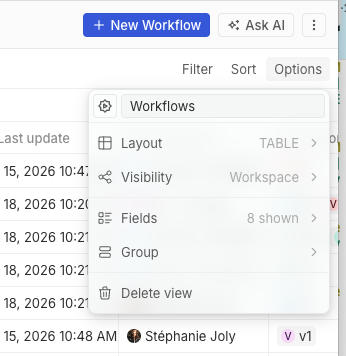 | 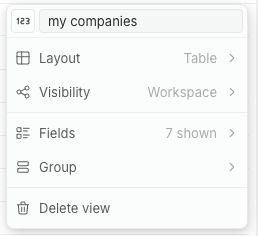 | ## Tests - `git diff --check` - Browser smoke test on `http://apple.localhost:3001/objects/companies` - default view Options menu still opens - custom view Options menu shows `Layout` contextual text as `Table`, not `TABLE` - Layout submenu still shows `Table`, `Calendar`, and `Kanban` - no browser console errors Not run: package lint/test commands, because this checkout has no `node_modules` installed. |
||
|
Priyanshu Bartwal
|
40e386bfb4 |
Fix(record table): Drag select position (#21579)
Fixes: #21578 https://github.com/user-attachments/assets/8a1f3aa1-b436-4ce0-a9ec-c49ab61e214c <!-- This is an auto-generated description by cubic. --> <a href="https://cubic.dev/pr/twentyhq/twenty/pull/21579?utm_source=github" target="_blank" rel="noopener noreferrer" data-no-image-dialog="true"><picture><source media="(prefers-color-scheme: dark)" srcset="https://www.cubic.dev/buttons/review-in-cubic-dark.svg"><source media="(prefers-color-scheme: light)" srcset="https://www.cubic.dev/buttons/review-in-cubic-light.svg"><img alt="Review in cubic" src="https://www.cubic.dev/buttons/review-in-cubic-dark.svg"></picture></a> <!-- End of auto-generated description by cubic. --> --------- Co-authored-by: Félix Malfait <felix.malfait@gmail.com> |
||
|
Weiko
|
9f30915f6f |
fix(metadata): remove deprecated isCustom from Objects and Fields (#21799)
## Context Follow-up to #21228, which deprecated `isCustom` on object/field metadata but kept it exposed because the frontend still relied on it. This removes it from the GraphQL API and the frontend entirely. ## Implementation ### Server - Remove `isCustom` `@Field` from the `Object`, `Field`, and `MinimalObjectMetadata` GraphQL types - Remove the `isCustom` `@ResolveField` resolvers and the `isCustomLoader` dataloader (+ payload/interface) - Remove `isCustom` as an internal `@HideField()` on the Object/Field DTOs used by the i18n standard-override gate > Use an explicit isStandard instead (which is the correct gating) ### Frontend - Add `getIsMetadataItemCustom` helper + `useGetIsMetadataItemCustom` hook: an item is custom when `applicationId === currentWorkspace.workspaceCustomApplication.id` - Migrate all consumers off `objectMetadataItem.isCustom` / `fieldMetadataItem.isCustom`; `isRecordFieldReadOnly` now takes a precomputed `isFieldCustom` - Drop `isCustom` from the metadata fragment/mutations/minimal query, FE types, zod schemas, and mock generators; regenerate GraphQL types ## Notes - Breaking change on the (already-deprecated) `Object.isCustom` / `Field.isCustom` GraphQL fields and the `isCustom` filter - FE semantic is "belongs to the workspace custom app" (third-party-app objects/fields are treated as non-custom) - `isCustom` on IndexMetadata / View / Skill / Agent is a separate column and is untouched - Breaking changes on REST metadata API |
||
|
Félix Malfait
|
6a1b28bc12 |
feat(auth): collect the workspace logo on the sign-up creation step (#21723)
## What & why A single, consistent **workspace-creation step** for both multi-workspace and single-workspace self-host — collecting **name + logo** (and the **subdomain** in multi-workspace) — which **removes the duplicate name/logo prompt** that previously reappeared on the workspace subdomain (reported after #21641). ## Changes **One creation form for both modes** - With 0 workspaces, both multi-workspace and single-workspace route to the shared `SignInUpWorkspaceCreationForm`; `SignInUp` renders it for the `WorkspaceCreation` step regardless of domain/scope. - The subdomain field shows only in multi-workspace; single-workspace keeps its fixed address. **Logo on the creation step** - New scoped `uploadNewWorkspaceLogo(workspaceId, file)` mutation: the creator sets a logo on their just-created `PENDING_CREATION` workspace via the workspace-agnostic token (membership enforced — only the creator is a member at that point), reusing `uploadWorkspacePicture`. Upload size is capped via `settings.storage.maxFileSize` (also applied to the existing logo / profile-picture uploads). - The picked file is held locally (object-URL preview, revoked on unmount) and uploaded right after creation (non-fatal on failure). **Onboarding step → pure activation loader** - The old "Create your workspace" form (name + logo) is removed. The onboarding step now activates the pending workspace on mount and shows the loader, with a **Retry** action on failure. ## Testing - typecheck (front + server) ✅; oxlint + oxfmt clean on changed files ✅ - Unit tests: `auth.resolver.spec`, `useWorkspaceSubdomainField`, `SignInUpWorkspaceCreationForm` (multi + single-workspace), `useAuth` ✅ - Metadata GraphQL + `twenty-client-sdk` schema regenerated. Follow-up to #21641. 🤖 Generated with [Claude Code](https://claude.com/claude-code) https://claude.ai/code/session_01Xw37hR5seiCyWnppG9z4op --------- Co-authored-by: Claude Opus 4.8 (1M context) <noreply@anthropic.com> |
||
|
Etienne
|
c6309fd92b |
feat(workflow): auto-layout steps on AI workflow creation via shared tidy-up (#21756)
## Context

The workflow builder has a "Tidy up" action that auto-positions steps
using a
Dagre layout. However, this lived entirely in the frontend and depended
on node
dimensions measured by React Flow after rendering in the browser.

As a result, workflows (and steps) created through AI Chat / MCP tools
were never
laid out: `create_complete_workflow` accepted optional `stepPositions`
that the
LLM had to invent, and `create_workflow_version_step` stored an optional
position
verbatim. In practice this produced overlapping / poorly positioned
steps.

## What this does

Extracts the tidy-up layout into a pure, frontend-free util in
`twenty-shared` and
reuses it from both the frontend tidy-up and the server, so
AI/MCP-created
workflows are auto-laid out at creation time.

### twenty-shared
- New `computeWorkflowLayout({ nodes, edges, options? })` — a pure Dagre
layout over
a minimal `{ id, width, height }` / `{ source, target }` graph,
returning
top-left-anchored positions (matching React Flow). Ignores edges
pointing to
  unknown nodes.
- New constants: `WORKFLOW_LAYOUT_DEFAULT_OPTIONS`
(ranksep/nodesep/rankdir) and
`WORKFLOW_DIAGRAM_DEFAULT_NODE_DIMENSIONS` (estimated node size for
server-side
  layout, where measured sizes are unavailable).
- Added `@dagrejs/dagre` dependency.

### twenty-front
- `getOrganizedDiagram` now delegates to `computeWorkflowLayout`,
passing real
  measured node sizes. No behavior change for users.

### twenty-server
- New `WorkflowVersionWorkspaceService.autoLayoutWorkflowVersion(...)`
builds the
graph topology via the existing `buildWorkflowGraph` (covers if-else
branches and
iterator loops), feeds estimated node sizes into
`computeWorkflowLayout`, and
  persists through the existing `updateWorkflowVersionPositions`.
- `create_complete_workflow`: removed `stepPositions` from the tool
schema; the
  server always auto-lays out after creation/edges.
- `create_workflow_version_step`: re-tidies the whole version after each
added step
(wired at the tool level so the builder UI is unaffected) and dropped
the now
  redundant `position` field.

## Notes
- Server-side layout uses estimated node sizes, so it is "good enough";
opening the
workflow and running the existing FE tidy-up refines it with real
measured sizes.
- Auto-layout is wired in the MCP tools, not in the shared creation
service, so
  manual step creation in the builder UI is unchanged.

## Test plan
- [x] `twenty-shared` unit tests for `computeWorkflowLayout` (linear
chain, if-else
  spread, dangling-edge safety)
- [x] `twenty-shared` builds; `twenty-server` and `twenty-front`
typecheck
- [x] Lint/format clean on changed files
- [ ] Create a workflow via AI Chat / MCP and confirm steps are laid out
without
  overlap
- [x] Add a step via MCP and confirm the version is re-tidied
- [ ] Frontend "Tidy up" still behaves as before

<!-- This is an auto-generated description by cubic. -->
<a
href="https://cubic.dev/pr/twentyhq/twenty/pull/21756?utm_source=github"
target="_blank" rel="noopener noreferrer"
data-no-image-dialog="true"><picture><source
media="(prefers-color-scheme: dark)"
srcset="https://www.cubic.dev/buttons/review-in-cubic-dark.svg"><source
media="(prefers-color-scheme: light)"
srcset="https://www.cubic.dev/buttons/review-in-cubic-light.svg"><img
alt="Review in cubic"
src="https://www.cubic.dev/buttons/review-in-cubic-dark.svg"></picture></a>
<!-- End of auto-generated description by cubic. -->
|
||
|
Thomas des Francs
|
454758471f |
Fix side panel command menu header controls (#21747)
## Summary Tested the 3 behaviors of the issue locally. Animation is not perfect on the closing but I think this is a great v1 - Move the side-panel close action to the right side of the top bar while keeping back navigation on the left. - Keep the nav side-panel button as the command-menu entry point for direct side-panel pages and hide it while command-menu pages/history are active. - Reset command-menu search/filter state when opening the root command menu from the nav button. Fixes twentyhq/core-team-issues#2504 ## Videos ### Before https://github.com/user-attachments/assets/08c1b6b3-5fbd-4154-a85d-5072a3b7690e ### After https://github.com/user-attachments/assets/11682dea-f21c-47b5-91a8-869f30b09d96 <!-- This is an auto-generated description by cubic. --> <a href="https://cubic.dev/pr/twentyhq/twenty/pull/21747?utm_source=github" target="_blank" rel="noopener noreferrer" data-no-image-dialog="true"><picture><source media="(prefers-color-scheme: dark)" srcset="https://www.cubic.dev/buttons/review-in-cubic-dark.svg"><source media="(prefers-color-scheme: light)" srcset="https://www.cubic.dev/buttons/review-in-cubic-light.svg"><img alt="Review in cubic" src="https://www.cubic.dev/buttons/review-in-cubic-dark.svg"></picture></a> <!-- End of auto-generated description by cubic. --> |
||
|
Raphaël Bosi
|
a2d030e97a |
Fix flaky Argos diffs (#21771)
Inputs and selects with a trailing icon (copy button, chevron, etc.) were flaky in Argos: the icon would intermittently flag as appearing twice. The icon's x-position depends on font-rendered content width, and under Argos's `fit-content` capture the whole row is content-sized. Inter is loaded from the Google Fonts CDN with `display=swap`, and Argos's font gate (`document.fonts.status === "loaded"`) doesn't reliably catch the late swap, so the snapshot sometimes lands pre-swap and sometimes post-swap. The diff then paints both the old and new icon positions, which reads as a duplicated icon. This adds a Storybook loader that force-loads the Inter weights and awaits `document.fonts.ready` before each story renders, so screenshots are always taken post-swap. Fixes the whole class at once rather than per component. Note: affected trailing-icon stories will need a one-time Argos re-baseline. <!-- This is an auto-generated description by cubic. --> <a href="https://cubic.dev/pr/twentyhq/twenty/pull/21771?utm_source=github" target="_blank" rel="noopener noreferrer" data-no-image-dialog="true"><picture><source media="(prefers-color-scheme: dark)" srcset="https://www.cubic.dev/buttons/review-in-cubic-dark.svg"><source media="(prefers-color-scheme: light)" srcset="https://www.cubic.dev/buttons/review-in-cubic-light.svg"><img alt="Review in cubic" src="https://www.cubic.dev/buttons/review-in-cubic-dark.svg"></picture></a> <!-- End of auto-generated description by cubic. --> |
||
|
Raphaël Bosi
|
3fe2aec5d1 |
Add search input to manual record trigger object select (#21777)
When configuring a manual record trigger in the workflow editor, the object selector could only be scrolled, not searched. This adds a search input to the object `Select` (via the existing `withSearchInput` prop), matching the behavior already used in the create-record action's object selector. ## Before <img width="786" height="544" alt="CleanShot 2026-06-18 at 13 35 45@2x" src="https://github.com/user-attachments/assets/30426a16-927e-4be3-80b6-73a296253c16" /> ## After <img width="786" height="628" alt="CleanShot 2026-06-18 at 13 35 22@2x" src="https://github.com/user-attachments/assets/57455518-0f95-483b-81d4-e1f4547c0d30" /> <!-- This is an auto-generated description by cubic. --> <a href="https://cubic.dev/pr/twentyhq/twenty/pull/21777?utm_source=github" target="_blank" rel="noopener noreferrer" data-no-image-dialog="true"><picture><source media="(prefers-color-scheme: dark)" srcset="https://www.cubic.dev/buttons/review-in-cubic-dark.svg"><source media="(prefers-color-scheme: light)" srcset="https://www.cubic.dev/buttons/review-in-cubic-light.svg"><img alt="Review in cubic" src="https://www.cubic.dev/buttons/review-in-cubic-dark.svg"></picture></a> <!-- End of auto-generated description by cubic. --> |
||
|
nitin
|
9bc0db5666 |
fix: exclude non-groupBy date fields (deletedAt) from calendar field selection (#21764)
Closes #21608 The Tasks Calendar renders an empty grid because `GroupByTasks` fails with `Field "deletedAt" is not supported in groupBy` while the header count (`AggregateTasks`) still succeeds. The calendar renders by grouping records on the selected date field. Calendar-field eligibility only checked `isFieldMetadataDateKind`, so `deletedAt` (a system DATE_TIME field) could be picked or auto-defaulted as the calendar field — and the groupBy engine correctly rejects it (only `createdAt`/`updatedAt` are groupable system date fields). Fix: gate calendar-field eligibility on `isFieldMetadataSupportedInGroupBy` (the same authority the backend groupBy validator uses), so non-groupable date fields can no longer be selected. - `useGetAvailableFieldsForCalendar` — add the groupBy-support check alongside the date-kind filter - `ObjectOptionsDropdownCalendarFieldsContent` — reuse the hook's list instead of re-filtering raw fields |
||
|
Raphaël Bosi
|
148d312cc7 |
Fix typecheck (#21783)
Typed `onNodeDragStop` as `@xyflow/react`'s `OnNodeDrag<WorkflowDiagramNode>` instead of hand-annotating the event param with the global DOM `MouseEvent | TouchEvent`, which didn't match the prop's expected React `MouseEvent` and broke typecheck. <!-- This is an auto-generated description by cubic. --> <a href="https://cubic.dev/pr/twentyhq/twenty/pull/21783?utm_source=github" target="_blank" rel="noopener noreferrer" data-no-image-dialog="true"><picture><source media="(prefers-color-scheme: dark)" srcset="https://www.cubic.dev/buttons/review-in-cubic-dark.svg"><source media="(prefers-color-scheme: light)" srcset="https://www.cubic.dev/buttons/review-in-cubic-light.svg"><img alt="Review in cubic" src="https://www.cubic.dev/buttons/review-in-cubic-dark.svg"></picture></a> <!-- End of auto-generated description by cubic. --> |
||
|
Raphaël Bosi
|
8034c7725f |
Reorganize twenty-ui into best-practice component domains and per-component folders (#21745)
Reorganizes `twenty-ui`'s component organization to follow how the best
UI libraries (MUI, Mantine, Base UI, Polaris) structure their source,
now that the package has stabilized.

**Taxonomy** — dissolves the meaningless `components/` junk-drawer and
the 107-file `display/` mega-category. New domains/subpaths:
`data-display`, `typography`, `icon`, `surfaces`; `feedback` and
`layout` absorb the rest (banners/callout/info + placeholders →
feedback; modal/card → surfaces; motion + separators → layout).

**Per-component layout** — every component is now
`<domain>/<ComponentName>/<ComponentName>.tsx` with colocated
styles/stories/types, `internal/` for private helpers and `parts/` for
re-exported compound sub-parts. The redundant inner `/components/` is
gone. `icon` and `json-visualizer` are kept as cohesive subsystems.

**Also:** adds a tree-shakeable root barrel (`import { Button } from
'twenty-ui'`), the generator now owns `individual-entry.ts`, and a real
barrel-leak bug is fixed (private `internals/` parts were leaking into
the public API).

Consumer imports (~1.2k files) and the `twenty-sdk` UI aggregator were
updated by codemod. The change is **export-neutral** except 16
intentionally-removed private internals symbols (all verified
unconsumed). Gates green: typecheck, lint, build, size-limit, storybook.


<!-- This is an auto-generated description by cubic. -->
<a
href="https://cubic.dev/pr/twentyhq/twenty/pull/21745?utm_source=github"
target="_blank" rel="noopener noreferrer"
data-no-image-dialog="true"><picture><source
media="(prefers-color-scheme: dark)"
srcset="https://www.cubic.dev/buttons/review-in-cubic-dark.svg"><source
media="(prefers-color-scheme: light)"
srcset="https://www.cubic.dev/buttons/review-in-cubic-light.svg"><img
alt="Review in cubic"
src="https://www.cubic.dev/buttons/review-in-cubic-dark.svg"></picture></a>
<!-- End of auto-generated description by cubic. -->
|
||
|
nitin
|
640a8e6ca6 |
Add post-call recording ingestion and billing (#21758)
## Summary - Add post-call Recall recording ingestion for transcripts, audio, and video - Request/retrieve async transcripts and reconcile stale pending transcript markers - Complete call recordings atomically once all artifacts and billable timestamps are available - Charge `CALL_RECORDING` usage once per completed recording based on recording duration - Add Recall recording/media API helpers, transcript marker utilities, and audio/video field identifiers - Update generated metadata/SDK files and billing usage operation support - Add unit coverage for ingestion, completion, charging, Recall API behavior, and reconciliation flows <!-- This is an auto-generated description by cubic. --> <a href="https://cubic.dev/pr/twentyhq/twenty/pull/21758?utm_source=github" target="_blank" rel="noopener noreferrer" data-no-image-dialog="true"><picture><source media="(prefers-color-scheme: dark)" srcset="https://www.cubic.dev/buttons/review-in-cubic-dark.svg"><source media="(prefers-color-scheme: light)" srcset="https://www.cubic.dev/buttons/review-in-cubic-light.svg"><img alt="Review in cubic" src="https://www.cubic.dev/buttons/review-in-cubic-dark.svg"></picture></a> <!-- End of auto-generated description by cubic. --> |
||
|
Etienne
|
39e00d5853 |
feat(workflow): expected output schema for runtime-output steps + validation (#21744)
## Summary Extends the workflow validation layer (introduced in #21422) and adds a new "expected output schema" capability for steps whose output structure is only known at runtime. Some workflow steps (HTTP Request, Code, Logic Function, AI Agent (coming soon), Webhook trigger) don't have a statically known output shape, so downstream steps can't resolve `{{step.x.y}}` variable paths or validate them. This PR lets users declare a **sample/expected output** for those steps, derives an output schema from it, and uses that schema both to power variable resolution and to surface validation issues at build time. ## What's included ### Expected output schema (shared schemas + types) - New `expectedOutputSchemaShape` reused across the HTTP request, code, logic function and AI agent action settings schemas, plus the webhook trigger schema (`expectedOutputSchema` optional loose object). - Mirrored on the server-side action/trigger settings types. ### Output schema computation (server) - `workflow-schema.workspace-service` now computes a step's output schema from the user-declared `expectedOutputSchema` sample (via `getOutputSchemaFromValue`) when no statically computed schema is available. ### Validation layer (server) - `STEP_HAS_NO_VARIABLE_REFERENCE` (warning): flags steps of `VARIABLE_CONSUMING_ACTION_TYPES` (HTTP_REQUEST, CODE, LOGIC_FUNCTION, SEND_EMAIL, record CRUD) that reference no upstream variable. - `LOGIC_FUNCTION_OUTPUT_SCHEMA_MISMATCH` / `AI_AGENT_OUTPUT_SCHEMA_MISMATCH` (warnings): compare the declared output schema against the expected sample using the new shared `getOutputSchemaMismatchIssues` util (missing keys, leaf/object mismatches, type mismatches). - Trigger is now validated alongside steps (trigger type requirements + trigger variable references). - Validation issues no longer return both `suggestions` and `availablePaths` when they are identical (avoids redundant, costly payloads). ### Shared utilities - New `getOutputSchemaMismatchIssues` (+ tests) in `twenty-shared/logic-function`. - Moved `agentResponseSchemaToOutputSchema` from `twenty-front` into `twenty-shared/ai` so it can be reused on both sides. ### Frontend - New `WorkflowExpectedOutputBodyInput` component (JSON sample editor with validation) used by HTTP request, code, logic function and AI agent step editors. - New `resolvePersistedStepOutputSchema` util + `useStepsOutputSchema` update: resolves a step's output schema from `outputSchema`, falling back to `expectedOutputSchema`, with an AI_AGENT default. - HTTP request / code / logic function editors persist `expectedOutputSchema` and derive `outputSchema` from it. - Webhook trigger default settings include `expectedOutputSchema`. BONUS : iterator loop validation <!-- This is an auto-generated description by cubic. --> <a href="https://cubic.dev/pr/twentyhq/twenty/pull/21744?utm_source=github" target="_blank" rel="noopener noreferrer" data-no-image-dialog="true"><picture><source media="(prefers-color-scheme: dark)" srcset="https://www.cubic.dev/buttons/review-in-cubic-dark.svg"><source media="(prefers-color-scheme: light)" srcset="https://www.cubic.dev/buttons/review-in-cubic-light.svg"><img alt="Review in cubic" src="https://www.cubic.dev/buttons/review-in-cubic-dark.svg"></picture></a> <!-- End of auto-generated description by cubic. --> |
||
|
Félix Malfait
|
ecd90b78b9 |
fix(front): stop impersonation from corrupting the impersonator's profile name (#21757)
## Problem A customer reported that after impersonating another user, **their own account's first/last name had been permanently changed to the impersonated user's name** (persisted in the DB, surviving logout), and their actions showed up under the wrong "Updated by". The "Updated by = impersonated user" part is expected (while impersonating you genuinely act as that user). The real bug is the **durable overwrite of the impersonator's profile name**. ## Root cause About a week ago `currentUserState` became localStorage-backed with `getOnInit: true` (`currentWorkspaceMemberState` already was). Impersonation swaps the auth token and does a full reload, but — unlike sign-out — it never cleared those cached identity keys. So after the reload: 1. The atoms hydrate **synchronously from localStorage with the previous identity** (e.g. the impersonated user, on stop), and because `currentUser` is now non-null the authenticated UI renders immediately with that stale identity. 2. The network `loadCurrentUser` then corrects `currentUser` / `currentWorkspaceMember` **in place**. If **Settings → Profile** was mounted across that in-place identity flip, `NameFields` — which seeds local `useState` from `currentWorkspaceMember` once and auto-saves on change — read the stale name as a pending edit and debounce-saved it onto the **now-current** workspace member, persisting one user's name onto another. Read-only caches (object metadata, permissions) tolerate the same staleness because nothing writes them back — they're only ever overwritten by the network. `NameFields` is the one consumer that *persists* a cached identity value, which is what turns a transient stale read into a durable write. ## Fix Two small, complementary layers: - **`useImpersonationSession`** — clear the cached session identity (`clearSessionLocalStorageKeys()`) on both `startImpersonating` and `stopImpersonating`, before the reload. The reload then re-bootstraps from a clean slate for the correct user (and the brief stale-**permissions** flash goes away too). The admin's token stash lives in `sessionStorage` and is untouched; `tokenPairState` has its own key and is not in the cleared set. - **`NameFields`** — re-seed the inputs when the workspace-member **identity** changes, so an identity swap is never mistaken for a user edit. This closes the underlying footgun regardless of how the identity changes. ## Testing - Added `NameFields.test.tsx`: swapping `currentWorkspaceMemberState` to a different member must **not** trigger `updateWorkspaceMemberSettings`, while a genuine user edit still saves. Verified the test **fails without** the `NameFields` fix (it writes the previous member's name onto the new member) and **passes with** it. - `nx typecheck twenty-front`, `oxlint --type-aware`, and `oxfmt --check` all pass on the changed files; full `twenty-front` Jest suite green. 🤖 Generated with [Claude Code](https://claude.com/claude-code) https://claude.ai/code/session_015MVW3gg7CVq5oR572ctisx --- _Generated by [Claude Code](https://claude.ai/code/session_015MVW3gg7CVq5oR572ctisx)_ <!-- This is an auto-generated description by cubic. --> <a href="https://cubic.dev/pr/twentyhq/twenty/pull/21757?utm_source=github" target="_blank" rel="noopener noreferrer" data-no-image-dialog="true"><picture><source media="(prefers-color-scheme: dark)" srcset="https://www.cubic.dev/buttons/review-in-cubic-dark.svg"><source media="(prefers-color-scheme: light)" srcset="https://www.cubic.dev/buttons/review-in-cubic-light.svg"><img alt="Review in cubic" src="https://www.cubic.dev/buttons/review-in-cubic-dark.svg"></picture></a> <!-- End of auto-generated description by cubic. --> --------- Co-authored-by: Claude <noreply@anthropic.com> |
||
|
Etienne
|
d99e479be8 |
feat(billing) - facilitate top up in ai chat (#21645)
Today, when a trialing user hits their AI usage cap inside the Ask AI chat, ending the trial bounces them to the Stripe billing portal (and, for card-less users, loses their place in the conversation). This PR makes activating a paid plan / topping up credits feel seamless from within the chat: Trial users with a card on file activate their subscription in place, without leaving the app. Trial users without a card are sent to the Stripe payment-method portal and, on return, the trial is ended automatically and they're dropped back into the exact Ask AI thread they came from. Credit-exhaustion and trial banners now reflect whether a payment method exists (Add Credit Card vs Subscribe Now / End Trial Period) and upgrade inline via a confirmation modal instead of redirecting to Settings. Uploading Screen Recording 2026-06-16 at 07.51.12.mov… https://github.com/user-attachments/assets/4ea77273-da63-4b32-b6f1-5ac9e9560651 <!-- This is an auto-generated description by cubic. --> <a href="https://cubic.dev/pr/twentyhq/twenty/pull/21645?utm_source=github" target="_blank" rel="noopener noreferrer" data-no-image-dialog="true"><picture><source media="(prefers-color-scheme: dark)" srcset="https://www.cubic.dev/buttons/review-in-cubic-dark.svg"><source media="(prefers-color-scheme: light)" srcset="https://www.cubic.dev/buttons/review-in-cubic-light.svg"><img alt="Review in cubic" src="https://www.cubic.dev/buttons/review-in-cubic-dark.svg"></picture></a> <!-- End of auto-generated description by cubic. --> |
||
|
nitin
|
177afde866 |
[BREAKING CHANGE] fix chart cache collisions with key-based data plumbing (#21743)
closes https://discord.com/channels/1130383047699738754/1514946035317997709 This fixes Apollo cache collisions for pie slices and line series by keeping chart bucket identity as key end-to-end, matching how bar chart already works. What changed -- - Renamed pie/line chart response identity from id to key in the chart data path. - Kept key through frontend chart hooks, types, stories, and tooltip/drilldown logic. - Only adapt key to id at actual external boundaries like Nivo and GraphWidgetLegend. - Added/updated tests covering cache normalization and chart data behavior. before - <img width="2600" height="844" alt="CleanShot 2026-06-17 at 20 17 14@2x" src="https://github.com/user-attachments/assets/b9ee83e9-db4b-423e-8668-a7beb4c4c62e" /> after - <img width="2614" height="800" alt="CleanShot 2026-06-17 at 20 16 17@2x" src="https://github.com/user-attachments/assets/674a5417-ffc2-441d-9484-e1126438254c" /> <!-- This is an auto-generated description by cubic. --> <a href="https://cubic.dev/pr/twentyhq/twenty/pull/21743?utm_source=github" target="_blank" rel="noopener noreferrer" data-no-image-dialog="true"><picture><source media="(prefers-color-scheme: dark)" srcset="https://www.cubic.dev/buttons/review-in-cubic-dark.svg"><source media="(prefers-color-scheme: light)" srcset="https://www.cubic.dev/buttons/review-in-cubic-light.svg"><img alt="Review in cubic" src="https://www.cubic.dev/buttons/review-in-cubic-dark.svg"></picture></a> <!-- End of auto-generated description by cubic. --> |
||
|
Félix Malfait
|
02a3a3c47c |
fix(ai): handle dynamic-tool message parts in chat persistence (#21740)
## Summary Fixes #20558. AI chat streams crashed with `Unsupported part type: dynamic-tool` whenever the model emitted a *dynamic* tool call (a tool that isn't part of the bound schema). The assistant message never persisted, so the user saw a hard failure mid-stream. ## Root cause The AI SDK v6 emits two flavors of tool parts: - **Static** — `type: "tool-<toolName>"` (e.g. `tool-execute_tool`) - **Dynamic** — `type: "dynamic-tool"`, with the name on `part.toolName` `mapUIMessagePartsToDBParts` recognised tool parts with a homegrown check: ```ts part.type.includes('tool-') && 'toolCallId' in part ``` That returns `false` for `'dynamic-tool'` (it contains `-tool`, not `tool-`), so dynamic parts fell through to `throw new Error(\`Unsupported part type: ${part.type}\`)` during the `handleStreamFinish` persistence step. Stack trace from the issue matches exactly. The same broken heuristic was duplicated in: - `packages/twenty-server/.../mapDBPartToUIMessagePart.ts` (reverse mapper) - `packages/twenty-front/.../utils/mapDBPartToUIMessagePart.ts` (frontend mirror — would also throw on a `dynamic-tool` row reloaded from history) Meanwhile, two other call sites in the codebase (`finalize-dangling-tool-parts.util.ts`, `isThinkingStepPart.ts`) already correctly use the SDK's `isToolUIPart`, which natively recognises both flavors. ## What this PR does 1. **Switches all three mappers to the SDK's canonical check** (`isToolUIPart` on the forward path; explicit `dynamic-tool` + `tool-` startsWith on the reverse paths, where the input is an entity/DTO, not a UI part). 2. **Persists `toolName`** — the column already existed on the entity, DTO and GraphQL fragment but nothing wrote it. For static parts the name is recoverable from `type`; for dynamic parts it's the only place the name lives, so without it the round-trip is impossible. The shared denormalisation also helps existing per-tool analytics (`count-native-web-search-calls-from-steps.util.ts`). 3. **Reconstructs `dynamic-tool` parts on read** (with `toolName`) so they survive a DB round-trip both on the server and on the frontend history view. 4. **Adds a round-trip unit test** covering both `dynamic-tool` and a static tool part to lock the behavior in. ## Architecture notes (called out for review) - `mapDBPartToUIMessagePart` is duplicated frontend + backend because the input shape differs (TypeORM entity vs. GraphQL DTO). Out of scope to consolidate here, but they're drifting — this PR is what that drift looked like in production. Worth a follow-up to express the shared logic once over a unified row type. - I left the existing renderer guard `part.type !== 'dynamic-tool'` in `AiChatAssistantMessageRenderer.tsx` alone — it's a reasonable UI-side decision to not attempt to render an unknown dynamic tool generically. Persistence and history reload now work; rendering of dynamic tool calls is a separate UX decision. - No DB migration needed — the `toolName` column already exists. Old static rows have `toolName: null`; the reverse mapper recovers their name from the `type` column as before. Old dynamic-tool rows don't exist (they all threw on write). ## Test plan - [x] `yarn workspace twenty-server jest map-message-parts.dynamic-tool` — 5 passed - [x] `yarn workspace twenty-server jest finalize-dangling-tool-parts.roundtrip` — still 4 passed (no regression) - [x] `yarn nx typecheck twenty-server` — clean - [x] `yarn nx typecheck twenty-front` — clean - [x] `yarn nx lint:diff-with-main twenty-server` — clean - [x] `yarn nx lint:diff-with-main twenty-front` — clean - [ ] Manual: trigger an AI chat that exercises a dynamic tool (e.g. via an MCP server returning a tool not in the bound schema) and confirm the stream finishes and the message persists. 🤖 Generated with [Claude Code](https://claude.com/claude-code) https://claude.ai/code/session_013EE11eVWtyxmdcbEHVJKoc --- _Generated by [Claude Code](https://claude.ai/code/session_013EE11eVWtyxmdcbEHVJKoc)_ <!-- This is an auto-generated description by cubic. --> <a href="https://cubic.dev/pr/twentyhq/twenty/pull/21740?utm_source=github" target="_blank" rel="noopener noreferrer" data-no-image-dialog="true"><picture><source media="(prefers-color-scheme: dark)" srcset="https://www.cubic.dev/buttons/review-in-cubic-dark.svg"><source media="(prefers-color-scheme: light)" srcset="https://www.cubic.dev/buttons/review-in-cubic-light.svg"><img alt="Review in cubic" src="https://www.cubic.dev/buttons/review-in-cubic-dark.svg"></picture></a> <!-- End of auto-generated description by cubic. --> --------- Co-authored-by: Claude <noreply@anthropic.com> |
||
|
Thomas Trompette
|
105f9565a5 |
feat(workflow): surface manual-trigger payload + metadata in variable picker (#21692)
## Summary Step 2 of the manual-trigger output schema restructuring (expand → display → migrate → contract). Builds on the now-merged #21676 (which expanded the runtime payload to serve `payload` and `metadata` siblings at the trigger root). This PR **surfaces** those in the variable picker as nested, expandable nodes: - `trigger.payload.{record fields}` — the record(s) that triggered the run - `trigger.metadata.workspaceMemberId` — who triggered it The flat root fields (`trigger.id`, etc.) remain available, so existing saved variable references keep working until a later migration phase moves them. ### Changes - **twenty-shared**: metadata/payload label constants + `build-manual-trigger-metadata-node` util + barrel exports. - **twenty-front**: `computeStepOutputSchema` MANUAL branch now nests `payload` (RecordNode for SINGLE_RECORD, array Node for BULK_RECORDS, omitted for GLOBAL) and `metadata`; `ManualTriggerOutputSchema` type updated to `{ payload?; metadata }`. - **twenty-server**: `computeTriggerOutputSchemaFromAvailability` mirrors the same nested shape for server-side validation. The key is `metadata` (not `_metadata`) — custom fields can't start with `_`, so collision risk was deemed acceptable. ## Test plan - [x] `npx nx build twenty-shared` - [x] `computeStepOutputSchema` unit tests pass (55) - [x] Manual: create a manual-trigger workflow (GLOBAL / single-record / bulk), confirm the picker shows `payload` and `metadata` as expandable folders and that selecting a field yields `{{trigger.payload.<field>}}` / `{{trigger.metadata.workspaceMemberId}}` > Note: server typecheck has pre-existing unrelated failures on main (Stripe billing mocks, gmail mocks); none touch workflow files. <!-- This is an auto-generated description by cubic. --> <a href="https://cubic.dev/pr/twentyhq/twenty/pull/21692?utm_source=github" target="_blank" rel="noopener noreferrer" data-no-image-dialog="true"><picture><source media="(prefers-color-scheme: dark)" srcset="https://www.cubic.dev/buttons/review-in-cubic-dark.svg"><source media="(prefers-color-scheme: light)" srcset="https://www.cubic.dev/buttons/review-in-cubic-light.svg"><img alt="Review in cubic" src="https://www.cubic.dev/buttons/review-in-cubic-dark.svg"></picture></a> <!-- End of auto-generated description by cubic. --> |
||
|
martmull
|
102c530d0f |
Add limit on view widget (#21718)
<img width="1345" height="463" alt="image" src="https://github.com/user-attachments/assets/a5d9ac2f-6375-4956-895d-3675aa9bebc1" /> <!-- This is an auto-generated description by cubic. --> <a href="https://cubic.dev/pr/twentyhq/twenty/pull/21718?utm_source=github" target="_blank" rel="noopener noreferrer" data-no-image-dialog="true"><picture><source media="(prefers-color-scheme: dark)" srcset="https://www.cubic.dev/buttons/review-in-cubic-dark.svg"><source media="(prefers-color-scheme: light)" srcset="https://www.cubic.dev/buttons/review-in-cubic-light.svg"><img alt="Review in cubic" src="https://www.cubic.dev/buttons/review-in-cubic-dark.svg"></picture></a> <!-- End of auto-generated description by cubic. --> --------- Co-authored-by: cubic-dev-ai[bot] <191113872+cubic-dev-ai[bot]@users.noreply.github.com> |
||
|
Thomas Trompette
|
8130fa1c45 |
feat(workflow): use workspace member as variable sender for emails (#21582)
## Summary

Lets the email workflow node sender be driven by a variable: the
connected-account field accepts a `{{variable}}`, and the backend
resolves it to a connected account at run time.

<img width="436" height="195" alt="Capture d’écran 2026-06-16 à 11 59
27"
src="https://github.com/user-attachments/assets/18eee21e-aed6-4447-9bf4-5cb0e2cfc371"
/>

### Email sender by variable
- The connected-account field now accepts a `{{variable}}` via the
variable picker (uses `FormSelectFieldInput` with
`WorkflowVariablePicker`), with a hint to pick a connected account or
set a workspace member as a variable.
- The email workflow action resolves the stored sender value explicitly:
if it is a `workspaceMemberId` (a UUID matching a workspace member), it
resolves that member's first connected account; otherwise the value is
used directly as a `connectedAccountId`.
- Resolution lives in `EmailWorkflowActionBase` and applies to both
`SEND_EMAIL` and `DRAFT_EMAIL`. If a matching member has no connected
account, the run fails fast with a clear message (no silent fallback).
- `DRAFT_EMAIL` also fails fast when the resolved connected account is
missing the required OAuth scopes (`gmail.compose` / `Mail.Send`), via a
server-side `getMissingDraftEmailScopes` util that mirrors the front-end
check.
- Existing workflows with a hardcoded `connectedAccountId` keep working
unchanged (no migration needed).

> Note: exposing the running workspace member as a manual-trigger
variable (`_metadata.workspaceMemberId`) is split into a follow-up PR.

## Test plan
- [x] Backend unit tests for `draft-email-tool`,
`get-missing-draft-email-scopes`, and the `send-email` / `draft-email`
workflow actions (incl. workspace-member sender resolution)
- [x] Lints clean on all changed files
- [x] Manual: configure an email node with a workspace-member variable
sender and confirm it resolves and drafts/sends
- [x] Manual: confirm a member lacking compose permission fails the run
with the permission message

<!-- This is an auto-generated description by cubic. -->
<a
href="https://cubic.dev/pr/twentyhq/twenty/pull/21582?utm_source=github"
target="_blank" rel="noopener noreferrer"
data-no-image-dialog="true"><picture><source
media="(prefers-color-scheme: dark)"
srcset="https://www.cubic.dev/buttons/review-in-cubic-dark.svg"><source
media="(prefers-color-scheme: light)"
srcset="https://www.cubic.dev/buttons/review-in-cubic-light.svg"><img
alt="Review in cubic"
src="https://www.cubic.dev/buttons/review-in-cubic-dark.svg"></picture></a>
<!-- End of auto-generated description by cubic. -->


---

### Update — scoped to Draft Email only

The sender variable picker is now exposed **only on the Draft Email
node**. The Send Email node keeps a plain account select (no variable
picker, no variable hint) until we enable it there in a follow-up.
Backend resolution still lives in `EmailWorkflowActionBase` and remains
generic, so enabling the picker for Send Email later requires no backend
change.
|
||
|
Thomas Trompette
|
1f9c4cf5b9 |
fix(front): home redirect honors first object of the navigation menu (#21626)
https://github.com/user-attachments/assets/db11f02c-4502-4adc-8cf7-55d3dc0211a6 ## Summary Fixes [#21166](https://github.com/twentyhq/twenty/issues/21166). Going to the workspace root (`/`) always redirected to the alphabetically-first object. Following [the review discussion](https://github.com/twentyhq/twenty/issues/21166#issuecomment-4611570420), this redirects to the **first object of the navigation menu** instead of the last-visited object. "Last-visited" had too many edge cases (which page? records vs. index?), whereas the first item of the user's menu is unambiguous and matches what they see at the top of the left sidebar. ## Changes - New `getFirstObjectNavigationMenuItemLink` util walks the workspace navigation menu items in display order (sorted by `position`) and returns the link of the first object-backed item (`OBJECT`/`VIEW`) the user can read. - `useDefaultHomePagePath` uses it as the primary target. It stays on `AppPath.Index` until navigation menu items have loaded (they load *after* the minimal-metadata fast path, so resolving earlier would land on the wrong object during the post-login window), then falls back to the first readable object if the menu has no object item. Scope is intentionally minimal: the last-visited tracking is left in place and will be cleaned up separately now that the redirect no longer reads it. ## Test plan - `npx jest useDefaultHomePagePath --config=packages/twenty-front/jest.config.mjs` — covers menu order honored over alphabetical, `VIEW` item links, the loading deferrals (object metadata + navigation menu items), the readable-object fallback, and the no-readable-object profile-settings fallback. - Manually: visit a non-first object, navigate to `/`, confirm the redirect goes to the first object of the navigation menu. |
||
|
Félix Malfait
|
ece7a384df |
fix(front): wait for viewFields + fieldMetadataItems before opening the metadata gate (#21713)
## Problem On twenty-main, loading a record-index/standalone page for the first time renders the page chrome (title, view chip with record count) but the table body stays blank. A subsequent reload fixes it. Regression introduced by the cache-first `currentUser` bootstrap (#21532); follow-up to #21592, which already mentioned the experiment "should be reviewed." ## Root cause (concurrency) The metadata loader runs in two phases and the gate opens between them: 1. **`loadMinimalMetadata`** fast-paths `objectMetadataItems` and `views` to `status: 'up-to-date'` with only their *minimal* fields. `viewFields` and `fieldMetadataItems` stay `'empty'`. 2. **`IsMinimalMetadataReadyEffect`** opens the gate as soon as those two are `'up-to-date'` — before viewFields exist. 3. The page mounts. `viewsSelector` joins views with an empty `viewFields` collection, so `view.viewFields = []`. `RecordIndexLoadBaseOnContextStoreEffect` calls `loadRecordIndexStates(view, …)` with the empty viewFields and pins `loadedViewId === contextStoreCurrentViewId`. 4. `loadStaleMetadataEntities` later populates viewFields; the selector recomputes, but the effect bails out on the `loadedViewId` guard. `currentRecordFields` stays empty. 5. `visibleRecordFields` stays empty → `RecordTableVirtualizedInitialDataLoadEffect` hits its `isEmpty(visibleRecordFields)` guard and never fetches → empty body. The "300" count visible in the screenshot comes from `useGetRecordIndexTotalCount`'s separate aggregate query, which doesn't depend on viewFields. **Why the gate close/reopen self-heal doesn't work reliably:** `replaceDraft → applyChanges` happen in the same microtask chain. React 18 automatic batching collapses both into a single render where status goes `'empty' → 'up-to-date'` without an intermediate `'draft-pending'` observable to React. The gate never closes, children never unmount, `loadedViewId` is never reset. **Why it surfaced after #21532:** Before, `currentUser` was loaded only after `GetCurrentUser` returned — by which time `loadStaleMetadataEntities` had typically also completed and viewFields were populated when the gate opened. Now the cached `currentUser` lets the gate open the moment `loadMinimalMetadata` finishes. ## Fix Extend `IsMinimalMetadataReadyEffect` to also require `fieldMetadataItems` and `viewFields` to be `'up-to-date'` before opening the gate. Both are joined into the data the record-index page reads on first paint (`objectMetadataItemsWithFieldsSelector` reads fieldMetadataItems; `viewsSelector` reads viewFields), so the page can't render correctly without them. - **Warm cache** (all entities hydrated `up-to-date` from IndexedDB): unaffected — gate opens immediately. - **Cold cache and the first load post–IndexedDB-migration**: the gate stays closed until `loadStaleMetadataEntities` + `applyChanges` finish, then opens with full metadata. The page mounts once with a populated view; no race. ## Tests - [x] `nx typecheck twenty-front` clean (file change passes `oxlint` on the touched file). - [ ] Manual on twenty-main: cold reload + first navigation to a record-index page renders the table body without needing a second reload. 🤖 Generated with [Claude Code](https://claude.com/claude-code) https://claude.ai/code/session_01DD3469JAWYURa2sKUTJ85e --- _Generated by [Claude Code](https://claude.ai/code/session_01DD3469JAWYURa2sKUTJ85e)_ <!-- This is an auto-generated description by cubic. --> <a href="https://cubic.dev/pr/twentyhq/twenty/pull/21713?utm_source=github" target="_blank" rel="noopener noreferrer" data-no-image-dialog="true"><picture><source media="(prefers-color-scheme: dark)" srcset="https://www.cubic.dev/buttons/review-in-cubic-dark.svg"><source media="(prefers-color-scheme: light)" srcset="https://www.cubic.dev/buttons/review-in-cubic-light.svg"><img alt="Review in cubic" src="https://www.cubic.dev/buttons/review-in-cubic-dark.svg"></picture></a> <!-- End of auto-generated description by cubic. --> --------- Co-authored-by: Claude <noreply@anthropic.com> |
||
|
Thomas des Francs
|
ca7ffb97b9 |
Added page card box-shadow (#21688)
## Summary - add a subtle left-side page card shadow in light and dark mode - preserve the existing border-ring box shadow - give the page card wrapper enough left padding for the shadow to render <img width="904" height="1116" alt="image" src="https://github.com/user-attachments/assets/2948fe4a-81ff-4045-ad6f-c0bc9b58be26" /> --------- Co-authored-by: Charles Bochet <charles@twenty.com> |
||
|
Raphaël Bosi
|
9c9c34fccf |
Remove twenty-ui-deprecated and migrate frontend to twenty-ui (#21596)
Migrates `twenty-front`, `twenty-sdk`, and `twenty-front-component-renderer` from `twenty-ui-deprecated` to `twenty-ui` (mechanical import swap — the packages have API parity) and deletes the deprecated package along with its workspace/CI/config wiring. Also adds `@linaria/react`/`@linaria/core` as direct deps of `twenty-front` (it used them transitively via the deprecated package). Note: move the required status check from `ci-ui-status-check` to `ci-new-ui-status-check`. Argos: the Storybook box-model/button-reset baseline shift (the bulk of the visual diffs) is isolated in #21665 — Storybook now loads twenty-ui's global `reset.scss`, which the production app already ships. Once #21665 merges and this branch is rebased, the remaining Argos diffs are component-level visual-parity items only. |
||
|
Thomas des Francs
|
079040f1c0 |
Fix selectable list arrow focus (#21679)
## Summary Tested on all select fields one by one - Keep searchable selectable-list inputs focused while ArrowUp/ArrowDown moves the selected item. - Remove the old global "grid focused" mode and blur/refocus recovery path. - Scroll the selected item into view with `block: 'nearest'`, which restores keyboard scrolling in long relation pickers without forcing the row to the top. - Add focused regressions for command-menu input focus and selected-item scrolling. ## Root Cause `SelectableList` hotkeys blurred the active input before arrow navigation and stored a global grid-focused state. That let ArrowDown move selection, but focus could fall back to the underlying page/table instead of remaining in the command menu input. ## Recording ### Before https://github.com/user-attachments/assets/a802cbc3-4cfd-4466-bc22-274935a77715 ### After https://github.com/user-attachments/assets/9c315d2e-dcb1-424d-80c9-a5942eb1b6bd ## QA Note I checked all inputs one by one with a 2h30 agent in goal mode. <!-- This is an auto-generated description by cubic. --> <a href="https://cubic.dev/pr/twentyhq/twenty/pull/21679?utm_source=github" target="_blank" rel="noopener noreferrer" data-no-image-dialog="true"><picture><source media="(prefers-color-scheme: dark)" srcset="https://www.cubic.dev/buttons/review-in-cubic-dark.svg"><source media="(prefers-color-scheme: light)" srcset="https://www.cubic.dev/buttons/review-in-cubic-light.svg"><img alt="Review in cubic" src="https://www.cubic.dev/buttons/review-in-cubic-dark.svg"></picture></a> <!-- End of auto-generated description by cubic. --> |
||
|
Félix Malfait
|
eeed998c9e |
Let users pick their workspace subdomain during sign-up (#21641)
## What & why

During onboarding the workspace subdomain was auto-generated at sign-up
and only editable later in Settings. This adds a subdomain picker to the
workspace-creation flow, with **live availability checking** and
**name-driven auto-fill**.

The subdomain is chosen **on the central sign-up domain, before the
redirect onto the workspace subdomain** — so there's no mid-onboarding
domain switch (which would otherwise force a re-auth, like the Settings
"this logs everyone out" flow). It works uniformly for credentials and
SSO, since workspace creation is a post-auth mutation.

## Flow

Authenticate → **Create a workspace** → new step (workspace name +
address with live availability + auto-fill, seeded from the work email)
→ workspace is created with the chosen subdomain → the single redirect
lands on the final subdomain → onboarding modal (name pre-filled).

## Changes

**twenty-shared**
- `getSubdomainSlugFromDisplayName` — friendly slug from a display name,
built on the existing `transliteration` package (also transliterates
non-Latin names, e.g. 日本語 → `ri-ben-yu`).

**twenty-server**
- `checkWorkspaceSubdomainAvailability(subdomain)` query
(workspace-agnostic, `UserAuthGuard`) → `{ isValid, available,
suggestedSubdomain }`.
- `SubdomainManagerService`: availability + suggestion logic with
friendly numbered suffixes (`acme`, `acme-2`, …) instead of random hex;
`generateSubdomain` reuses it.
- `signUpInNewWorkspace` accepts an optional `{ displayName, subdomain
}` input (validated; falls back to auto-generation when omitted —
backward compatible, so existing callers are unaffected). Concurrent
same-subdomain sign-ups return a clear "already taken" error instead of
a generic DB error.

**twenty-front**
- New `SignInUpStep.WorkspaceCreation` step +
`useWorkspaceSubdomainField` hook (debounced, stale-response-safe;
auto-fills from the name until the user edits it, with a one-click "use
suggested" when taken; ignores Enter during IME composition; surfaces a
clear error if the availability check fails).
- Onboarding modal name pre-filled from the chosen name.

## Testing

- Unit tests: shared slug util, the `useWorkspaceSubdomainField` hook
(real auto-fill/availability flows via `MockedProvider`), and the
workspace-creation component; existing sign-up tests still pass.
- Typecheck, lint, and format green across twenty-shared / twenty-server
/ twenty-front.

## Notes / out of scope

- No DB migration — the `subdomain` column already existed.
- Self-hosted single-workspace sign-up is unchanged; the step is gated
to multi-workspace (global scope).
- Low-priority follow-ups: length bounds on the subdomain / displayName
inputs, and an integration test for the availability query.

---------

Co-authored-by: Claude Opus 4.8 (1M context) <noreply@anthropic.com>
|



