e38d58760283e1e5453a2bfc4035af65143201bc
14 Commits
| Author | SHA1 | Message | Date | |
|---|---|---|---|---|
 Thomas des Francs Thomas des Francs
|
de9af38a67 |
Fix view type label casing (#21772)
## Summary Fix the view type label shown in the object Options menu by introducing a shared `ViewType` label map instead of formatting raw enum values at each call site. I chose to fix the root cause instead of only patching the symptom: the menu was displaying the generated enum value `TABLE`, and `capitalize()` only uppercased the first character without lowercasing the rest. The new mapping gives each view type an explicit translated UI label, so the parent Options menu, the Layout submenu, the view picker, and application content rows all use the same casing source. ## Before / After | Before | After | | --- | --- | | The Options menu showed `TABLE` in uppercase. | The Options menu now shows `Table`, and the Layout submenu still shows `Table`, `Calendar`, and `Kanban`. | | 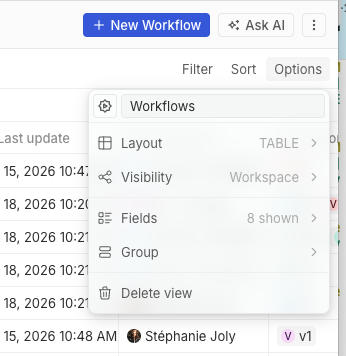 | 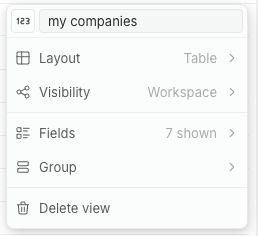 | ## Tests - `git diff --check` - Browser smoke test on `http://apple.localhost:3001/objects/companies` - default view Options menu still opens - custom view Options menu shows `Layout` contextual text as `Table`, not `TABLE` - Layout submenu still shows `Table`, `Calendar`, and `Kanban` - no browser console errors Not run: package lint/test commands, because this checkout has no `node_modules` installed. |
||
|
Raphaël Bosi
|
8034c7725f |
Reorganize twenty-ui into best-practice component domains and per-component folders (#21745)
Reorganizes `twenty-ui`'s component organization to follow how the best
UI libraries (MUI, Mantine, Base UI, Polaris) structure their source,
now that the package has stabilized.

**Taxonomy** — dissolves the meaningless `components/` junk-drawer and
the 107-file `display/` mega-category. New domains/subpaths:
`data-display`, `typography`, `icon`, `surfaces`; `feedback` and
`layout` absorb the rest (banners/callout/info + placeholders →
feedback; modal/card → surfaces; motion + separators → layout).

**Per-component layout** — every component is now
`<domain>/<ComponentName>/<ComponentName>.tsx` with colocated
styles/stories/types, `internal/` for private helpers and `parts/` for
re-exported compound sub-parts. The redundant inner `/components/` is
gone. `icon` and `json-visualizer` are kept as cohesive subsystems.

**Also:** adds a tree-shakeable root barrel (`import { Button } from
'twenty-ui'`), the generator now owns `individual-entry.ts`, and a real
barrel-leak bug is fixed (private `internals/` parts were leaking into
the public API).

Consumer imports (~1.2k files) and the `twenty-sdk` UI aggregator were
updated by codemod. The change is **export-neutral** except 16
intentionally-removed private internals symbols (all verified
unconsumed). Gates green: typecheck, lint, build, size-limit, storybook.


<!-- This is an auto-generated description by cubic. -->
<a
href="https://cubic.dev/pr/twentyhq/twenty/pull/21745?utm_source=github"
target="_blank" rel="noopener noreferrer"
data-no-image-dialog="true"><picture><source
media="(prefers-color-scheme: dark)"
srcset="https://www.cubic.dev/buttons/review-in-cubic-dark.svg"><source
media="(prefers-color-scheme: light)"
srcset="https://www.cubic.dev/buttons/review-in-cubic-light.svg"><img
alt="Review in cubic"
src="https://www.cubic.dev/buttons/review-in-cubic-dark.svg"></picture></a>
<!-- End of auto-generated description by cubic. -->
|
||
|
Raphaël Bosi
|
9c9c34fccf |
Remove twenty-ui-deprecated and migrate frontend to twenty-ui (#21596)
Migrates `twenty-front`, `twenty-sdk`, and `twenty-front-component-renderer` from `twenty-ui-deprecated` to `twenty-ui` (mechanical import swap — the packages have API parity) and deletes the deprecated package along with its workspace/CI/config wiring. Also adds `@linaria/react`/`@linaria/core` as direct deps of `twenty-front` (it used them transitively via the deprecated package). Note: move the required status check from `ci-ui-status-check` to `ci-new-ui-status-check`. Argos: the Storybook box-model/button-reset baseline shift (the bulk of the visual diffs) is isolated in #21665 — Storybook now loads twenty-ui's global `reset.scss`, which the production app already ships. Once #21665 merges and this branch is rebased, the remaining Argos diffs are component-level visual-parity items only. |
||
|
Raphaël Bosi
|
c596a5e342 |
Rename twenty-ui to twenty-ui-deprecated and twenty-new-ui to twenty-ui to prepare package release (#21315)
## Description Promotes the next-gen UI library (formerly `twenty-new-ui`) to the name **`twenty-ui`** (v0.1.0, publishable) and renames the old package to **`twenty-ui-deprecated`**. Rewrites ~1,730 `twenty-ui` imports → `twenty-ui-deprecated`, updates all configs/CI/Docker/deps, and migrates twenty-front's `Toggle` to the new package (first consumer) as a drop-in. ## Next steps - Wire the `ui/v*` publish dispatch (`cd-deploy-tag.yaml` + `.yarnrc.yml`), then tag `ui/v0.1.0` to publish. - Continue migrating components from `twenty-ui-deprecated` → `twenty-ui`. |
||
|
Abdul Rahman
|
cbd2a017da |
Improve app gallery image sizing (no cropping) (#20287)
<img width="908" height="808" alt="Screenshot 2026-05-05 at 7 38 46 PM" src="https://github.com/user-attachments/assets/a6f0a9b7-f676-46a3-8642-48c4bd06c7f4" /> |
||
|
Félix Malfait
|
633553f729 |
feat(sdk): add defineCommandMenuItem (#20256)
## Summary - Add `defineCommandMenuItem` and `definePageLayoutWidget` as standalone SDK defines, mirroring the existing `definePageLayoutTab` pattern. Both entities can still be declared nested inside their parent (`defineFrontComponent.command` / `definePageLayout.tabs[].widgets[]`). - Add `CommandMenuItem` and `PageLayoutWidget` to the `SyncableEntity` enum and the dev-mode UI labels. - Wire the SDK manifest-build to extract the two new defines into top-level `commandMenuItems` / `pageLayoutWidgets` arrays on the manifest, and the server aggregator to consume them through the existing flat-entity converters. - On the server, expose `Application.commandMenuItems` (relation + DTO + service hydration in `findOneApplication`). - On the front, list command menu items in the application content tab and add a dedicated detail page with a settings tab, mirroring how `frontComponents` are surfaced. - Add `twenty add` templates and Vitest unit tests for both new defines. - Document the standalone-vs-nested pattern in `packages/twenty-sdk/README.md`. ### Why Until now, command menu items could only be declared as the nested `command:` field on `defineFrontComponent` — there was no way to register a command menu item from a separate file or from another package. The `SyncableEntity` enum had 12 values, while the server already synced 18 (including `commandMenuItem` and `pageLayoutWidget`). The same gap existed for `pageLayoutWidget`, which had no top-level define despite being synced server-side. This PR closes both gaps and aligns the SDK surface with what the server actually accepts. The standalone defines coexist with the nested form — pick one per entity, never both with the same `universalIdentifier` (the manifest aggregator will throw on duplicates). The README now documents this. ## Test plan - [x] `npx nx typecheck twenty-sdk` / `twenty-server` / `twenty-front` - [x] `npx nx lint:diff-with-main twenty-front` / `twenty-server` - [x] `npx nx lint twenty-sdk` / `twenty-shared` - [x] New unit tests: `define-command-menu-item.spec.ts`, `define-page-layout-widget.spec.ts` - [x] Existing manifest extract config tests still pass - [ ] Codegen `npx nx run twenty-front:graphql:generate --configuration=metadata` should be re-run after merge — the generated `graphql.ts` was patched manually to include `commandMenuItems` on `Application` and the `FindOneApplication` document. - [ ] Smoke test: scaffold an app with `twenty add` for both new entity types, run `twenty dev`, confirm the dev UI shows them in the sync list and the settings page surfaces command menu items in the content tab. 🤖 Generated with [Claude Code](https://claude.com/claude-code) --------- Co-authored-by: Claude Opus 4.6 <noreply@anthropic.com> Co-authored-by: martmull <martmull@hotmail.fr> Co-authored-by: Charles Bochet <charles@twenty.com> |
||
|
Félix Malfait
|
9e94045fa5 |
feat(apps): generic OAuth provider support for app SDK (#20181)
## Summary

App developers can now declare third-party OAuth integrations (GitHub,
Linear, Slack, etc.) in their manifest and the platform handles the full
authorize → callback → token-exchange → refresh → injection lifecycle.
The dev writes ~10 lines of config and reads tokens via
`useOAuth('linear')` inside any logic function.

```ts
// app/src/oauth-providers/linear.ts
export default defineOAuthProvider({
  universalIdentifier: '...',
  name: 'linear',
  displayName: 'Linear',
  authorizationEndpoint: 'https://linear.app/oauth/authorize',
  tokenEndpoint: 'https://api.linear.app/oauth/token',
  scopes: ['read', 'write'],
  connectionMode: 'per-user',
  clientIdVariable: 'LINEAR_CLIENT_ID',
  clientSecretVariable: 'LINEAR_CLIENT_SECRET',
  tokenRequestContentType: 'form-urlencoded',
});

// app/src/logic-functions/handlers/...
const { accessToken } = useOAuth('linear'); // throws OAuthNotConnectedError if missing
```

## Architecture

- **Storage**: extends the existing `connectedAccount` table — new
nullable `applicationOAuthProviderId` FK + new `app` value on the
`ConnectedAccountProvider` enum. Existing Google/Microsoft flows are
untouched.
- **OAuth flow**: a single `/apps/oauth/authorize` +
`/apps/oauth/callback` controller pair handles every app provider. State
travels in a JWT signed via the existing `JwtWrapperService` (new
`APP_OAUTH_STATE` token type).
- **Token exchange**: goes through
`SecureHttpClientService.createSsrfSafeFetch()` (so an installed app
can't point `tokenEndpoint` at internal hosts).
- **Refresh**: piggybacks on the existing
`ConnectedAccountRefreshTokensService` dispatch — Google/Microsoft
drivers untouched, new app driver lives engine-side under
`application-oauth-provider/refresh/`.
- **Injection**: the executor injects refreshed tokens as env vars
(`OAUTH_<NAME>_ACCESS_TOKEN`, `_HANDLE`, `_SCOPES`, `_CONNECTED`); the
SDK helpers `useOAuth` / `useOptionalOAuth` read them.
- **Frontend**: auto-rendered "OAuth Connections" section under each
app's settings tab (no custom front component needed). App-managed
connections are filtered out of `/settings/accounts` so the
email/calendar page stays focused.
- **Disconnect**: best-effort revoke against the manifest's
`revokeEndpoint` before deleting the row.

## Reference app

`packages/twenty-apps/internal/twenty-linear/` exercises the full
pipeline:

- `defineOAuthProvider` for Linear
- `POST /linear/create-issue` and `GET /linear/teams` HTTP-route logic
functions
- Vitest tests for the handlers

## Tests

- 14 server-side Jest tests: token-exchange util (form-urlencoded vs
JSON, PKCE, error paths), flow service (authorize URL shape, state
binding, ConnectedAccount upsert on first/reconnect, per-workspace mode,
invalid state)
- 8 app-level Vitest tests: handler error paths, GraphQL request shape,
Linear error propagation
- All 4 packages clean: `npx nx lint:diff-with-main` and `npx tsc
--noEmit`

## Test plan

- [ ] Apply migration on a dev DB: `npx nx run
twenty-server:database:migrate:prod`
- [ ] Regenerate frontend types: `npx nx run
twenty-front:graphql:generate --configuration=metadata`
- [ ] Create a Linear OAuth app at
https://linear.app/settings/api/applications/new with redirect URI
`<SERVER_URL>/apps/oauth/callback`
- [ ] Deploy + install `twenty-linear` on a workspace, paste the Linear
client id/secret into the app's variables
- [ ] Click "Connect Linear" in the app's settings tab → complete OAuth
→ verify `connectedAccount` row created with `provider = 'app'`
- [ ] Trigger `POST /linear/create-issue` with a valid teamId → verify
issue lands in Linear
- [ ] Disconnect → verify the row is deleted and (if Linear's revoke
endpoint is configured in the manifest) the revoke call fires
- [ ] Verify `/settings/accounts` does NOT show the Linear connection —
it appears only under the Linear app's settings tab

## Out of scope (deliberately)

- **Cron + per-user providers**: a cron-triggered function with a
per-user OAuth provider currently returns `CONNECTED=false` (no user
context). The follow-up design is `useOAuthForUser(name,
userWorkspaceId)` paired with a `POST /apps/oauth/connection-token`
endpoint, deferred to keep this PR focused.
- **Token encryption at rest**: tokens stored as plain `varchar`
matching the existing Google/Microsoft pattern. Worth a separate
cross-cutting PR.
- **Manifest endpoint pinning**: a malicious app upgrade could change
`tokenEndpoint` silently. Same trust model as logic-function source code
(which already runs arbitrary server-side); worth tightening across the
whole upgrade pipeline rather than just OAuth.
- **CLI helpers** (`twenty oauth show-callback-url`, `twenty oauth
connect`): manual setup for v1.

🤖 Generated with [Claude Code](https://claude.com/claude-code)

---------

Co-authored-by: Claude Opus 4.6 <noreply@anthropic.com>
|
||
|
martmull
|
bddd23fd9c |
Fix application icons (#20142)
fixes application chip (icon Name) in all setting tables ## After <img width="1200" height="896" alt="image" src="https://github.com/user-attachments/assets/bd377f47-1d52-4142-b904-f2ce90c1db78" /> <img width="1200" height="917" alt="image" src="https://github.com/user-attachments/assets/f49cc742-f11e-47e3-86ed-34beffe493c7" /> <img width="1234" height="878" alt="image" src="https://github.com/user-attachments/assets/2ab459de-5f9d-4d39-9490-eec4ed9ee432" /> <img width="1239" height="845" alt="image" src="https://github.com/user-attachments/assets/3c1bf258-285a-47b9-a60d-05ba1564334d" /> <img width="1183" height="907" alt="image" src="https://github.com/user-attachments/assets/715b2470-2d88-48e3-88ac-d3daf3451717" /> <img width="1300" height="912" alt="image" src="https://github.com/user-attachments/assets/d7c829fa-bf1d-4f19-82de-a8bf29e22bfa" /> |
||
|
Félix Malfait
|
8f362186ce |
Redesign application content tab + logic function settings; add Layout detail pages (#20056)
## Summary Iterative redesign of two related areas in settings, plus a new `pages/settings/layout/` folder for read-only entity detail pages. ### Application content tab - **Grouped into three sections** — Data / Layout / Logic — each with one H2 + multiple `TableSection`-wrapped sub-tables (mirrors the role-permissions pattern). Replaces six per-category table/row components with one uniform `<SettingsApplicationContentSubtable>` + `ApplicationContentRow` shape (net **−~700 lines** across the refactor). - **All 10 row categories now clickable** for installed apps: - Objects / Fields / Logic functions / Front components → existing detail pages - Agents → existing `AiAgentDetail` - Skills → existing `AiSkillDetail` (looked up by `Skill.applicationId + name`) - Roles → existing `RoleDetail` (looked up by `Role.universalIdentifier`) - Views / Page layouts / Navigation menu items → **new** detail pages (see below) - **Lifecycle hooks visible** — `pre-install` / `post-install` logic functions are surfaced in the Trigger column instead of appearing as empty/misconfigured. ### Logic function settings (Triggers + Test tabs) - Triggers tab is now editable (HTTP / Cron / Database event / AI tool) with a `<SettingsLogicFunctionTriggerSection>` wrapper that owns the toggle, header, and read-only short-circuit. - HTTP section gets a Live URL field with copy-to-clipboard. - Each section shows a **Sample input** preview (the JSON the function will receive) using the same payload builders the Test tab uses. - Test tab: **Simulate trigger** buttons that prefill the JSON input from the configured trigger's schema. Replaces an unclickable `<Select>` (which auto-disables when there's only one option — the typical case). - Read-only behavior for installed-app functions: explicit `<Callout>` notice when there's no trigger; trigger sections render as disabled controls when there is one. - Removed the empty Environment Variables section from the Settings tab (it just told the user to go elsewhere). ### New `pages/settings/layout/` folder Three new app-scoped detail pages so users can drill into entities the GraphQL `Application` type doesn't expose by id (keyed by manifest `universalIdentifier`): - `ApplicationViewDetail` — type, object, visibility + Fields / Filters / Sorts subsections (field UIDs resolved to readable labels via `useFieldLabelByUid`) - `ApplicationPageLayoutDetail` — type, object + per-tab subsections listing widgets - `ApplicationNavigationMenuItemDetail` — type, destination (resolved), icon, color, position Each page reads from the marketplace manifest the parent app page already loads (no extra queries). Folder set up so a future "Layout" settings tab can grow here (analogous to the existing `data-model/` folder under the Data tab). ### Other consistency fixes - Breadcrumbs on every app-scoped entity detail page now include a category crumb so users know what they're looking at: `Workspace / Applications / Timely / Navigation menu items / Time entry`. - Title fallback for nav menu items uses the resolved destination (`"Time entry"`) instead of the raw enum (`"OBJECT"`). - New shared utils: `getNavigationMenuItemDestination`, `resolveManifestObjectLabel`, `getLogicFunctionTriggerLabel`, `<MonoText>`. ## Backend changes Only one minor schema-shape change (additive): added `applicationId` to the `SkillFields` GraphQL fragment and `universalIdentifier` to the `RoleFragment` so the new lookups have what they need. Generated metadata schema patched in-tree to match — regenerate with `nx run twenty-front:graphql:generate --configuration=metadata` if it drifts. ## Test plan - [ ] Application content tab on an installed app shows the 3 grouped sections; rows in each section are clickable - [ ] Click an Object → existing object detail page - [ ] Click a Field → existing field-edit page - [ ] Click an Agent / Skill / Role → existing detail page - [ ] Click a View / Page layout / Navigation menu item → new read-only detail page; subsections (Fields/Filters/Sorts for views, per-tab widgets for page layouts) populate correctly - [ ] Breadcrumbs on every entity detail page have 5 crumbs ending in `<Category> / <Entity name>` - [ ] Logic function Triggers tab: toggle each trigger type on/off, see the Sample input preview update; for installed apps, sections render as read-only - [ ] Test tab: each "Simulate trigger" button prefills the JSON editor with the matching payload shape - [ ] Functions list: a function configured as `post-install` shows "Post-install" in the Trigger column 🤖 Generated with [Claude Code](https://claude.com/claude-code) --------- Co-authored-by: Claude Opus 4.7 (1M context) <noreply@anthropic.com> Co-authored-by: claude[bot] <claude[bot]@users.noreply.github.com> |
||
|
Thomas des Francs
|
68d509e98d |
Update settings application illustrations and app metadata previews (#19964)
## Summary - Refresh the settings application visuals with new light/dark PNG covers for the data model card - Replace the custom and standard application carousel assets with the new provided illustrations - Align app chips, type tags, and application detail previews with the updated icon and description treatment - Keep the data model cover container and overlay button behavior intact while swapping the underlying imagery ## Testing - Not run (not requested) - Existing frontend typecheck and formatting checks were exercised during implementation --------- Co-authored-by: Charles Bochet <charles@twenty.com> |
||
|
Charles Bochet
|
96fc98e710 |
Fix Apps UI: replace 'Managed' label with actual app name and unify app icons (#19897)
## Summary

- The Data Model table was labeling core Twenty objects (e.g. Person,
Company) as **Managed** even though they are part of the standard
application. This PR teaches the frontend to resolve an `applicationId`
back to its real application name (`Standard`, `Custom`, or any
installed app), and removes the misleading **Managed** label entirely.
- Introduces a single, consistent way to render an "app badge" across
the settings UI:
- new `Avatar` variant `type="app"` (rounded 4px corners + 1px
deterministic border derived from `placeholderColorSeed`)
- new `AppChip` component (icon + name) backed by a new
`useApplicationChipData` hook
- new `useApplicationsByIdMap` hook + `CurrentApplicationContext` so the
chip can render **This app** when shown inside the matching app's detail
page
- Reuses these primitives on:
- the application detail page header (`SettingsApplicationDetailTitle`)
  - the Installed / My apps tables (`SettingsApplicationTableRow`)
  - the NPM packages list (`SettingsApplicationsDeveloperTab`)
- Backend: exposes a minimal `installedApplications { id name
universalIdentifier }` field on `Workspace` (resolved from the workspace
cache, soft-deleted entries filtered out) so the frontend can resolve
`applicationId` -> name without N+1 fetches.
- Cleanup: deletes `getItemTagInfo` and inlines its tiny
responsibilities into the components that need them, matching the
`RecordChip` pattern.
|
||
|
martmull
|
5dd7eba911 |
Fix app design 6 (#19827)
Unify application display page and isntalled page --------- Co-authored-by: Charles Bochet <charles@twenty.com> |
||
|
Félix Malfait
|
77d4bd9158 |
Add billing usage analytics dashboard with ClickHouse integration (#18592)
## Summary This PR adds a comprehensive billing usage analytics feature that provides detailed breakdowns of credit consumption across execution types, users, resources, and time periods. The implementation includes a new ClickHouse-backed analytics service, GraphQL API endpoint, and a frontend dashboard component. ## Key Changes ### Backend - **New BillingAnalyticsService**: Queries ClickHouse for usage breakdowns by user, resource, execution type, and time series data - **BillingEventWriterService**: Writes billing events to ClickHouse for analytics while maintaining best-effort semantics (never blocks Stripe billing) - **ClickHouse Schema**: Added `billingEvent` table with 3-year TTL for storing detailed billing event data - **GraphQL Resolver**: New `getBillingAnalytics` query that aggregates usage data for the current billing period, protected by feature flag and billing permissions - **Enhanced BillingUsageEvent**: Added `userWorkspaceId` field to track per-user credit consumption - **AI Billing Integration**: Updated AI billing service to pass `userWorkspaceId` when recording usage events ### Frontend - **SettingsBillingAnalyticsSection**: New component displaying: - Usage breakdown by execution type with progress bars - Daily usage time series chart (28-day view) - Per-user credit consumption breakdown - Per-resource (agent/workflow) credit consumption breakdown - **SettingsUsage Page**: Dedicated page for viewing usage analytics - **GraphQL Query**: `GetBillingAnalytics` query with generated hooks - **Navigation**: Added Usage menu item in settings (feature-flagged) - **Mock Data**: Included screenshot mock data for preview/testing ### Feature Flag - Added `IS_USAGE_ANALYTICS_ENABLED` feature flag to control visibility and access to analytics features ## Implementation Details - Analytics data is queried in parallel for performance - ClickHouse writes are non-blocking to ensure billing operations never fail - Progress bars use dynamic coloring from a predefined palette - Time series visualization normalizes bar heights relative to max value - Empty state handling when no analytics data is available - Responsive UI with proper text truncation for long names https://claude.ai/code/session_01Y1EqrX6PFq3EJxJq89h7DF --------- Co-authored-by: Claude <noreply@anthropic.com> |
||
|
martmull
|
445b76fa26 |
Add uninstall button to application setting (#15988)
As title <img width="878" height="668" alt="image" src="https://github.com/user-attachments/assets/b0c9ae1e-036f-4bdd-9bd2-a2a37c2e3b99" /> |



