## Problem

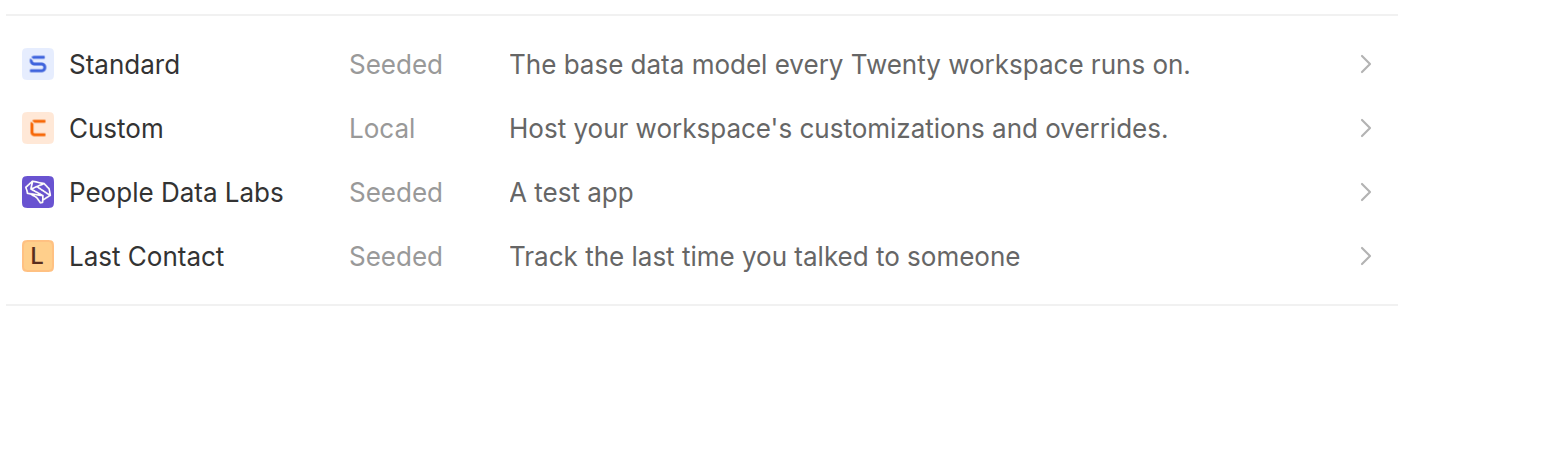
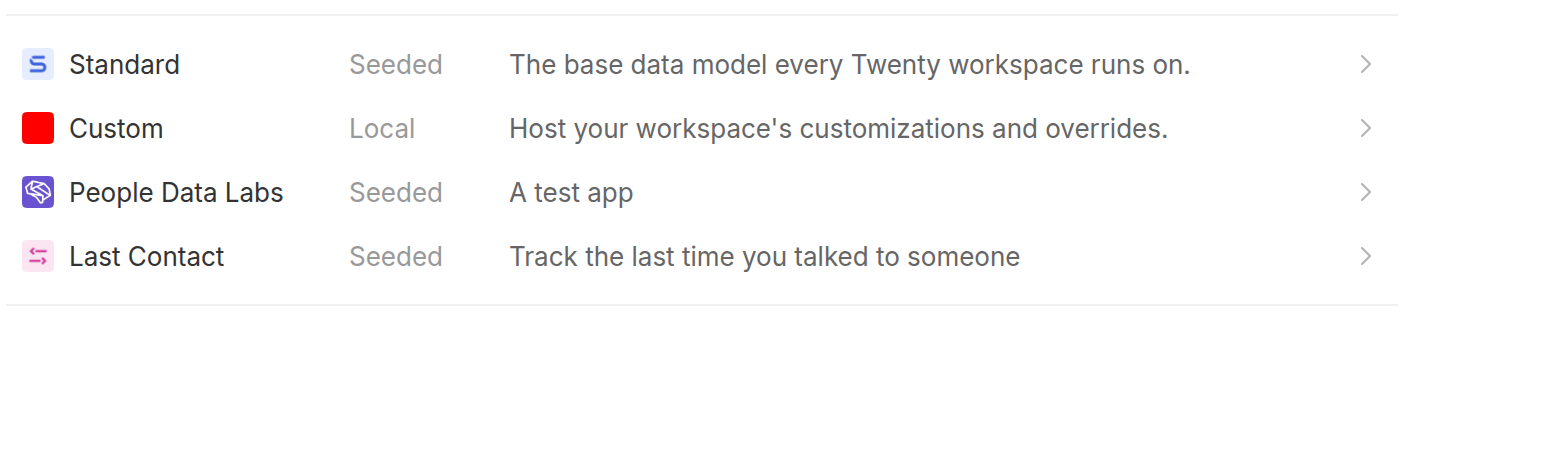
After installing an app, its icon is missing across the UI, while
application *registration* icons render fine.

`Application.logo` holds the manifest path (`public/logo.svg`), which is
package-relative and not displayable. The server exposes a `logoUrl`
resolve field that turns it into
`/public-assets/{workspaceId}/{applicationId}/{logo}`, but on the front
end:

- `APPLICATION_FRAGMENT` and `FIND_MANY_APPLICATIONS` never selected
`Application.logoUrl`.
- So the only source of a usable logo url was
`currentWorkspace.installedApplications`, which is fetched by
`GetCurrentUser` at bootstrap. Nothing refreshed it after
`installApplication`, so a freshly installed app was absent from that
list.
- `useApplicationChipData` then fell through to
`fallbackApplicationData`, which callers populated with the raw `logo`
path. `getAbsoluteImageUrl('public/logo.svg')` yields
`{serverUrl}/public/logo.svg`, which 404s, so the avatar rendered as a
letter placeholder.

## Before / After

An app installed while the applications page is open, so the workspace
snapshot loaded at bootstrap does not know about it yet:

| Before | After |
|---|---|
| <img
src="https://raw.githubusercontent.com/twentyhq/twenty/e27a817fd95c5e44c1fbb64fd4fd68525daeee61/.pr-assets/app-icon-before.png"
width="480"> | <img
src="https://raw.githubusercontent.com/twentyhq/twenty/e27a817fd95c5e44c1fbb64fd4fd68525daeee61/.pr-assets/app-icon-after.png"
width="480"> |

## Changes

- Select `logoUrl` on `Application` in `APPLICATION_FRAGMENT` and
`FIND_MANY_APPLICATIONS`.
- Drop `logo` from `ApplicationDisplayData` and from the `AppChip` /
subtable fallback props, so a package-relative path can no longer reach
an `img` src. Call sites that already passed a url under `logo` now pass
`logoUrl`.
- `SettingsApplicationDetails` and `SettingsApplicationsTable` pass the
application's own `logoUrl`.
- On install, add the returned application to
`currentWorkspace.installedApplications` instead of reloading the
current user, so the chips that resolve by `applicationId` only (nav
menu items, object/field tables, tool rows, workflow nodes) pick it up.
- Stop exposing `logo` on the `Application` GraphQL type: nothing
selects it anymore, and having both `logo` (package-relative path) and
`logoUrl` (display url) was the source of the bug. The column is still
read server-side to build `logoUrl`.
- Regenerated `generated-metadata/graphql.ts`.

## Verification

Ran the stack locally against a seeded workspace with an installed app
whose logo lives at `public/logo.png`:

- `findManyApplications` returns a `logoUrl` under `/public-assets/...`,
and that url serves `200 image/png`.
- Reproduced the bug and the fix in the browser with the scenario shown
above (screenshots taken on the base commit and on this branch).
- `npx nx typecheck twenty-front`, `npx nx typecheck twenty-server`,
`npx nx lint:diff-with-main` on both, and the application settings jest
suites pass.

---
_Generated by [Claude
Code](https://claude.ai/code/session_01N8r4z2dZ553nAnCNe7GxMH)_

[Review in
cubic](https://cubic.dev/pr/twentyhq/twenty/pull/23411?utm_source=github)
## Fix resolver schema leaking between `/metadata` and `/graphql`
endpoints

### Summary
- Patch `@nestjs/graphql` to support a `resolverSchemaScope` option that
filters resolvers at both schema generation and runtime, preventing
cross-endpoint leaking
- Introduce `@CoreResolver()` and `@MetadataResolver()` decorators to
explicitly scope each resolver to its endpoint
- Move most resolvers (auth, billing, workspace, user, etc.) to the
metadata schema where the frontend expects them; only workflow and
timeline calendar/messaging resolvers remain on `/graphql`
- Fix frontend `SSEQuerySubscribeEffect` to use the default (metadata)
Apollo client instead of the core client

### Problem
NestJS GraphQL's module-based resolver discovery traverses transitive
imports, causing resolvers from `/metadata` modules to leak into the
`/graphql` schema and vice versa. This made the schemas unpredictable
and tightly coupled to module import order.

### Approach
- Added `resolverSchemaScope` to `GqlModuleOptions` via a patch on
`@nestjs/graphql`, filtering in both `filterResolvers()` (runtime
binding) and `getAllCtors()` (schema generation)
- Each resolver is explicitly decorated with `@CoreResolver()` or
`@MetadataResolver()`
- Organized decorator, constant, and type files under `graphql-config/`
following project conventions


Core GQL Schema: (see: no more fields!)
<img width="827" height="894" alt="image"
src="https://github.com/user-attachments/assets/668f3f0f-485e-43f0-92be-4345aeccacb6"
/>

Metadata GQL Schema (see no more getTimelineCalendarEventsFromCompany)
<img width="827" height="894" alt="image"
src="https://github.com/user-attachments/assets/443913db-e5fe-4161-b0e7-4a971cc80a71"
/>
# Introduction
related to https://github.com/twentyhq/core-team-issues/issues/1833
In this PR we're starting the sync-metadata and standardIds deprecation
by introducing `twenty-standard` application that will regroup every
standard object such as company and opportunities. But also the
`custom-workspace-application` which is an app created at the same time
as a workspace and that will regroup everything configure within the
workspace ( custom objects fields etc )

## What's done
On both new workspace and seeded workspace creation:
- Creating a custom workspace app
- Creating a twenty standard app
- Refactored the seed core schema and workspace creation to be run
within a transaction in order to handle circular dependency foreignkey
requirements ( which is deferred for app toward workspace )
- Updated workspace entity to have a custom workspace relation (
nullable for the moment until we implem an upgrade command to handle
retro comp )
- Integration testing on user, workspace creation deletion and expected
default apps creation
- ~~Soft deleted user on `deleteUser`~~ Done by marie and rebased on it

## What's next
- Update seeder to propagate the `twenty-standard` workspace
`applicationId` to every standard synchronized entities ( cheap and fast
iteration through the about to be deprecated sync-metadata as an easy
way to synchronize standards metadata entities ).
- Update seeder to propagate the `custom-workspace-application`
workspace `applicationId` to anything custom ( `pets` and `rockets` )
- Prepend `custom-workspace-application` `applicationId` to every
metadata API operations ( create a specific cache etc )
- Upgrade command on all existing workspace to create a custom app and
associate its applicationId to any existing custom entities
- Make `universalIdentifier` and `applicationId` required for any
syncable entity
 martmull