## Summary
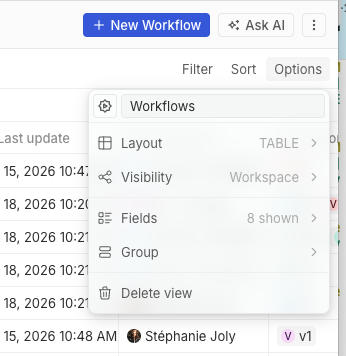
Fix the view type label shown in the object Options menu by introducing
a shared `ViewType` label map instead of formatting raw enum values at
each call site.
I chose to fix the root cause instead of only patching the symptom: the
menu was displaying the generated enum value `TABLE`, and `capitalize()`
only uppercased the first character without lowercasing the rest. The
new mapping gives each view type an explicit translated UI label, so the
parent Options menu, the Layout submenu, the view picker, and
application content rows all use the same casing source.
## Before / After
| Before | After |
| --- | --- |
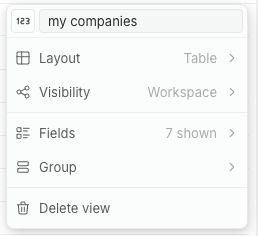
| The Options menu showed `TABLE` in uppercase. | The Options menu now
shows `Table`, and the Layout submenu still shows `Table`, `Calendar`,
and `Kanban`. |
| 
| 
|
## Tests
- `git diff --check`
- Browser smoke test on `http://apple.localhost:3001/objects/companies`
- default view Options menu still opens
- custom view Options menu shows `Layout` contextual text as `Table`,
not `TABLE`
- Layout submenu still shows `Table`, `Calendar`, and `Kanban`
- no browser console errors
Not run: package lint/test commands, because this checkout has no
`node_modules` installed.
 Thomas des Francs
de9af38a67
Thomas des Francs
de9af38a67

